
If you have never budgeted before, don't start with a budget. Start by finding out where your money actually goes. For the first few weeks, put every expense in one place and give it a label, with no limits and no plan to follow yet. Once you can see the pattern, set one limit on one category, live with it for a month, and lower it a little the next month.
That is the whole method: see it, label it, then limit one thing at a time. You don't need a spreadsheet, a strict 50/30/20 split or a perfect first month. Expect the first month to feel hard, the second to feel easier, and the third to feel normal.
Disclosure: FloosYo is our app. The last part of this guide shows how to set this up in FloosYo, but every step works with any budgeting app or a notebook.
We had never budgeted either
One of us on the FloosYo team went years without any budget at all. The paycheck was about $4,000 a month, which felt like good money. It was gone before the month ended anyway.
The pay had gone up over time, and that was the moment it clicked: with a bigger paycheck, there should be more left at the end of the month, not the same nothing. If that part sounds familiar, our guide on how to stop living paycheck to paycheck despite a high income goes deeper into why.
The worst moment came after buying a house. Out of excitement, the new things for the house kept coming, one after another, each one feeling reasonable on its own. None of them was a big decision on its own. What was missing was the running total. There was no way to see how quickly the money was draining until it was already gone, and the month ended with borrowing money from family.
The problem was never one big purchase. It was a lot of small ones with nothing showing the total.
Everything below is what changed after that.
7 ways to start budgeting when you've never done it before
1. Start by seeing where your money goes
Before you set a single limit, put every expense in one place for a few weeks. Rent, groceries, the coffee, the subscription you forgot about. Don't judge it and don't cut anything yet. The goal is a true picture, because every plan you make later is built on it. Our guide on how to track spending covers simple ways to do this.
2. Give every expense a category
A long list of expenses is hard to read. The same list sorted into categories (groceries, eating out, transport, home, personal) tells you a story in a few seconds. Our view is that first-time budgeters should start with categories rather than jumping straight into envelopes, because categories show you the detail of your spending in a clear way. If you're not sure which categories to use, see our personal budget category blueprint.
3. Set one limit, on your biggest category
You don't need a limit on everything in month one. Pick the category that is biggest or most out of control and give it a monthly limit. For example, if groceries come to about $500 a month, set a $500 limit and try not to go over it. One limit is something you can keep. Ten limits on day one is how people quit in week two.
4. Lower it a little next month
Once you hit that limit for a full month, lower it slightly the next month. $500 becomes $475, then $450. Small steps stick because they don't feel like a punishment. When one category feels under control, add a limit to the next one.
5. Turn yearly bills into small monthly amounts
The bills that break a new budget are the ones that come once a year: car insurance, a yearly subscription, registration fees. Divide each one by 12 and set that amount aside every month. This is called a sinking fund, and it is the reason we haven't been surprised by a bill since. Today we are months ahead of every yearly bill, because a little of each month's money goes toward them.
6. Give each paycheck a job
Once you know your numbers, split your paycheck the moment it lands, so every dollar already has a place. This is the envelope budget method, and it's what we use today. Here is our actual split on a $4,000 paycheck:
| Envelope | Each month |
|---|---|
| Personal | $1,000 |
| Projects | $1,500 |
| Car | $500 |
| Savings | $1,000 |
| Total | $4,000 |
These are our numbers, shown only as an example. Your envelopes and amounts will be different. If you want the full picture of how envelopes work, read what is envelope budgeting.
7. Overspent? Move money, don't raise the total
You will go over in some category. That is normal. The fix is to cover it from another envelope, never to quietly spend more in total. When the Projects envelope runs over, Personal gives up the difference. The monthly total never moves, only the split between envelopes does. Overspending becomes a trade you choose, not a surprise you find out about later.
Budgeting Apps for People Who've Never Budgeted Before
If you have never budgeted, the right app is the one that asks the least of you on day one. Here is what we would look for:
- It shows where your money goes before it asks for a plan. You should be able to start logging spending without setting a single limit.
- It lets you start with one budget. A single budget for everything is a gentle first step. Categories and limits can come later.
- Bank linking is optional. Importing transactions saves time, but you should be able to log by hand if you'd rather not connect a bank.
- It knows about yearly bills. The surprise bills are the ones that break a first budget, so the app should show them before they land.
- It makes the habit feel good. The first month is the hardest. Anything that makes opening the app feel rewarding helps you get through it.
That last point matters more than it sounds. One App Store review of FloosYo put it this way: "It makes budgeting actually feel fun and motivating instead of boring." For a first-time budgeter, that feeling is often the difference between month one and month three.
For a wider comparison of what different apps focus on, see how to choose the right budgeting app for your lifestyle.
Budgeting App for Beginners: Start Simple, Get Detailed Later
Most people who give up on budgeting give up because they started too detailed. A beginner does not need twelve categories with twelve limits on the first day. A beginner needs to see the total.
So start simple. Put everything in one budget and watch the total for a few weeks. When you understand the shape of your spending, switch to categories and give your biggest category a limit. When that feels easy, add the next one. When all of it feels easy, split your paycheck into envelopes.
In FloosYo this path is built in. During setup you can pick One budget, described as "Everything in one place." Later you can switch to Detailed, which gives each category its own monthly limit. The app lets you switch between them anytime, so starting simple never locks you in.
How Long Does It Take to See Results From Budgeting?
For us, it took about three months. That is one person's experience, not a promise, but it matches how most habits feel.
Month one was hard. After years of being a "spend what you have" person, every limit felt like a wall. Checking before buying felt slow and strange.
Month two was easier. It was like going to the gym: the second month hurts less than the first, even though nothing about the workout changed. The categories started to feel normal and the limits stopped feeling like walls.
By month three, everything settled. There was real control for the first time. It even became easy to lower the Personal envelope on purpose and put the extra into our own project. After years of money disappearing, that felt like a huge relief.
If your first month feels hard, that is not a sign the budget isn't working. It is the part everyone goes through. Our guide on how to stick to a budget has more on getting through it.
Common budgeting mistakes and how to avoid them
Setting limits on everything in the first month
Ten new limits at once is ten new things to fail at. Start with one limit, keep it for a month, then add the next.
Starting with a strict split before you know your numbers
Fixed splits like the 50/30/20 budget method can be useful, and plenty of people like them. Our view is that a first-time budgeter doesn't need one on day one. It isn't "50/30/20 or you're not budgeting." Learn your real numbers first, then pick a split that fits them. If you want to try one later, our list of 50/30/20 budget apps is a good place to start.
Forgetting the yearly bills
A budget that only covers monthly bills will break the month a yearly bill lands. List every bill you pay once or twice a year and set a little aside for each one every month.
Not watching the running total
This was our house story. Every purchase looked small on its own. Seeing what is left after each purchase is what stops a lot of small spending from becoming one big problem.
Raising the total when one category runs over
When one category runs over, move money from another category instead of letting the total grow. The total is the part of the plan that protects you.
Quitting after a hard first month
The first month is the hardest one. A month where you went over but still tracked everything is a good first month. Keep going.
How to set this up in FloosYo
FloosYo works whether you connect your bank in the iPhone app or prefer to log everything yourself, and you can use it on iPhone or on the web. Here's the setup that matches the steps above.
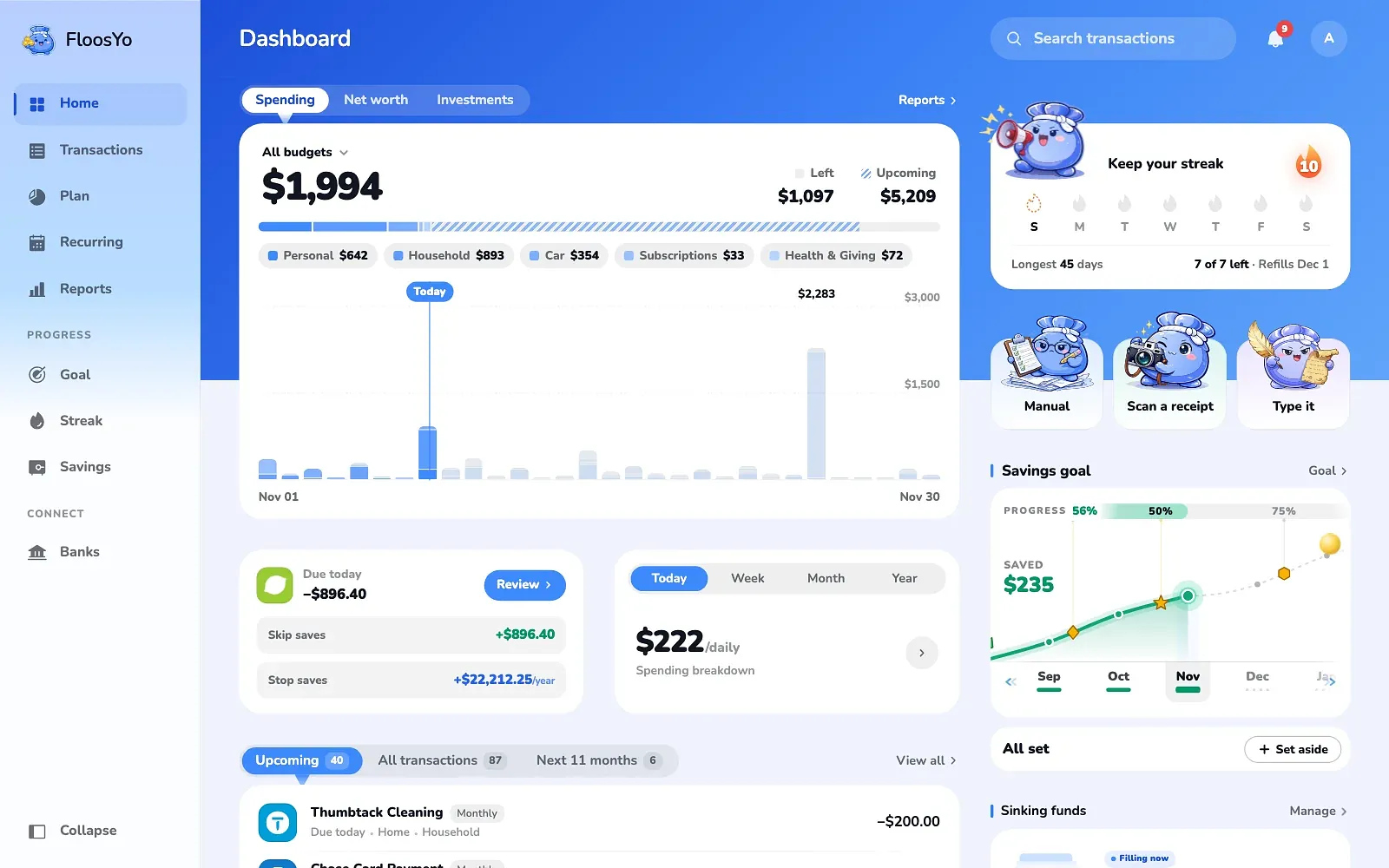
Step 1: Connect your bank, or log your expenses yourself
On iPhone, you can connect your bank. Access is read-only through Plaid, and your accounts sync automatically once a day. FloosYo finds your recurring bills, including the yearly ones, so you don't have to remember them. If you'd rather not connect a bank, or you're on the web, add expenses yourself. Bank linking is optional.
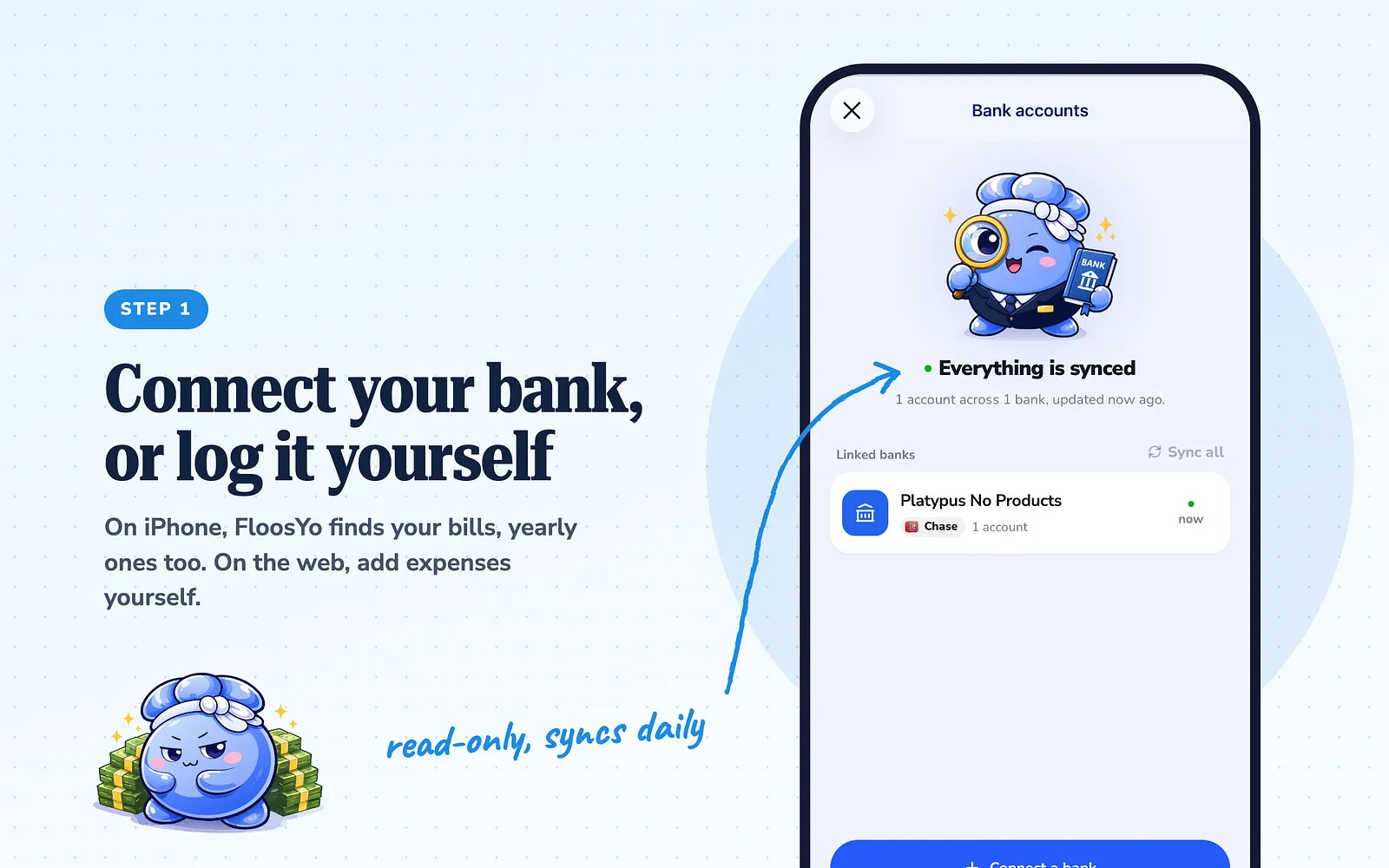
Step 2: Give your paycheck a plan
Enter the income you want to assign, then share it out between your budgets. The top of the screen shows what is Left to assign until every dollar has a job. If a budget runs over later, move money in from Flexible or another category with room.
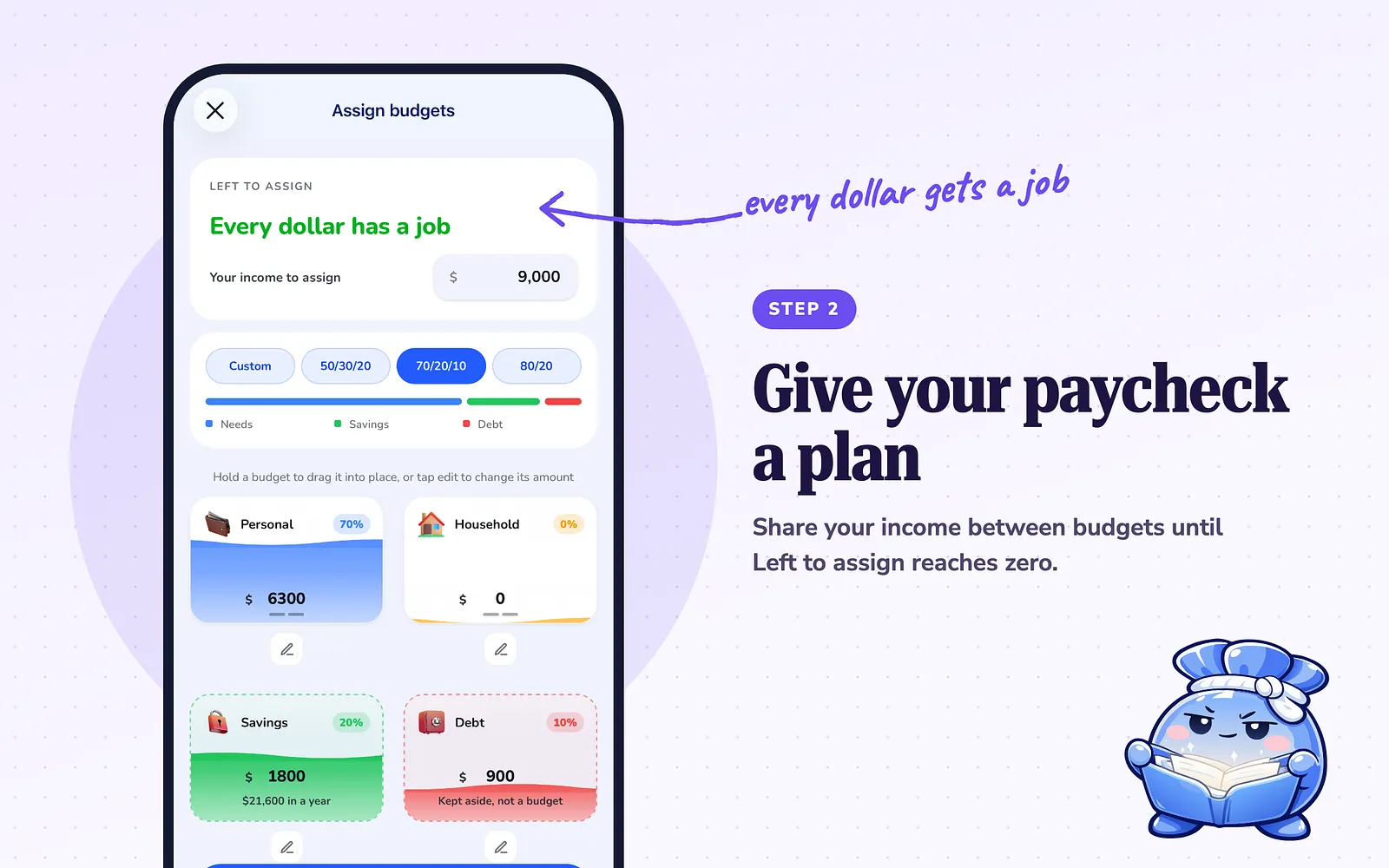
Step 3: Turn on Sinking funds for your yearly bills
Once you have yearly expenses, the Sinking funds card can sit on your dashboard. Turn it on in Actions → Edit dashboard. It shows your next renewal and how much to set aside each month, so each fund is ready when it's due.
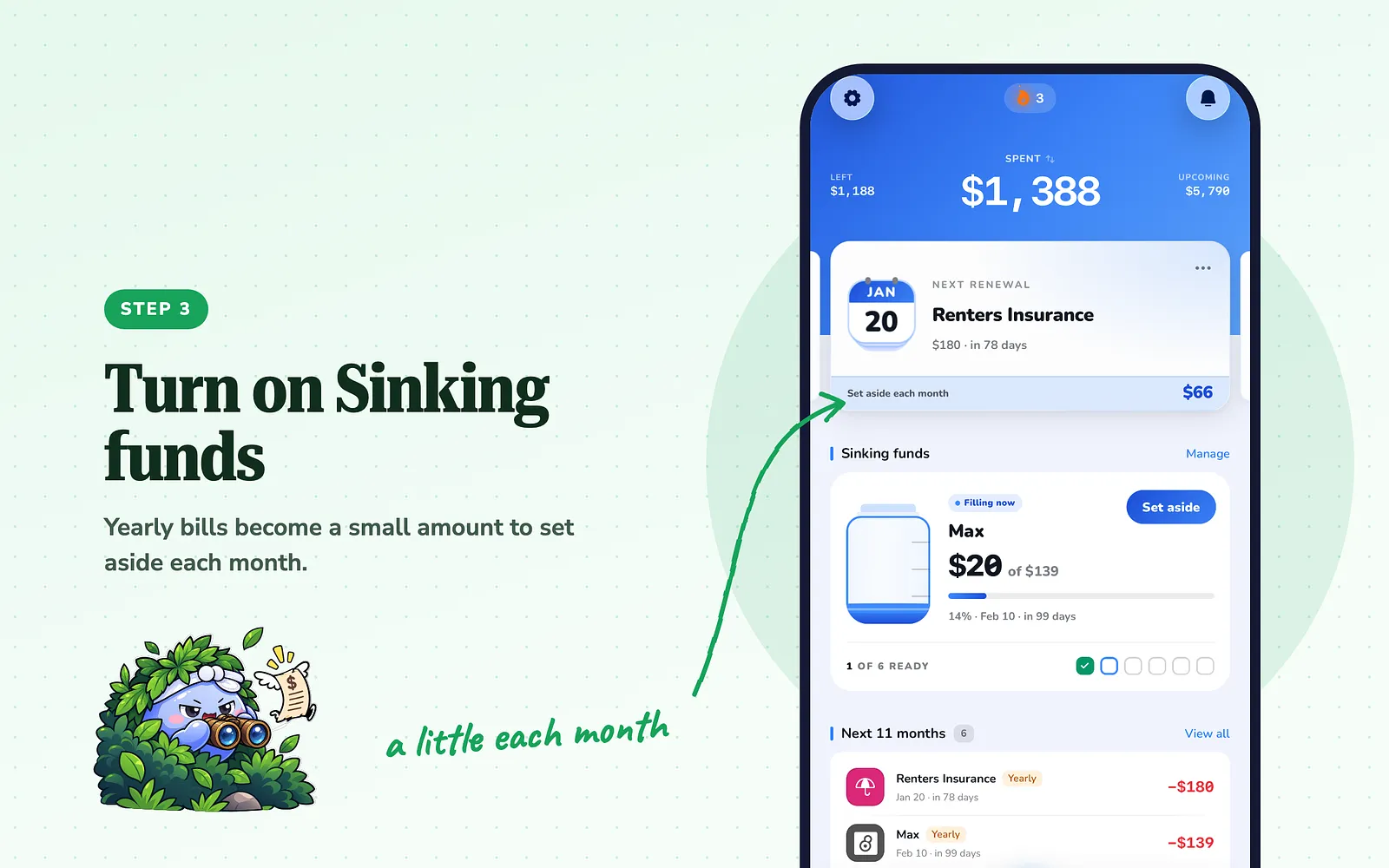
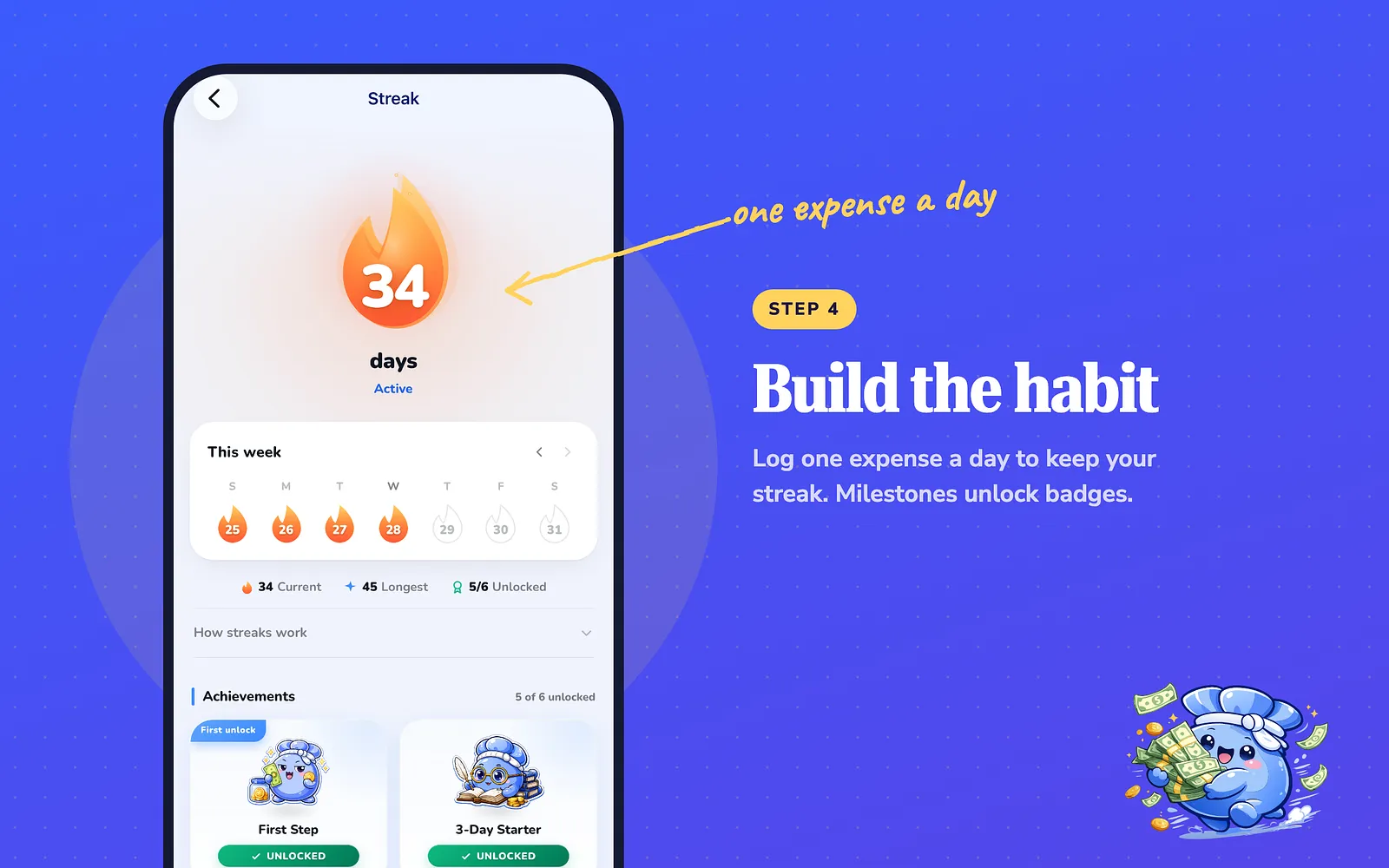
Step 4: Build the habit with your streak
Log one expense a day to keep your streak alive. Skipping or stopping a recurring expense counts too. Missed a day? You get 7 fixes every month. Milestones unlock badges along the way, starting with First Step and 3-Day Starter, which makes the hard first month a little easier.
What to do today
Don't set any limits today. Pick one place for your spending, whether that's FloosYo set to One budget or a notebook, and log every expense for one week. If you're on iPhone, you can connect your bank and let the expenses come in by themselves. At the end of the week, look at your biggest category. That is where your first limit goes.
Common questions
What is the easiest way to start budgeting?
Track where your money goes for a few weeks without any limits, then set one limit on your biggest category. Add more limits only once the first one feels easy.
Should I start with categories or envelopes?
Our view is categories first. They show you where your money goes in detail. Envelopes work well once you know your numbers.
Do I need the 50/30/20 budget method to start?
No. It is one budget method among many. You can start without any fixed split and choose one later if it fits.
What is a sinking fund?
Money you set aside a little each month for a bill you know is coming, like a yearly insurance bill or subscription. When the bill arrives, the money is already there.
Do I have to connect my bank to use FloosYo?
No. Bank linking is optional and is done in the iPhone app. You can add expenses yourself on iPhone or on the web.
Sources
- FloosYo features described here: checked in the app, November 2026.
- The story, numbers and methods: the FloosYo team's own experience starting a budget for the first time.
- User quote: a public FloosYo review on the US App Store, October 2026.
Keep reading
Coming from another budgeting app? See how FloosYo compares to YNAB, Mint, Monarch or Rocket Money.
Which budget fits me: See which split fits the amounts you enter. Budget my income: Give every dollar a job before the month starts.