
Earning good money and still running out before payday is more common than it sounds. It is rarely an income problem. It usually means your spending grew to match the bigger paycheck: a newer car, a better phone, a trip, a few more subscriptions. Each one makes sense on its own. Together they take the whole raise, and then some.
To stop living paycheck to paycheck on a high income, keep your budget at your old salary and give every extra dollar a job before you spend it. Turn yearly costs into small monthly sinking funds, check what an upgrade costs over a full year before you commit to it, and build an emergency fund a little each month, so a surprise bill never sends you to borrow.
Disclosure: FloosYo is our app. The last part of this guide shows how to set this up in FloosYo, but every step works with any budgeting app or a notebook.
The raise that disappeared
Someone close to us on the FloosYo team got a good raise, around 20%. It felt like the money problem was solved for good.
Within a few months, the raise was spoken for. A new phone. A new car, with a bigger monthly cost than the old one. A trip planned. None of it was reckless. It was what the new salary seemed to allow.
Then a bill they had forgotten about landed. The emergency fund covered part of it and was gone. The rest came from borrowing, some from family and some from friends. On a salary higher than ever before.
The raise was real. What was missing was a plan for it. Without one, the new salary simply became the new normal.
Everything below is what changed after that.
Why You're Broke Despite Making Good Money
When a good income still runs out, it is usually one of these five reasons, or a mix of them.
1. Your spending rose to meet your pay
This is often called lifestyle creep. Every raise brings a few upgrades, and after a while the upgrades cost as much as the raise. Nothing feels like overspending, because each step is small and the paycheck is bigger.
2. Upgrades are monthly, but they feel like one-off choices
A new car or a nicer apartment is decided once. You pay for it every month, for years. The decision takes a minute; the cost stays in your budget long after the raise stops feeling new.
3. Yearly bills are not in the plan
Car insurance, registration, yearly subscriptions and trips do not show up every month, so they are easy to leave out. When one lands, it eats a month that was already fully spent.
4. The emergency fund pays for things that are not emergencies
A yearly bill you knew about is not an emergency. When the emergency fund keeps paying for predictable costs, it is never full when a real emergency comes.
5. Nothing tells the extra money where to go
Money without a job gets spent. If the raise lands in your account with no plan attached, it slowly turns into everyday spending, and you cannot say where it went.
Some of the people who write to us earn well. They tell us the money is there on payday and gone before the next one, and they can't say where it went. In our experience, that is almost always reason 5 working together with reasons 1 to 3.
7 ways to stop living paycheck to paycheck on a high income
1. Keep your budget at your old salary
When the raise arrives, do not raise your budget with it. Keep your spending budgets at the total they had before. Your life does not get smaller; it just stops growing automatically. The difference becomes money you can plan on purpose.
2. Give the raise a job the day it lands
Decide where the extra goes before the first bigger paycheck arrives. A simple split works: part to sinking funds for yearly costs, the rest to savings. Do it the same way every payday, so there is nothing to decide each month.
| Example | Per month | Notes |
|---|---|---|
| Take-home before the raise | $6,000 | Example only |
| Take-home after a 20% raise | $7,200 | The raise is $1,200 |
| Spending budgets | $6,000 | Kept at the old salary |
| Sinking fund: car insurance ($1,800 a year) | $150 | From the raise |
| Sinking fund: car upkeep ($1,200 a year) | $100 | From the raise |
| Sinking fund: yearly trip ($1,800 a year) | $150 | From the raise |
| Savings | $800 | The rest of the raise |
These numbers are only an example. Use your own pay and your own bills. The point is that the whole $1,200 has a place before any of it is spent.
3. Turn yearly costs into monthly sinking funds
A sinking fund is money you set aside a little at a time for a cost you know is coming. Divide each yearly cost by 12 and set that amount aside every month. When the bill comes, the money is already there, and the emergency fund stays untouched. Our guide on how to budget when your income varies every month walks through sinking funds step by step.
4. Check the yearly cost of an upgrade before you buy it
The common advice is to never upgrade anything after a raise. We disagree, and this is our view, not something everyone must do: upgrading is fine if it fits. Before you commit, look at what the new cost adds up to over a full year. An extra $150 a month for a nicer car is $1,800 a year. Seen that way, some upgrades still make sense and some clearly don't, and you decide before the damage is done, not after.
5. Put a limit on every budget
A budget without a limit is just a list of what you spent. Give each spending budget a clear limit and check what is left in it, after the bills still coming this month. If you are not sure where your money goes today, start with our guide on how to track spending.
6. Build the emergency fund a little at a time
You do not need a big month to start. Aim for one month of spending first, then three. In the example above, $800 a month reaches one month of spending ($6,000) in about seven and a half months. Our guide on how much to save helps you pick your own number.
7. Fix what already happened first
If the raise already went into upgrades and you had to borrow from people close to you, start there. In the story above, the first few months of the raise went to paying back family and friends. Then the sinking funds started, and then the emergency fund was refilled. No big cuts on day one. The change was simple: the next raise goes to the plan before it goes to the lifestyle.
Two good incomes and still nothing left
Couples where both partners earn well can hit the same wall, only faster. Two incomes make it easy for both people to upgrade at once, and nobody sees the full picture.
What helps is one plan for the household. Put your combined pay in as income, agree on the total for spending budgets, and give the rest a job together: sinking funds for shared yearly costs, then savings. Our view is that one shared plan beats two separate ones, because the yearly bills and the emergency fund belong to both of you. For different ways to split money as a couple, see our budget plans for couples.
Best Budgeting App for Building Wealth on High Income
For most people on a good salary, wealth starts with one thing: the gap between what comes in and what goes out, kept on purpose every month. A budgeting app cannot create that gap, but the right one makes it visible and harder to lose. Here is what to look for.
1. It shows what is still coming, not only what you spent
Looking back at last month's spending is too late. A good app shows the bills still due this month, so you know what is really left.
2. It handles yearly bills
Look for sinking funds or something like them: a monthly amount for each yearly cost, so those bills never land on an empty month.
3. It shows spending over a full year
A yearly view makes upgrades honest. Small monthly costs look very different when you see them as a year.
4. It lets you plan your income
You should be able to enter your income and decide where each part of it goes, before you spend it.
5. It has a savings goal you add to on purpose
Savings that happen "if there is anything left" rarely happen. A goal with a target and a monthly amount keeps the raise from sliding into everyday spending.
6. It works with or without bank linking
Some people want their bank connected; others prefer to log things themselves. A good app lets you choose.
FloosYo does all six: Upcoming bills on the dashboard, Sinking funds for yearly bills, Spending pace by day, week, month and year, Plan my income, a savings goal, and bank linking that stays optional. It is our app, so weigh that. You can compare other options in our roundup of 50/30/20 budget apps.
Can You Really Get Rich Using a Budgeting App?
No app makes you rich on its own. What a budgeting app can do is show you the gap between what you earn and what you spend, and help you keep that gap every month. Over time, that is where real wealth comes from.
Here is what a budgeting app can and cannot do for you:
- It can show where every dollar goes, including the bills still coming.
- It can turn yearly costs into small monthly amounts.
- It can show what an upgrade costs over a full year, once you add it.
- It can keep a savings goal in front of you.
- It cannot make the decisions for you. Keeping your budget at the old salary is still your choice.
Using the example numbers above, saving $800 a month for a year adds up to $9,600. That money did not come from earning more. It came from a raise that was given a job instead of being absorbed. Our guide on how to set savings goals shows how to set a target you will actually reach.
How to set this up in FloosYo
FloosYo works whether you connect your bank in the iPhone app or prefer to log everything yourself, and you can use it on iPhone or on the web. Here is the setup that matches the steps above.
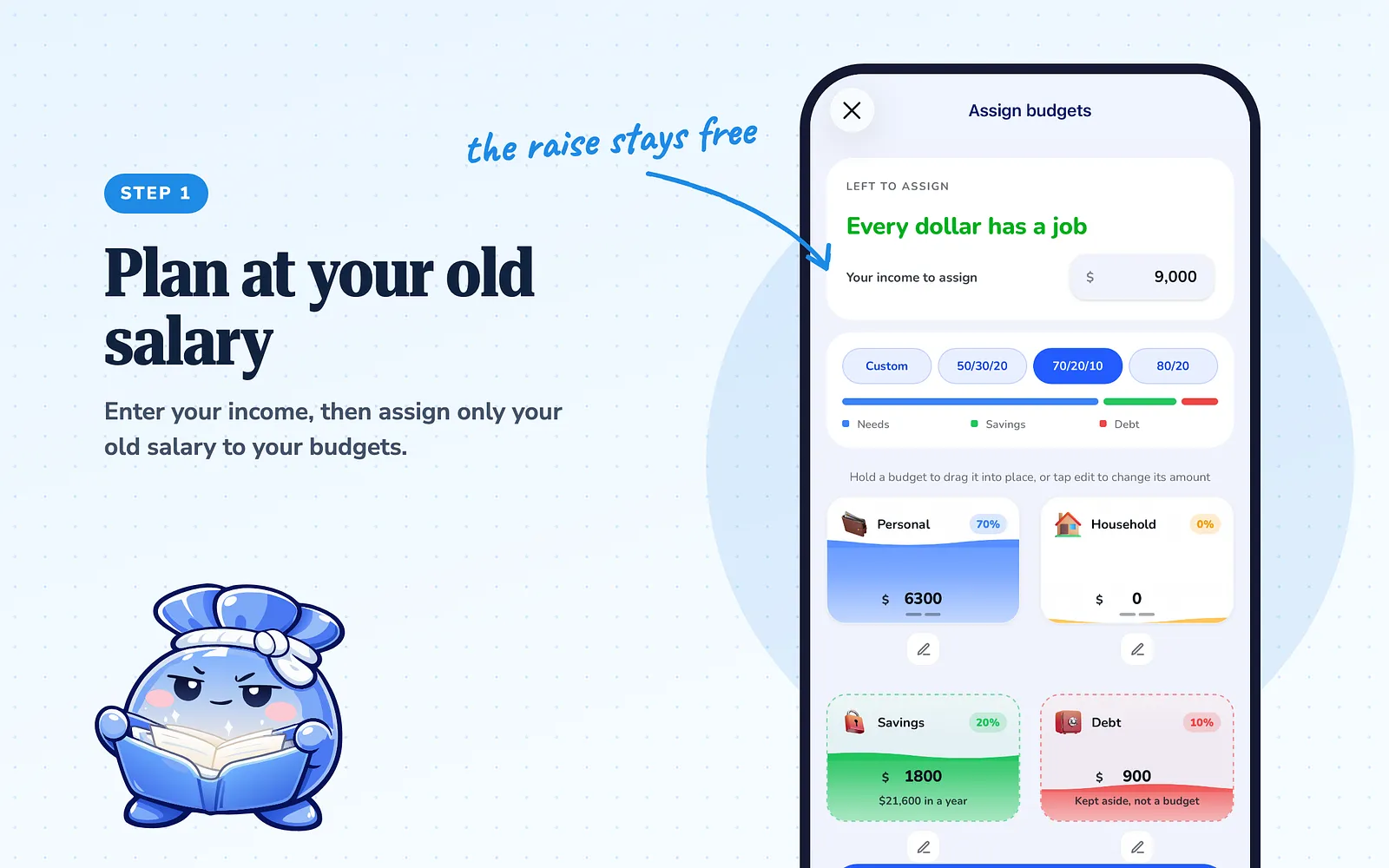
Step 1: Plan your income at your old salary
Open Actions and tap Plan my income. Enter your income, then assign your old salary across your budgets. What you don't assign is not lost: it shows at the top of your dashboard as Flexible, which is your income minus what you budgeted.
Step 2: Turn on Sinking funds for your yearly costs
Add each yearly cost once, as an expense that repeats yearly. Then turn on the Sinking funds card in Actions → Edit dashboard. It shows how much to set aside each month so each fund is ready when it's due, and you tap Set aside to move money into it.
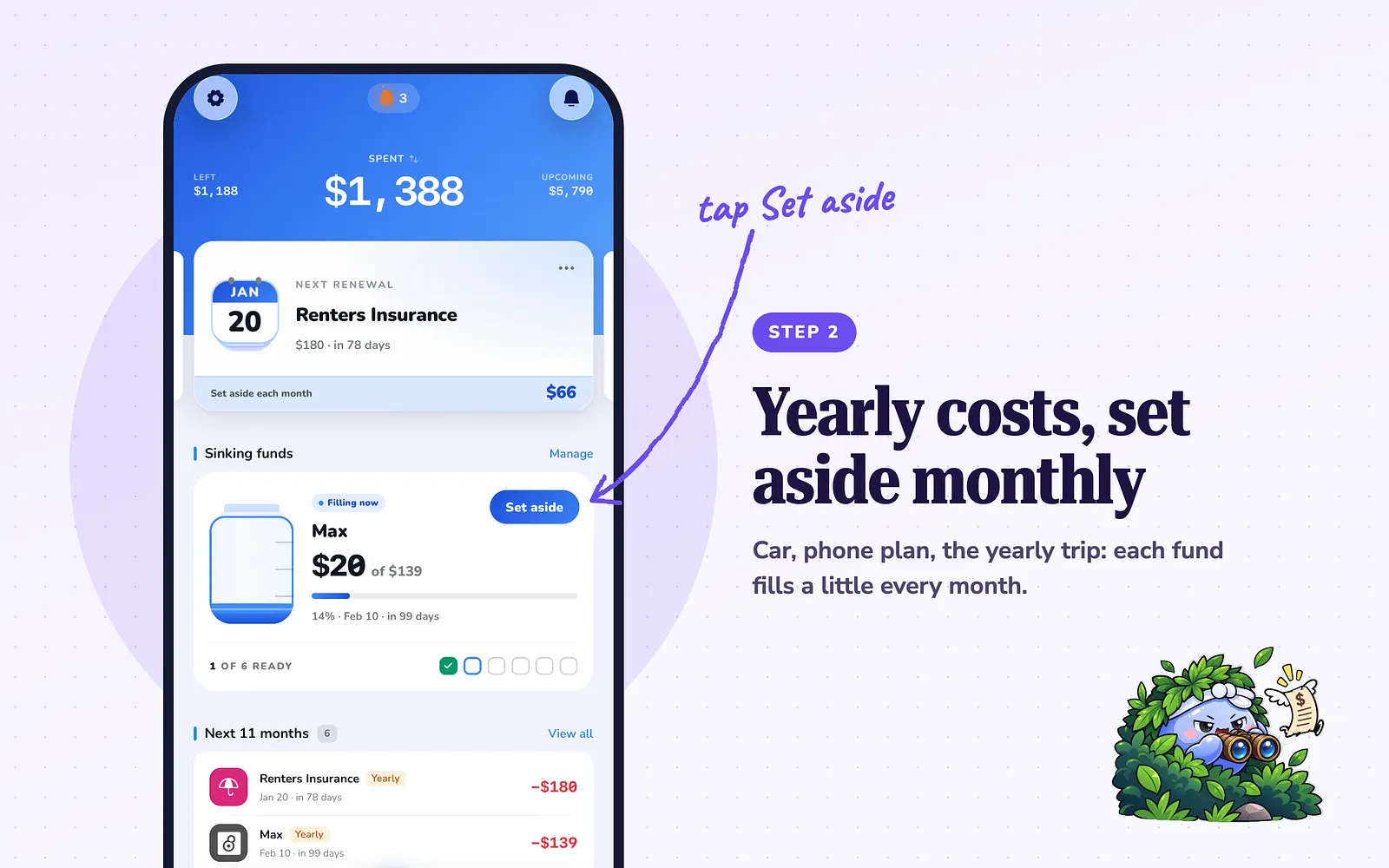
Step 3: Send the rest to your savings goal
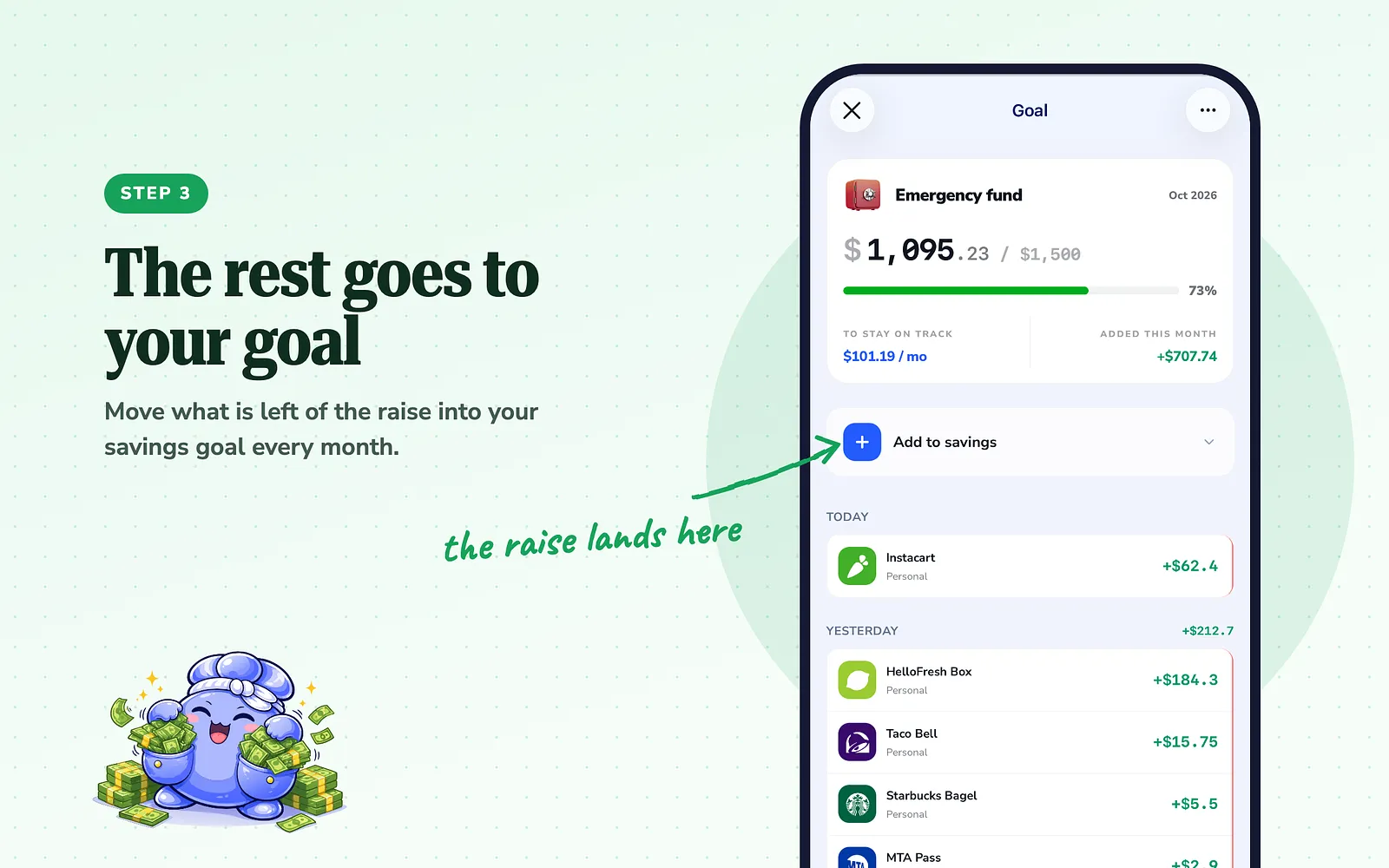
Create a goal, for example an emergency fund with a target. Each month, tap Add to savings or Set aside to move the rest of the raise into it. The goal shows how much a month keeps you on track.
Step 4: Check Left and Spending pace every week
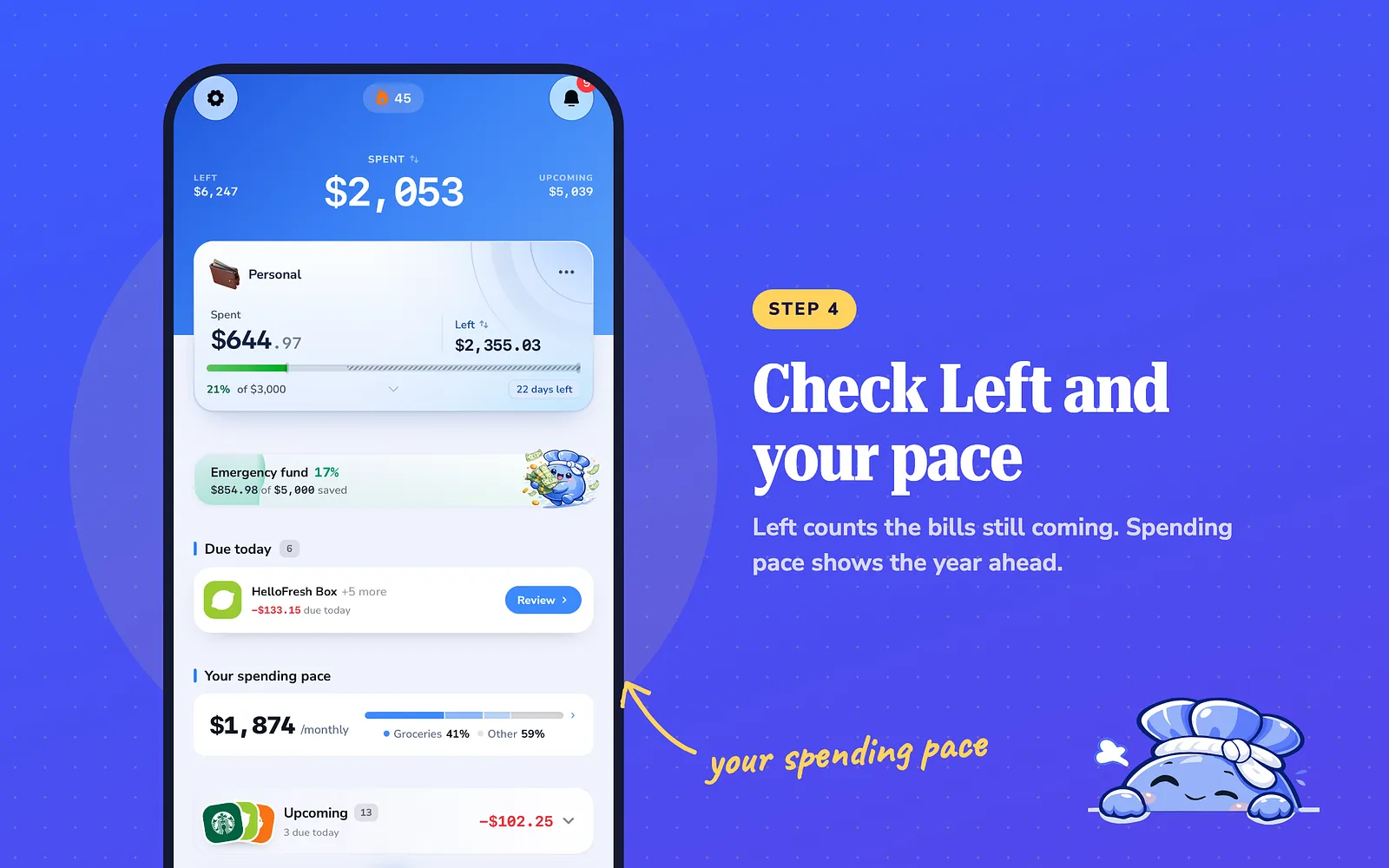
Each budget shows what is Left, after the bills still coming this month, not only what you've spent. Spending pace shows what your spending adds up to per day, week, month and year if nothing changes. Add a new monthly cost and you see its full yearly effect right away.
What to do today
Set your total budget limits to your old salary and set aside the difference. That one change turns your next raise into savings instead of a new normal.
Common questions
What is lifestyle creep?
Spending that rises as your income rises, usually through small upgrades that each feel reasonable. Over time they can use up a whole raise.
Is it wrong to upgrade after a raise?
No. Our view is that an upgrade is fine if it fits the plan. Check its cost over a full year before you commit.
How big should my emergency fund be?
Start with one month of spending, then build to three. Build it a little each month.
Can I use FloosYo without entering my income?
Yes. Adding income is optional. Budgets and Sinking funds work without it. Flexible needs your income to show.
Does FloosYo work on the web?
Yes. You can use FloosYo on iPhone or on the web. Connecting a bank is done in the iPhone app.
Sources
- FloosYo features described here: checked in the app, November 2026.
- The story and methods: the experience of someone close to the FloosYo team after a raise.
- All money amounts in this guide are examples.
Keep reading
Coming from another budgeting app? See how FloosYo compares to YNAB, Mint, Monarch or Rocket Money.
Which budget fits me: See which split fits the amounts you enter. Budget my income: Give every dollar a job before the month starts.