

A typical middle-income household can spend about $4,200 a year on recurring subscriptions, or roughly $350 a month, according to a consumer research summary on subscription costs. That's why a personal budget category shouldn't merely describe where money went. It should tell you what to skip, cancel, or keep, with the monthly charge beside its real annual cost.
A useful budget exposes the bills you've stopped noticing, separates fixed commitments from flexible habits, and gives every recurring line a decision. The framework below is built for subscriptions, household bills, app charges, memberships, daily purchases, and annual renewals that can weaken your cash flow.
Table of Contents
- Why Most Personal Budget Category Lists Miss the Real Drain
- Choosing the Right Number of Categories for Your Spending
- Naming Categories So They Match Real Behavior
- Sorting Recurring Charges From One-Off Purchases
- Annualizing Every Category to Expose Hidden Costs
- Turning Each Category Into a Skip, Cancel, or Keep Decision
Why Most Personal Budget Category Lists Miss the Real Drain
The problem with many budget lists is simple. They sort spending into broad labels such as “shopping,” “entertainment,” or “bills,” then stop before showing what the customer should do next.
A $9.99 charge can disappear inside a large category. A cloud-storage plan may sit beside a phone bill. A fitness app may be buried under health spending. A food delivery membership may look like dining rather than a recurring commitment. The label is technically accurate, but it doesn't help you decide whether the charge deserves another billing cycle.
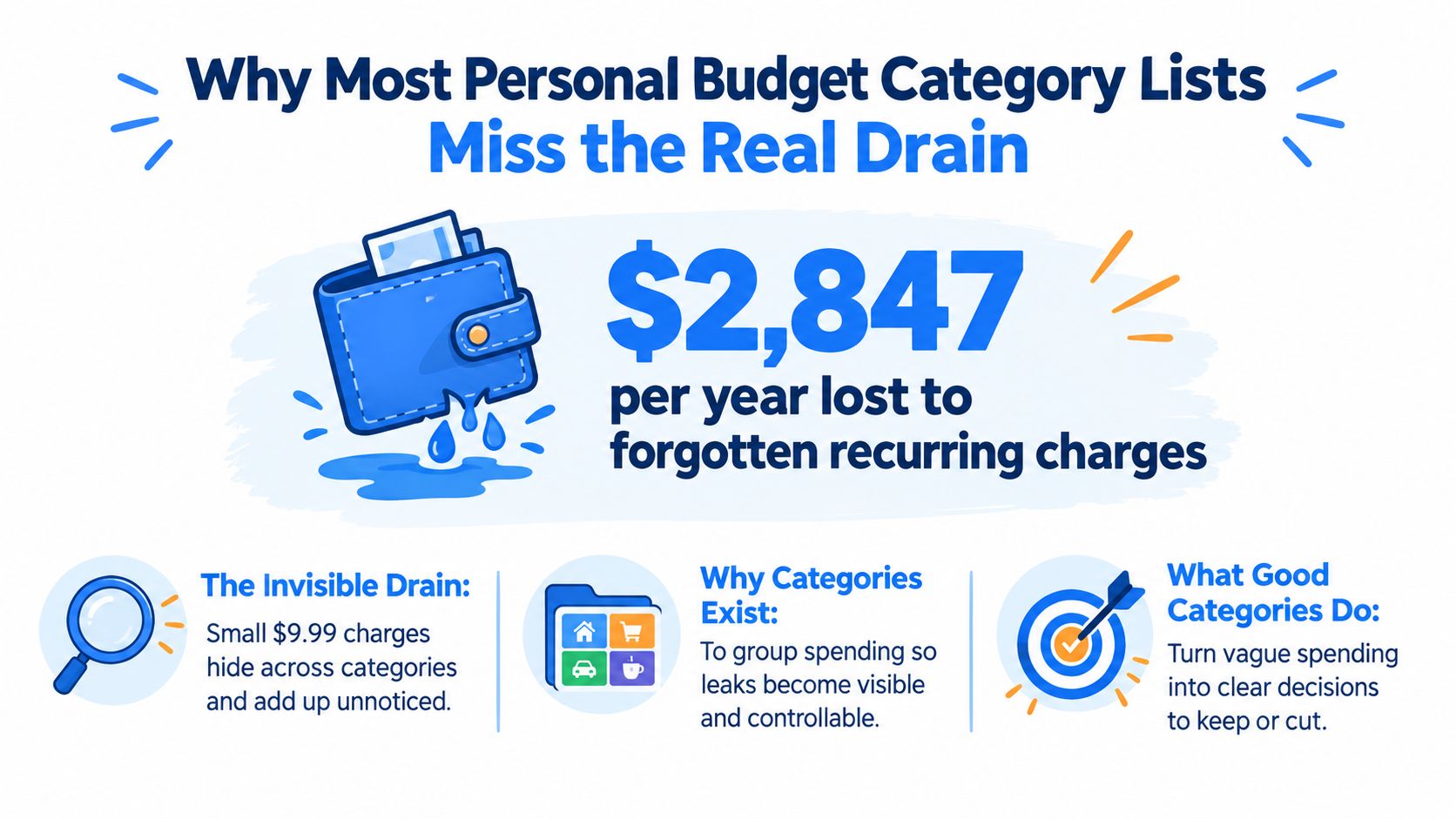
Categories should create visibility
A category is useful when it groups transactions that require the same decision. Housing, transport, groceries, healthcare, education, and clothing are familiar purpose-based groups because they reflect how households consume. The OECD household expenditure framework uses comparable groups such as food, clothing and footwear, housing, transport, health, education, and durable goods to measure household consumption across economies.
That standardization matters for personal finance. Your app-level labels don't have to remain an isolated list of custom names. They can reflect recognizable spending purposes while adding a second layer for cadence and action.
The U.S. Bureau of Labor Statistics maintains consumer expenditure tables with historical detail reaching back to 1961, alongside annual updates for current spending patterns. Its 2026 consumer expenditure tables report that U.S. households spent $6,224 on food at home in 2024, $3,945 on food away from home, $272 on social, recreation, and health club memberships, and $374 on alcoholic beverages away from home. The broader lesson is practical: repeated small purchases become significant obligations when grouped and viewed over a year.
Make every row answer a question
Use a personal budget category to answer four questions:
- What is this charge? Name the merchant or behavior clearly.
- How often does it recur? Record weekly, biweekly, monthly, quarterly, or annual cadence.
- What does it cost per year? Put the annual projection beside the monthly view.
- What action is available? Mark the line as skip, cancel, or keep.
The FloosYo guide to recurring expenses is useful background, but the operating principle is straightforward: a category should turn a vague outflow into a visible decision.
Practical rule: If a category can't tell you what to review before the next charge, it's too broad.
Choosing the Right Number of Categories for Your Spending
Start with six to ten broad household categories, a range recommended in guidance on practical budget category design. That's enough structure to show where money leaves the account without creating a maintenance project you'll abandon.
Use categories that match actual behavior, not textbook symmetry. If you pay rent, utilities, phone service, internet, and cloud storage, you might begin with Home and services. If transport includes a pass, fuel, parking, and ride-hailing, keep those together until the combined line becomes too large to manage. If food spending regularly mixes groceries, takeout, and memberships, split it because the actions are different.
Build the first version from transactions
Don't start with an empty spreadsheet and guess your categories. Pull recent bank and card activity, scan the merchants, and group charges by the decision you want to make.
A strong starting set might include:
- Housing and household bills, including rent, utilities, phone, internet, and essential home services.
- Food, split into groceries and prepared food if eating patterns need tighter control.
- Transportation, covering public transit, fuel, parking, tolls, and ride-hailing.
- Health and personal care, including medical costs, fitness, grooming, and wellness services.
- Family and pets, where dependents create recurring care obligations.
- Technology and media, including software, cloud storage, streaming, and gaming services.
- Shopping and household goods, for clothing, supplies, and irregular purchases.
- Education and work, including courses, professional tools, and business software.
- Gifts and giving, which prevents irregular generosity from appearing as random leakage.
- Non-monthly obligations, for annual renewals, maintenance, taxes, and other scheduled bills.
Don't force all ten if your transactions don't support them. Start narrower, then split one bucket only when it contains charges with different actions.
Balance insight against tracking overhead
| Bucket Count | Typical Usage | Risk |
|---|---|---|
| Six or fewer | Simple household overview | Recurring leaks can hide inside broad labels |
| Seven to ten | Practical starting structure for most spending patterns | Requires a short review routine |
| More than ten | Detailed tracking for mixed household or work spending | Categorization can consume attention without improving decisions |
A category deserves to exist when it changes behavior. “Technology” might be adequate for one person, while another needs separate lines for phone, software, media, and cloud services because each group has a different cancellation process.
Naming Categories So They Match Real Behavior
“Entertainment” is a weak name if it combines a monthly streaming plan, occasional cinema tickets, game purchases, and a recurring music service. Those transactions share a theme, but they don't share a decision. One may renew automatically, another happens only when you choose it, and a third may be duplicated by a family bundle.
Treat fixed expenses as a stable layer and variable expenses as a fluctuating layer. Fixed costs stay the same each month, while groceries, fuel, utilities, dining, and similar outflows can change. Practical budgeting guidance generally recommends broad categories plus a separate fixed-expense layer so recurring commitments remain visible before variable spending fills the plan.
Name the behavior, not just the department
| Weak Name | Behavior-Based Name | Merchants Included |
|---|---|---|
| Entertainment | Streaming and media renewals | Video, music, audiobook, and media memberships |
| Food | Groceries and prepared food | Supermarkets, restaurants, takeout, and delivery |
| Technology | Phone, software, and cloud | Mobile plan, software tools, storage, and app services |
| Health | Fitness and recurring wellness | Gym, fitness platform, and scheduled wellness plans |
| Shopping | Household supplies and one-off purchases | Retailers, marketplaces, clothing, and home goods |
The behavior-based name tells you what kind of review belongs there. “Streaming and media renewals” invites a renewal audit. “Entertainment” invites passive observation.
Split mixed categories only when it helps
Don't split every merchant into its own row. Split a category when one part is recurring and another is variable, or when the spending requires a different choice. Groceries and dining out often deserve separate treatment because one is a household provision category and the other is a discretionary habit. A phone plan and a one-time handset purchase shouldn't share the same recurring-cost line.
The needs-versus-wants budgeting guide can help clarify the purpose of a purchase, but your category names should go further. They should show cadence, control, and next action.
A good category name makes the unwanted charge obvious before you open the merchant's app.
For mixed behavior, use a parent category with decision-focused subcategories. “Technology” can contain “Phone plan,” “Cloud storage,” and “Software renewals.” That preserves a clear top-level view while keeping recurring lines separate enough to cancel or downgrade.
Sorting Recurring Charges From One-Off Purchases
Recurring charges hide because broad personal budget categories treat them like ordinary transactions. The fix is to review merchants first, then categories.
Pull the last 90 days of transactions and sort by merchant string. Don't rely on the bank's category label. The same vendor can appear under different descriptions, and one merchant may charge weekly, monthly, or quarterly. For example, marketplace activity can show labels such as “AMZN Mktp,” “AMZN Prime,” or “Audible*,” even though the underlying commitments may differ.
Read the account by cadence
Look for two signals:
- Repeated amounts: Identical or near-identical charges often indicate a subscription, membership, or scheduled bill.
- Predictable gaps: A charge that returns after a clean multiple of 30 days deserves recurring status, even when the amount changes slightly.
Cadence matters more than size. A small amount appearing on a predictable schedule belongs in the recurring filter because your decision is about the commitment, not whether the latest charge felt noticeable.
| Merchant String | Typical Cadence | Recurring Signal | Action |
|---|---|---|---|
| AMZN Prime | Monthly or annual | Same merchant family with a predictable renewal | Check the membership and renewal date |
| Audible* | Monthly | Similar amount at a regular interval | Keep only if recent use justifies it |
| Cloud storage provider | Monthly | Repeated billing with a stable service name | Compare storage need with the plan tier |
| Gym or fitness club | Monthly | Fixed charge from the same merchant | Review attendance and cancellation terms |
| Food delivery membership | Monthly or annual | Membership descriptor separate from orders | Separate the membership from meal spending |
| Marketplace purchase | Irregular | Different amounts and inconsistent gaps | Leave as variable until a recurring pattern appears |
If a merchant appears only twice in 90 days, treat it as variable until a third cycle confirms the pattern. That prevents a pair of unrelated purchases from becoming a false subscription.
Give each recurring line a real name
Move confirmed recurring charges into a Recurring filter and preserve the merchant name, cadence, renewal date, and annual projection. A $9.99 line is no longer a blip in “Shopping.” It becomes a yearly decision, which is the level at which recurring spending deserves scrutiny.
A recurring-charge audit should also include annual bills and less frequent commitments. The consumer guidance on recurring and non-recurring expenses recommends checking transaction history and annualizing charges because memory consistently misses fragmented payments. That approach catches subscriptions, gym contracts, software tools, domain renewals, and other outflows that don't look important in isolation.
Annualizing Every Category to Expose Hidden Costs
Monthly views flatter recurring spending. A $14.99 service looks harmless when it appears once beside rent and groceries, but the decision changes when the budget shows $179.88 a year.
Use one rule: payment amount multiplied by payments per year. Weekly payments multiply by 52, biweekly payments by 26, monthly payments by 12, quarterly payments by 4, and annual bills by 1. This calculation also covers insurance premiums, domain renewals, gym contracts, maintenance plans, and other charges billed less often than monthly.
Put annual cost beside monthly cost
A streaming bundle at $14.99 per month becomes $179.88 per year. Four such services commit $719.52 annually, which rounds to about $720 in a practical budget view. The point isn't that every service should be canceled. The point is that annual cost makes the trade-off visible.
Add an Annual $ column to every recurring personal budget category, then sort from highest to lowest. The top of that list shows your real candidates for negotiation, downgrade, rotation, or cancellation.
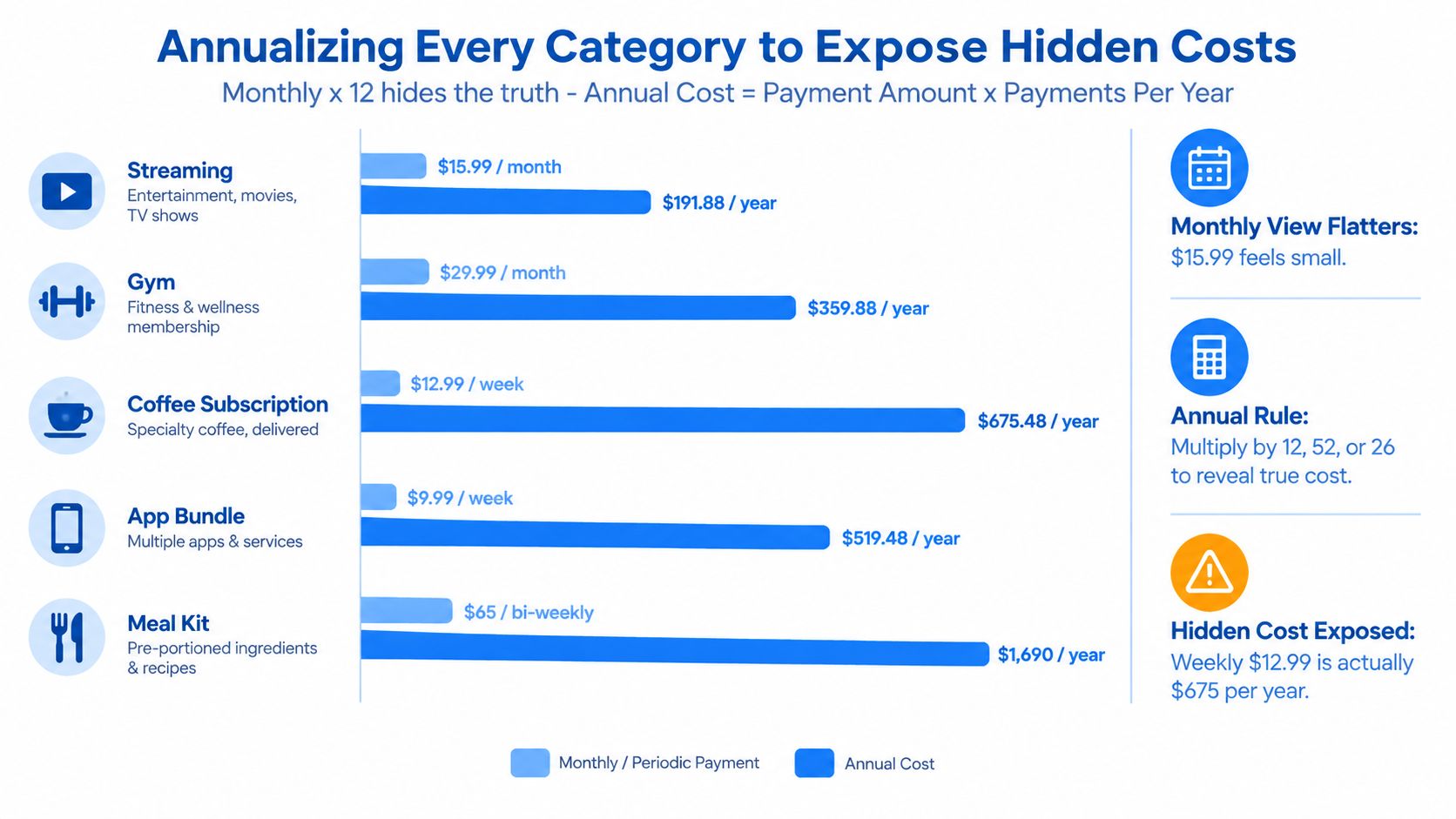
The provided chart illustrates how different cadences change the picture: a $15.99 monthly streaming cost equals $191.88 yearly, a $29.99 monthly gym cost equals $359.88 yearly, a $12.99 weekly coffee subscription equals $675.48 yearly, a $9.99 weekly app bundle equals $519.48 yearly, and a $65 biweekly meal kit equals $1,690 yearly. Those figures use the annualization rule rather than a monthly snapshot.
Include non-monthly bills
Annualization isn't only for subscriptions. Add quarterly insurance premiums, annual taxes, professional tools, domain renewals, school costs, and maintenance contracts. If the charge occurs outside the monthly rhythm, it belongs in the annual column and should have a reminder before its due date.
For more detail on this calculation, use the annual total cost guide. A budget that shows only monthly costs encourages underestimation. A budget that displays both columns tells you what today's small decision commits you to over the full year.
The U.S. Bureau of Labor Statistics illustrates why annual thinking matters. Food at home rose from $3,624 in 2010 to $6,224 in 2024, an increase of about 72% over 14 years, according to its consumer expenditure tables. Category totals reveal changes that individual transactions conceal.
Turning Each Category Into a Skip, Cancel, or Keep Decision
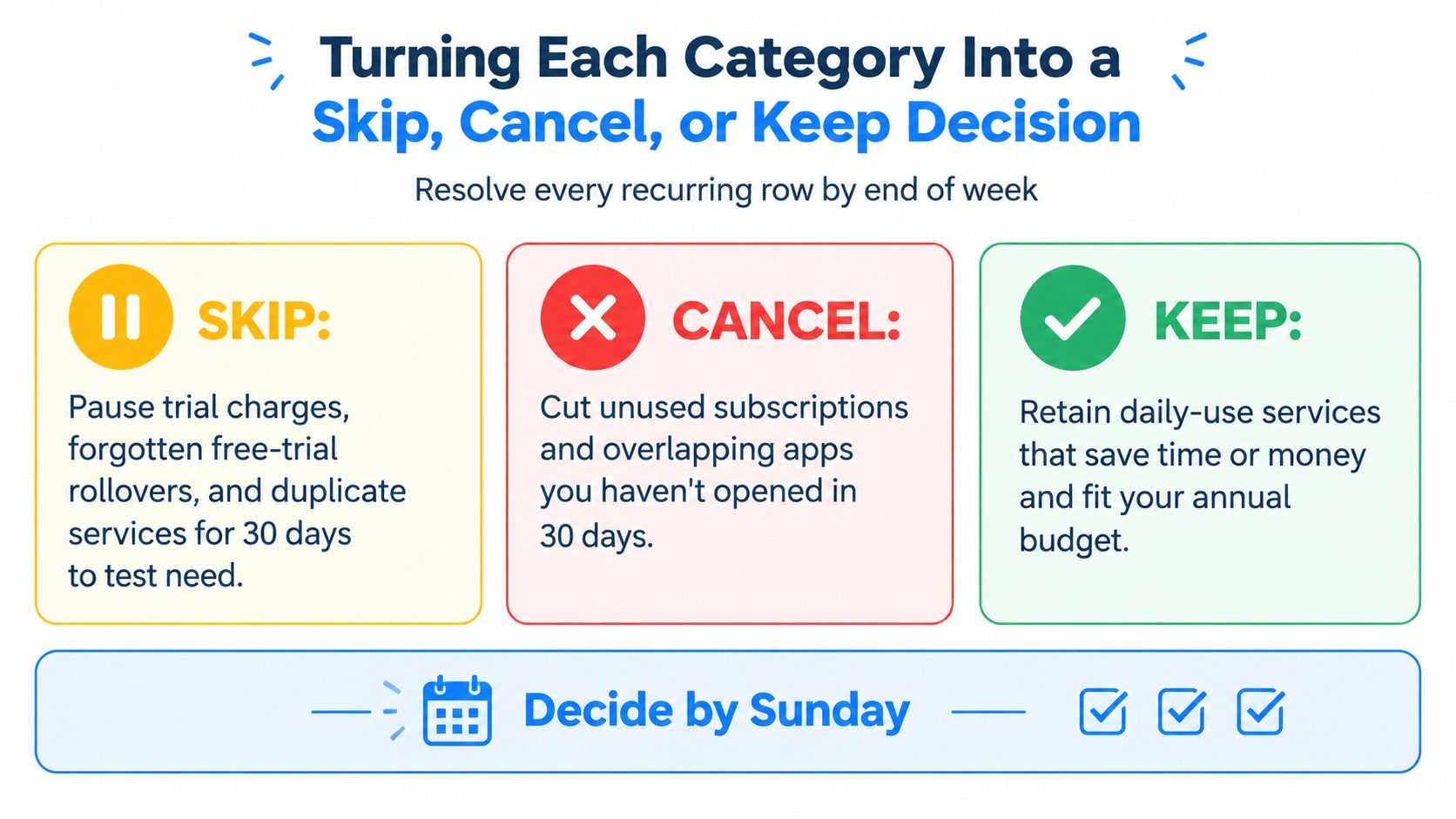
Every recurring row should end with one of three actions: skip, cancel, or keep. A category is doing its job only when it moves you from observation to a decision.
Skip applies to trial charges, forgotten free-trial rollovers, and duplicate services already covered elsewhere. Stop the charge before the next billing date. Cancel applies to services you don't use enough to justify the annual cost, overlap with an active alternative, or fail your personal value test. Keep applies to a service used recently, tied to a contract you can't exit without a fee, or delivering clear value that fits your annual plan.
Use firm decision rules
Apply the same test to every line:
- Skip: Pause or avoid the next cycle when the charge is a trial rollover, duplicate, or temporary need.
- Cancel: Cut a service that fails your usage test, duplicates another service, or costs more than 1% of monthly net income annualized. Calculate the threshold using your own income, then treat it as a prompt for review rather than an automatic verdict.
- Keep: Retain a service used within the last 30 days, required by a contract with an exit fee, or providing measurable value per dollar.
Set a calendar reminder 7 days before each renewal date. The FTC advises checking when a subscription expires, confirming that automatic charging will occur, and verifying that the renewal price matches expectations because some renewals cost more than the previous cycle. California automatic renewal rules also require renewal reminders for annual subscriptions to be sent 15 to 45 days before renewal, according to consumer guidance on California's automatic renewal law.
Set a ceiling before adding anything
Choose a limit for each discretionary recurring group. For example, cap streaming at $25 monthly or $300 yearly, then require a trade when a new service enters. Cancel an existing service, rotate access, or reject the new charge. Don't let every “small” addition become permanent.
A subscription audit found that people estimated their subscription spending at $86 per month, while itemized actual spending averaged $219 per month, making actual costs more than 2.5 times higher than expected, according to consumer research on recurring spending. The practical response is transaction history, not memory.
Finish the audit this week
- Day 1: Pull 90 days of transactions.
- Day 2: Group merchants and isolate recurring charges.
- Day 3: Add monthly and annual projections.
- Day 4: Mark every recurring row skip, cancel, or keep.
- Day 5: Set renewal alerts and record savings targets.
FloosYo connects to bank accounts through Plaid, detects repeating charges, supports voice or text entry for transactions banks miss, projects monthly and annual totals, and provides skip or cancel decisions with estimated savings scenarios. Its read-only bank access means it can read transactions but can't move money, making it one practical option for turning a personal budget category into an active recurring-spend review.
Your Sunday checkpoint: Every recurring line should have an owner, a renewal date, an annual cost, and a decision.
Use FloosYo to connect your transactions, surface recurring charges, and see monthly and yearly projections before the next renewal lands. Start this week by reviewing the detected lines, marking each one skip, cancel, or keep, and directing the recorded savings toward one clearly named goal.