
A spreadsheet is free. So is a notes app. So why would anyone pay every month for a budgeting app? Because the free tools only know what you remember to type in, and most money problems come from the payments you forget.
A premium budgeting app is worth paying for when it saves you more money and more time than it costs. In practice that means three things: it logs your spending without you typing every line, it shows every subscription and yearly bill before it charges, and it gives you a budget plan you can follow in minutes a week. Use the free trial to test exactly those three. If the app takes more of your time than your spreadsheet did, it isn't worth it.
Disclosure: FloosYo is our app, and it is a paid app with a free trial. The last part of this guide shows how we use it, but the checklist works for any budgeting app you're considering.
The spreadsheet that said everything was fine
One of us on the FloosYo team budgeted for years with Excel and Apple Notes. On paper, it looked like things were going well. The bank account said otherwise.
The problem was memory. A monthly or yearly payment would go out, and by the next day it was forgotten. It never made it into the sheet. Subscriptions renewed quietly. Yearly bills arrived as surprises. The spreadsheet was only as good as what got typed into it, and a lot never got typed in.
A budget you have to remember to update will always look better than your real account.
Paying for an app changed that. With the bank connected and bills added once, everything became clear: how much was going out, and where. Spending came down by about $2,000, in two steps. First, unused subscriptions turned up that were costing money every month and never being used. Second, spending started following a real budget plan instead of "whatever, on whatever."
7 ways to tell if a budgeting app is worth paying for
1. It logs spending without you typing every line
The biggest weakness of a free spreadsheet is that you are the data entry. A paid app should do most of that work: connect to your bank, capture card payments, read a receipt, or take a quick voice note. If you still have to type everything, you're paying for a prettier spreadsheet.
2. It shows every subscription and yearly bill before it charges
Forgotten subscriptions are where a lot of money leaks. A good app puts every repeating charge on a calendar, monthly and yearly, so you see it coming. For many people, the first cancelled subscription pays for months of the app. Our guide to apps that find subscriptions goes deeper on this.
3. It lets you decide what happens when something renews
Seeing a renewal is half the job. The other half is acting on it: mark it paid, skip it this time, or stop it. An app that only shows you charges after they happen is a history book, not a plan.
4. It gives you a budget method, not a blank page
A blank budget is where most people give up. A paid app should offer ready-made plans like the 50/30/20 budget method, and still let you build your own. If you want to compare apps on this, see our list of 50/30/20 budget apps.
5. It plans for yearly bills, not just this month
Car insurance paid once a year, annual memberships, registration fees. These are the bills that break a monthly budget. Look for sinking funds: a way to set aside a little each month so the yearly bill is ready when it lands.
6. It takes minutes a week, not hours
Our view, and the most important point on this list: if an app needs a lot of your time to run, walk away. Budgeting should make life much easier, not become a second job. You should be spending your evenings with the people you love, not moving numbers between columns.
7. It has a free trial long enough to test all of the above
Apps that are confident in what they do usually offer a free trial. Use it properly. Connect your account, add your bills, and live with the app for the whole trial before you pay.
What you actually pay for
Here's how the free tools we used compare with what a paid app should do. The last column is what FloosYo does today.
| Job | Spreadsheet or notes | What a paid app should do | In FloosYo |
|---|---|---|---|
| Logging spending | You type every line | Captures it for you | Bank linking (iPhone), Apple Pay taps, Log with Siri, Scan a receipt |
| Subscriptions | Only the ones you remember | Every charge on a calendar | Renewal calendar in Upcoming |
| Renewals | Found out after they charge | Decide before or on the day | Due today: Paid, Skip or Stop |
| Budget plan | Build it yourself | Ready-made plans plus custom | Balanced 50/30/20, Saver 70/20/10, Simple 80/20, One budget, or Custom |
| Yearly bills | Easy to forget | Set aside monthly | Sinking funds |
Best Free Budgeting App That Actually Works
Before paying for anything, our team used the free tools most people start with: a spreadsheet and a notes app. They do work for one thing: writing down a plan. Where they fall short is everything after that. They can't see your bank, they don't remind you a subscription is about to renew, and they don't notice the payment you forgot to type in.
Our view is simple: in our experience, no free budgeting tool does what a good paid app does, because the parts that cost money to build (bank connections, receipt reading, renewal tracking) are exactly the parts that catch what you forget. If you're not ready to pay, a spreadsheet plus a weekly check of your bank statement is the most honest free setup. Our guide on how to track spending shows how to do that by hand.
If you are ready to try a paid app, the free trial is your free app. Treat it that way: test everything during the trial, and only pay if it earned it.
Can a Budgeting App Really Help You Save Money?
Yes, but not by itself. The app doesn't save the money. It shows you where the money goes, and the saving comes from what you do next.
For us, the savings came in two clear steps. The first was finding subscriptions that were being paid every month and never used. That money came back the moment they were cancelled, with no change in lifestyle at all. The second was following a budget method. Once spending had limits, it stopped being "whatever I want, on whatever I want."
Users say the same thing about how it feels. One App Store review put it this way: "It makes budgeting actually feel fun and motivating instead of boring." Another reviewer was surprised by the setup: "it was super simple, no category creation, no forms to submit." An app you actually open is an app that can help you save.
How to set this up in FloosYo
FloosYo costs $9.99 a month or $99.99 a year after a 1-week free trial with full access. You can use it on iPhone or on the web. Here's the setup that matches the checklist above.
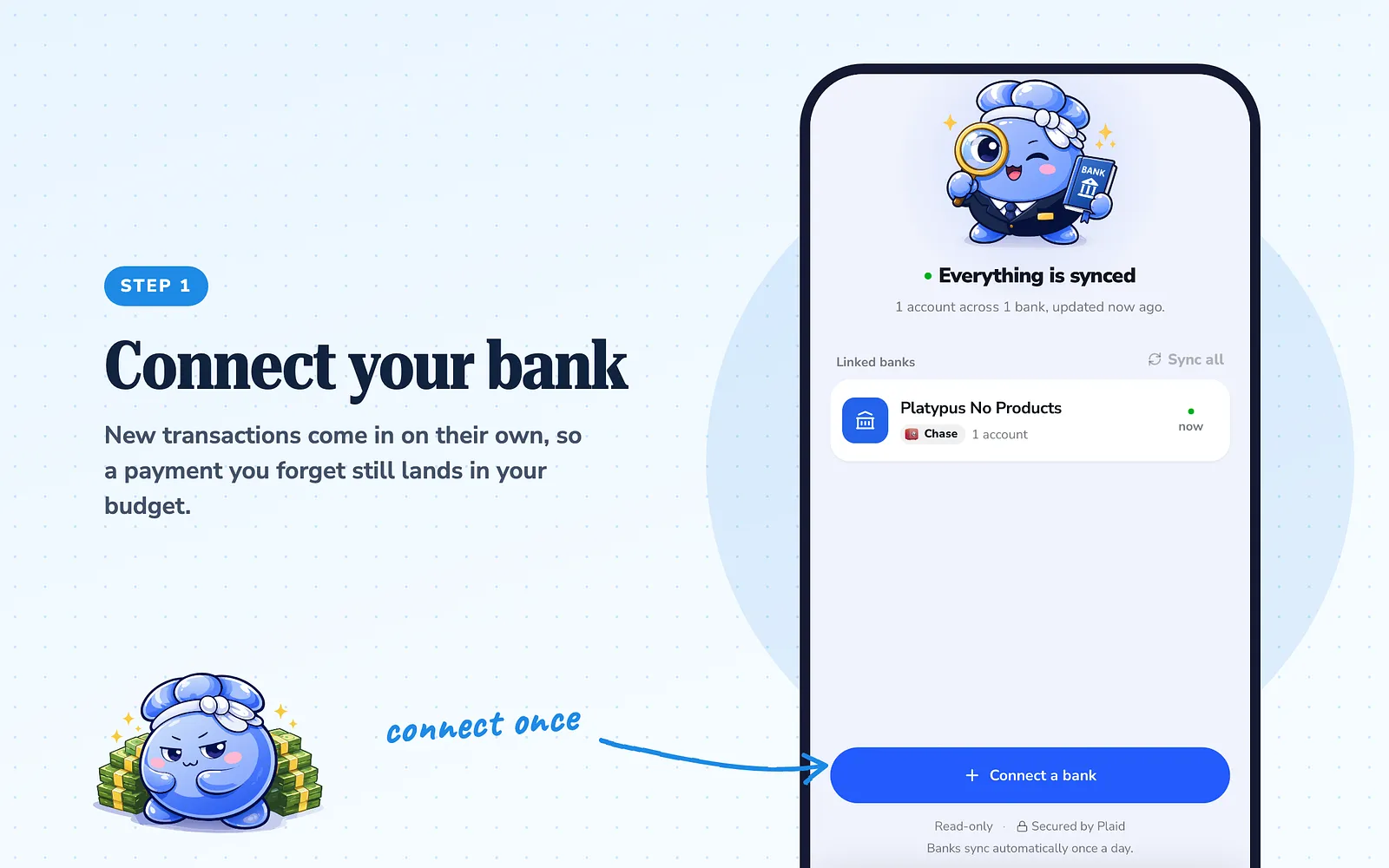
Step 1: Connect your bank so nothing slips past
Connect your bank in the iPhone app and new transactions come in on their own, so a payment you forget still lands in your budget. On the web, or for cash, you can scan a receipt, log with Siri, or type it. Apple Pay taps can log a payment the moment you pay, after a one-time Shortcuts setup.
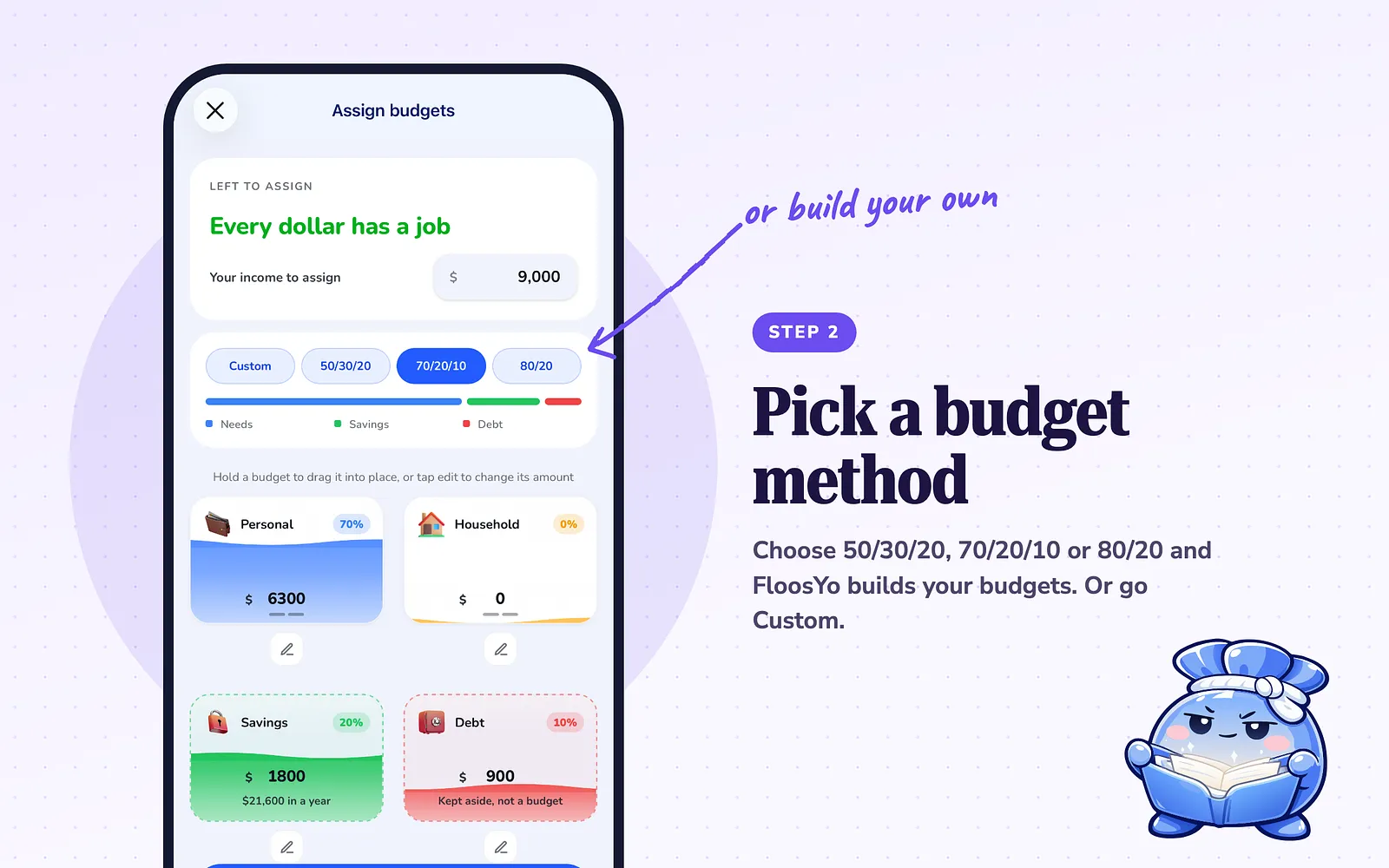
Step 2: Pick a budget method and let FloosYo build your budgets
Pick Balanced 50/30/20, Saver 70/20/10, Simple 80/20 or One budget during setup, and FloosYo builds the budgets for you. Prefer your own? Choose Custom and add budgets as you see fit.
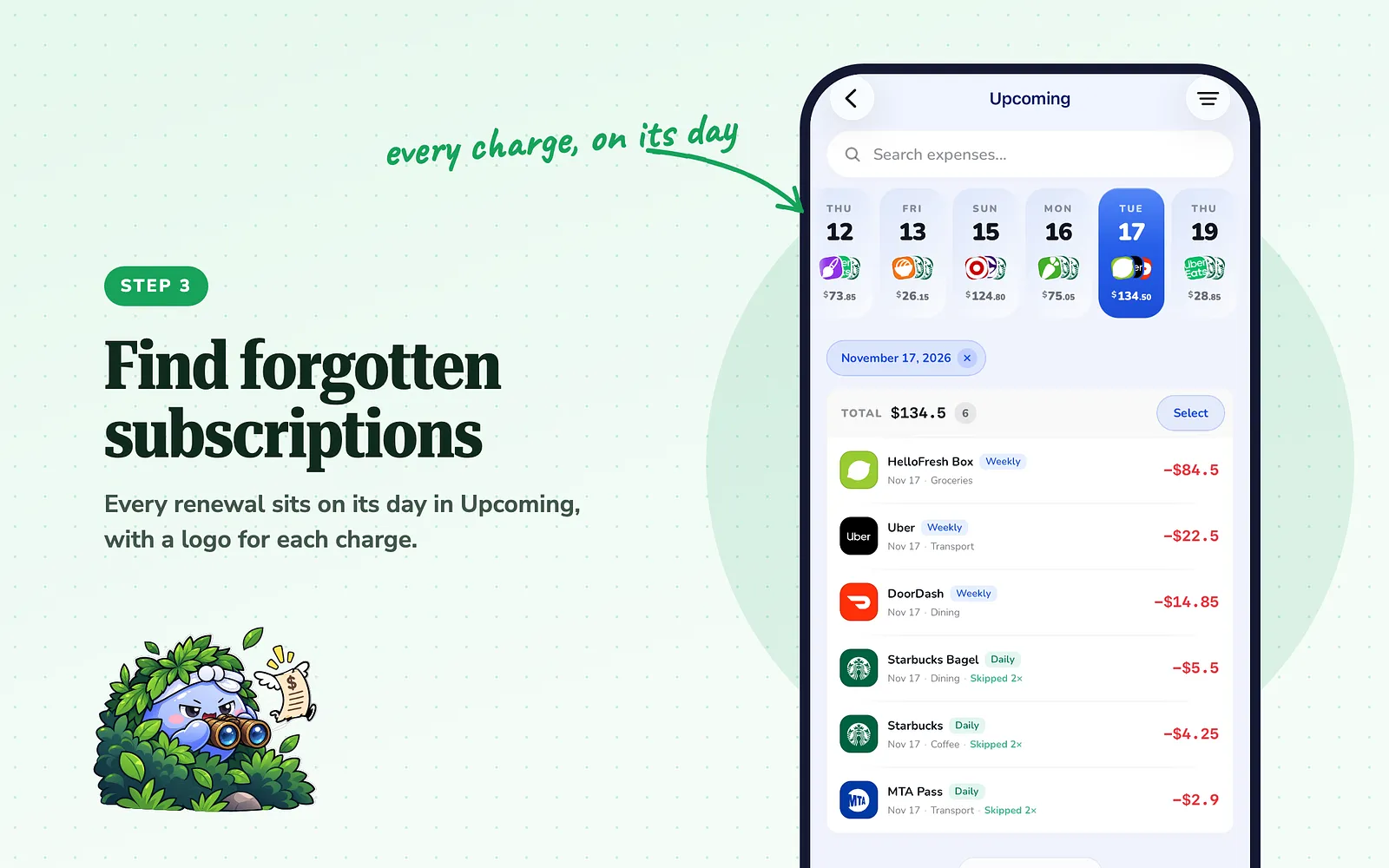
Step 3: Find forgotten subscriptions in the Renewal calendar
Add your monthly and yearly expenses once and they repeat on their own. Every renewal shows on its day in Upcoming, with a logo for each charge. Tap a day to see just that day. This is where the unused subscriptions show up.
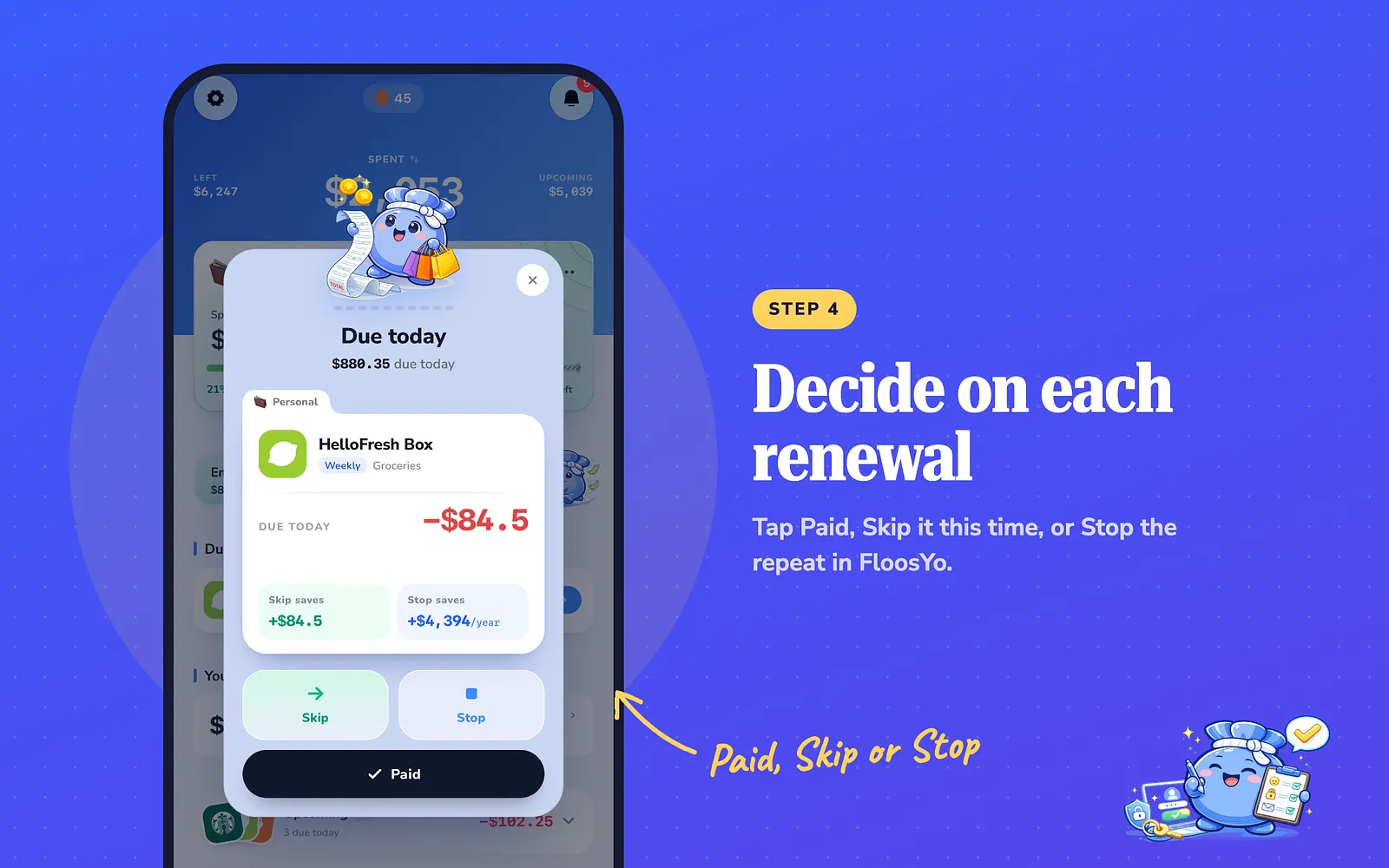
Step 4: Decide on each renewal in Due today
When something is due, it appears in Due today. Tap Paid, Skip to leave it out this time, or Stop to end the repeat in FloosYo. Stop ends it in your budget only: to stop being charged, cancel with the company too.
What to do today
Pick the budgeting app you're considering and start its free trial today. For that week, connect your account, add every subscription and yearly bill, and notice how much of your time it takes. If it took less time than your spreadsheet and showed you at least one charge you'd forgotten, it's worth paying for.
Common questions
How much does a premium budgeting app cost?
It depends on the app. FloosYo is $9.99 a month or $99.99 a year (about $8.33 a month) after a 1-week free trial.
Is a spreadsheet good enough for budgeting?
It's good for writing a plan. It can't see your bank or remind you about renewals, so it only knows what you type in.
Does stopping a subscription in FloosYo cancel it?
No. Stop ends the repeating expense in your FloosYo budget. To stop the charge, cancel with the company that bills you.
Can I use FloosYo without connecting my bank?
Yes. You can scan receipts, log with Siri, or type expenses. Bank linking is done in the iPhone app.
Does FloosYo work on the web?
Yes. You can use FloosYo on iPhone or on the web.
Sources
- FloosYo pricing, trial and features described here: checked in the app, November 2026.
- User quotes: FloosYo App Store reviews, November 2026.
- The story and opinions: the FloosYo team's own experience moving from a spreadsheet to a paid budgeting app.
Keep reading
Coming from another budgeting app? See how FloosYo compares to YNAB, Mint, Monarch or Rocket Money.
Which budget fits me: See which split fits the amounts you enter. Budget my income: Give every dollar a job before the month starts.