
EveryDollar vs YNAB comes down to time and money. EveryDollar has a free plan and is quick to start, but bank sync costs extra. YNAB costs more per year, includes bank linking in its one plan, and takes longer to learn.
Pick EveryDollar if you want a free monthly plan and do not mind typing purchases yourself. Pick YNAB if you will spend real time learning a method and want every account in one place. If neither fits a busy week, there are lighter options, covered at the end.
Disclosure: FloosYo is our app. We only mention it in the last section, and every price and feature for EveryDollar and YNAB below comes from their own pages, checked on November 23, 2026.
EveryDollar vs YNAB: which budget app is better for you?
Neither app is better for everyone. EveryDollar is the better fit for a free, plan-first start. YNAB is the better fit if you want bank linking included and are ready to learn a deeper method. The table puts the main differences side by side.
| EveryDollar | YNAB | |
|---|---|---|
| Price | Premium: $17.99/month or $79.99/year | $14.99/month or $109/year |
| Free plan | Yes, free forever, manual entry | No, 34-day free trial |
| Free trial | 14 days of Premium, new users only | 34 days; 365 days for college students |
| Budget method | Zero based, planned before the month starts | Zero based, money you already have (the YNAB Method) |
| Bank sync | Premium only | Included in the one plan |
| Learning curve | Short to start, effort is daily entry | Steeper, YNAB says so itself |
| Best for | A free monthly plan, hands-on tracking | People ready to learn a method in depth |
Prices from the YNAB pricing page and the Ramsey Solutions EveryDollar help center, checked November 23, 2026. Tax may apply.
What we saw when people tried both
Before writing this, our team read through public reviews of both apps. The same two paths came up again and again, and neither ends in a big disaster. It is usually a slow drift away from the budget.
Path one starts on EveryDollar's free plan, because it costs nothing. The plan part goes well. Then a few busy days pass without typing purchases in, the budget stops matching the bank, and catching up feels like a chore. Bank sync would fix that, but it is a Premium feature.
Path two starts on YNAB. People like the method and the accuracy. But reviewers on Trustpilot and Capterra describe weeks, sometimes a few months, before it felt natural. One review blog tells of a user who stopped after about three weeks, finding it too complicated for the price. That is one person's story, not a study.
One long-time YNAB user who tested EveryDollar wrote that reconciling took about 20 minutes in EveryDollar versus about 2 minutes in YNAB. Again, one blogger's experience, not a measurement. It still shows where the time goes in each app.
How much do EveryDollar and YNAB cost?
EveryDollar is free on its basic plan. EveryDollar Premium costs $17.99 a month or $79.99 a year. YNAB costs $14.99 a month or $109 a year. Yearly, EveryDollar Premium is $29.01 cheaper. Monthly, YNAB is $3 cheaper.
- EveryDollar free: $0, forever. Monthly budget, unlimited categories, sinking funds, bill due dates, manual entry only (Ramsey Solutions).
- EveryDollar Premium: $79.99/year, about $6.67 a month, or $17.99 billed monthly. 14-day free trial for new users. Premium adds bank transactions that stream in.
- YNAB: $109/year, shown as $9.08 a month, or $14.99 billed monthly, plus tax where it applies. 34-day free trial with no card needed on the web (app stores may ask for one).
- YNAB for students: a free 365-day trial for college students with proof of enrollment.
YNAB also lets one subscription be shared with family. Its pricing page gives two different numbers for how many people, so check the page before you plan around it.
If price alone decides it, EveryDollar free wins, as long as you accept manual entry.
For a deeper look at YNAB's plan and features, see our YNAB app review.
How does each app's zero based budget method work?
Both apps use a zero based budget method: income minus everything you plan for equals zero, so every dollar has a job. The difference is timing. EveryDollar plans next month's expected income before it starts. YNAB only budgets money you already have.
Ramsey describes EveryDollar as planning where every dollar goes so income minus expenses equals zero. You list your expected paychecks for the month, then fill categories until nothing is left over.
YNAB calls its approach the YNAB Method. Its pricing page frames it as one question for each dollar in your accounts right now: what is it for? You give jobs only to money that has already arrived.
Here is what a zero based month looks like. These are round example numbers, not anyone's real budget.
| Example category | Example amount |
|---|---|
| Take-home income | $4,000 |
| Rent | $1,400 |
| Groceries | $600 |
| Utilities | $250 |
| Transport | $300 |
| Savings | $500 |
| Fun money | $350 |
| Everything else | $600 |
| Left to assign | $0 |
In EveryDollar you would build this before the 1st, using the pay you expect. In YNAB you would fill it as each paycheck lands. For more apps that work this way, see our list of zero based budgeting apps for iPhone.
Does EveryDollar or YNAB connect to your bank?
Both can, but not at the same price. YNAB includes bank linking in its one subscription. EveryDollar's free plan is manual entry only; automatic bank transactions come with EveryDollar Premium.
YNAB's features page says you can securely link accounts and import transactions automatically. Direct import works with select banks in the US, Canada, the UK and the EU. If your bank is not supported, YNAB offers file-based import instead.
On EveryDollar, paying for Premium is what turns on bank transactions. Some reviewers mention the bank connection dropping now and then and needing to be reconnected (NerdWallet, The Penny Hoarder).
Reviewers split into two camps on this. Some like manual entry on EveryDollar free because typing each purchase makes them notice it. Others say they only stuck with budgeting once transactions came in on their own. Know which camp you are in before you pay.
Which is easier for beginners, EveryDollar or YNAB?
EveryDollar is easier on day one. You make a monthly plan, assign the money, and you are done. YNAB is harder at first, and YNAB itself calls its learning curve a little steep. The catch with EveryDollar comes later, from daily manual entry on the free plan.
YNAB redesigned its first-time experience to help new users with that curve. Reviewers on Capterra and Trustpilot suggest spending a few hours on YNAB's videos or free workshops before the trial ends.
The 34-day trial is long enough for one full month plus a payday. Starting it right after you get paid lets you see a whole cycle before you decide.
A build-up that works in either app: in month one, budget only your fixed bills and one spending category. Add more categories in month two, once the habit is there.
5 ways to choose between EveryDollar and YNAB
If the sections above still leave you stuck, these five checks usually settle it. Each one points at a real difference between the apps, not a matter of taste.
1. Count your weekly minutes
Write down how many minutes a week you will really spend on your budget. If it is under 10 and you do not want to type purchases, EveryDollar free will likely drift. YNAB or EveryDollar Premium imports them for you.
2. Decide if bank sync is worth paying for
If you want sync, compare $79.99 a year for EveryDollar Premium with $109 a year for YNAB. If you are happy typing, EveryDollar free costs nothing.
3. Check when your money arrives
Steady paychecks suit EveryDollar's plan-ahead style. If your pay is uneven, YNAB's habit of budgeting only money you already have can feel safer.
4. Check your bank and country
YNAB lists direct import for select US, Canadian, UK and EU banks. Look up your bank in each app's help center before you commit.
5. Use the full trial
EveryDollar Premium gives 14 days and YNAB gives 34. Start either one right after payday, so you test a real month, not a quiet week.
Our view, and it is only a preference: the best app is the one you still open in month three, not the one with the strictest method. People quit both apps for the same reason. They take more weekly time than a busy person has. Our guide on choosing a budgeting app for your lifestyle walks through that question.
Is there an EveryDollar alternative that's simpler?
Yes. If zero based budgeting feels like too much upkeep, a lighter budget method can work better: pick one simple split once, log spending as it happens, and check one number. FloosYo, our app, is built around that idea for busy people.
FloosYo is not zero based. You choose a budget method preset when you start: a single budget, 50/30/20, 70/20/10 or 80/20. Bank linking through Plaid is optional in the iPhone app and never required. FloosYo has a 1-week free trial, then costs $9.99 a month or $99.99 a year. We also wrote a longer guide to alternatives to You Need a Budget.
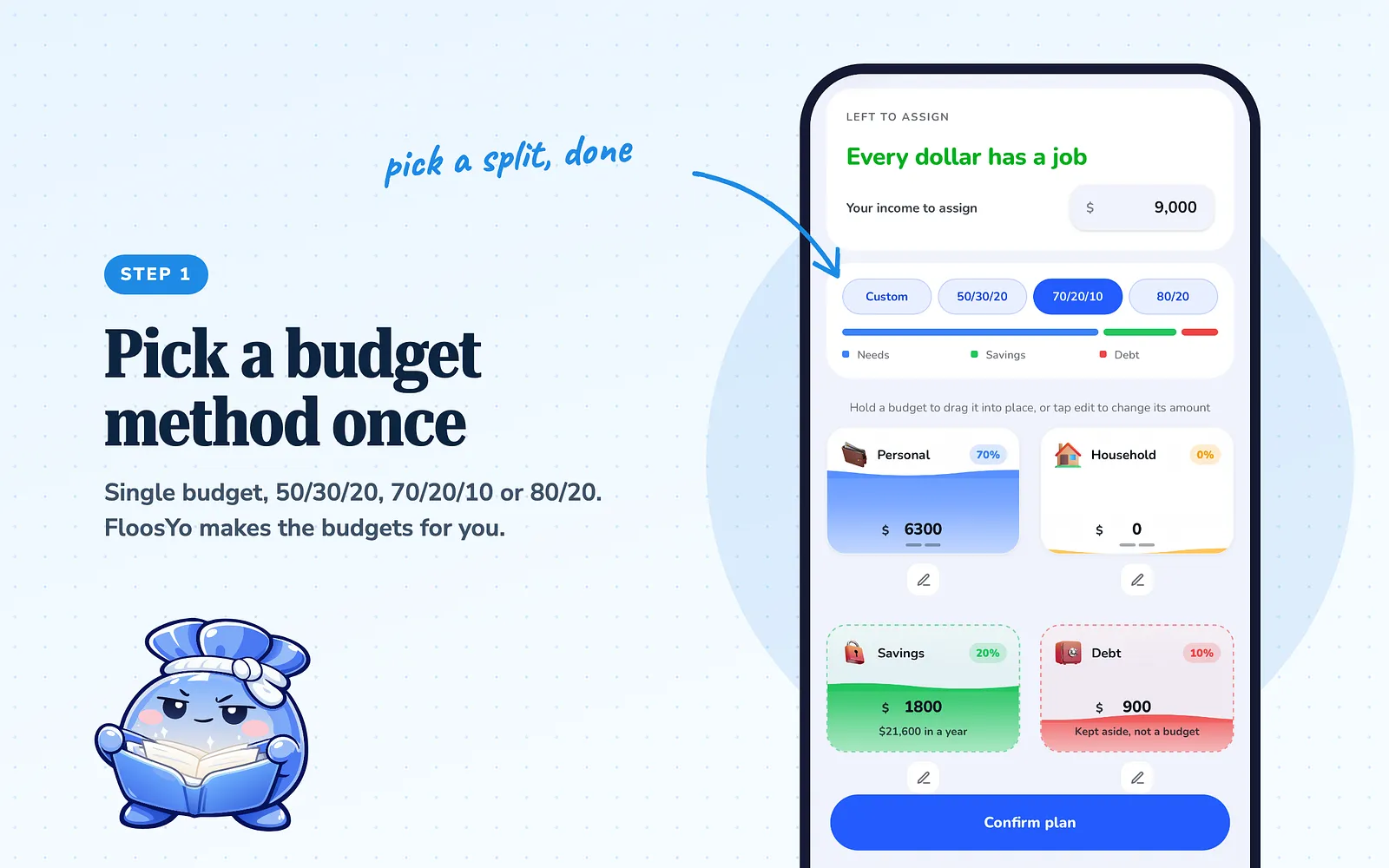
Step 1: Pick a budget method
During setup, choose Single budget, 50/30/20, 70/20/10 or 80/20. FloosYo creates the budgets for you, so you do not build a zero based plan from scratch.
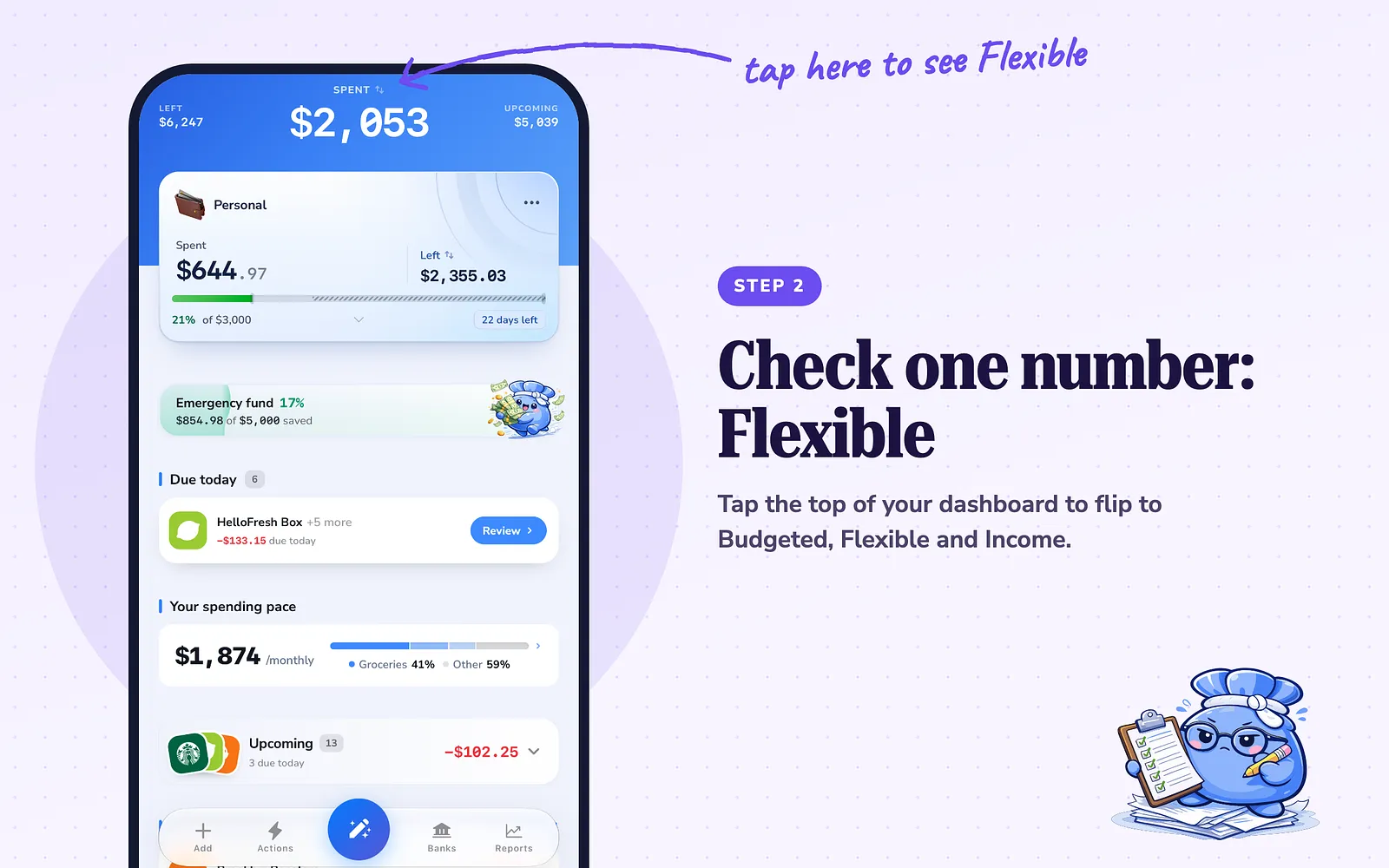
Step 2: Check one number, Flexible
The top of your dashboard opens on Left, Spent and Upcoming. Tap it to flip to Budgeted, Flexible and Income. Flexible is your income minus what your budgets hold. It is the one number to glance at instead of rebalancing every category.
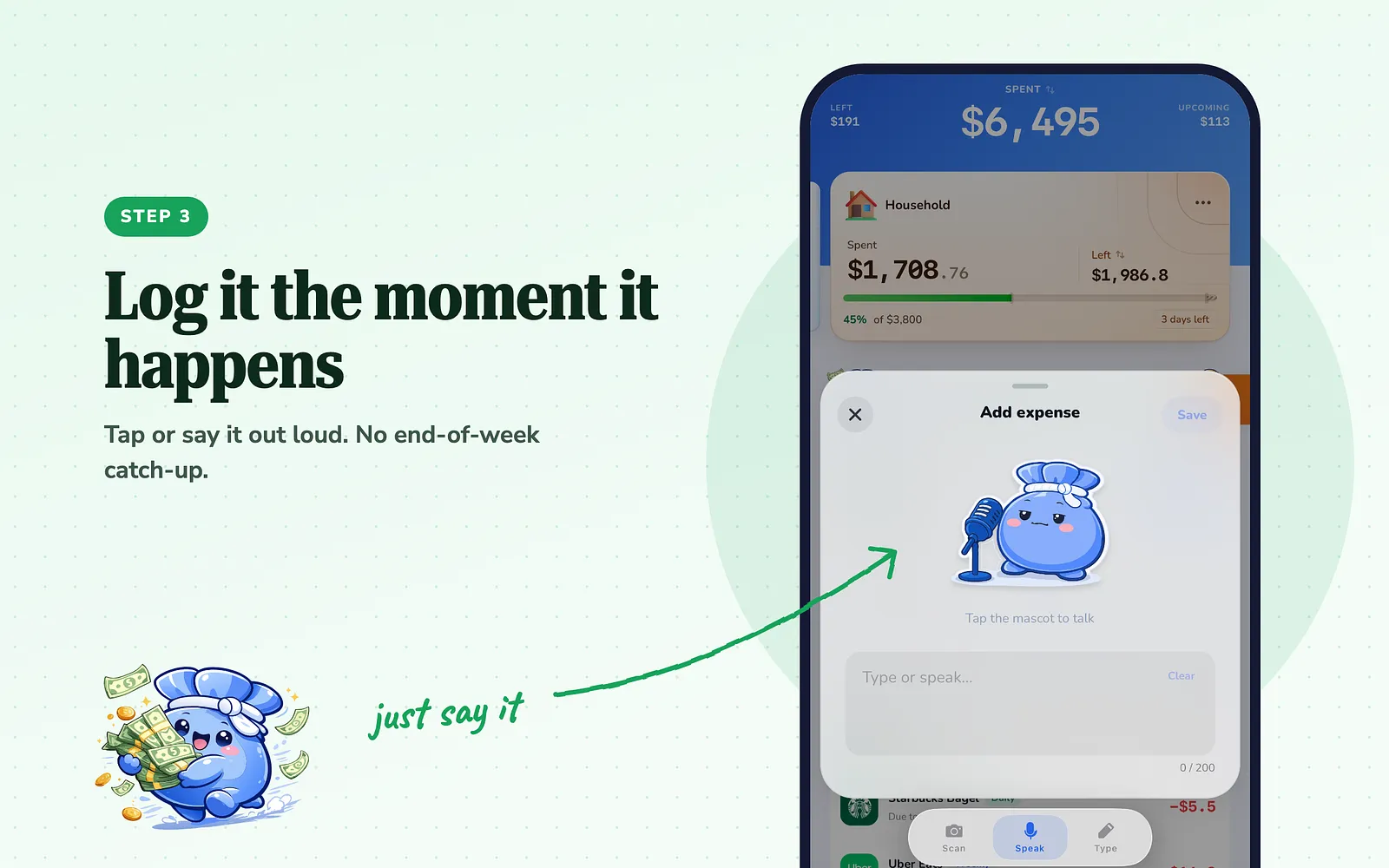
Step 3: Add expenses fast, by tap or by voice
Log a purchase the moment it happens. On iPhone you can also say it out loud with voice entry, which takes the sting out of manual entry.
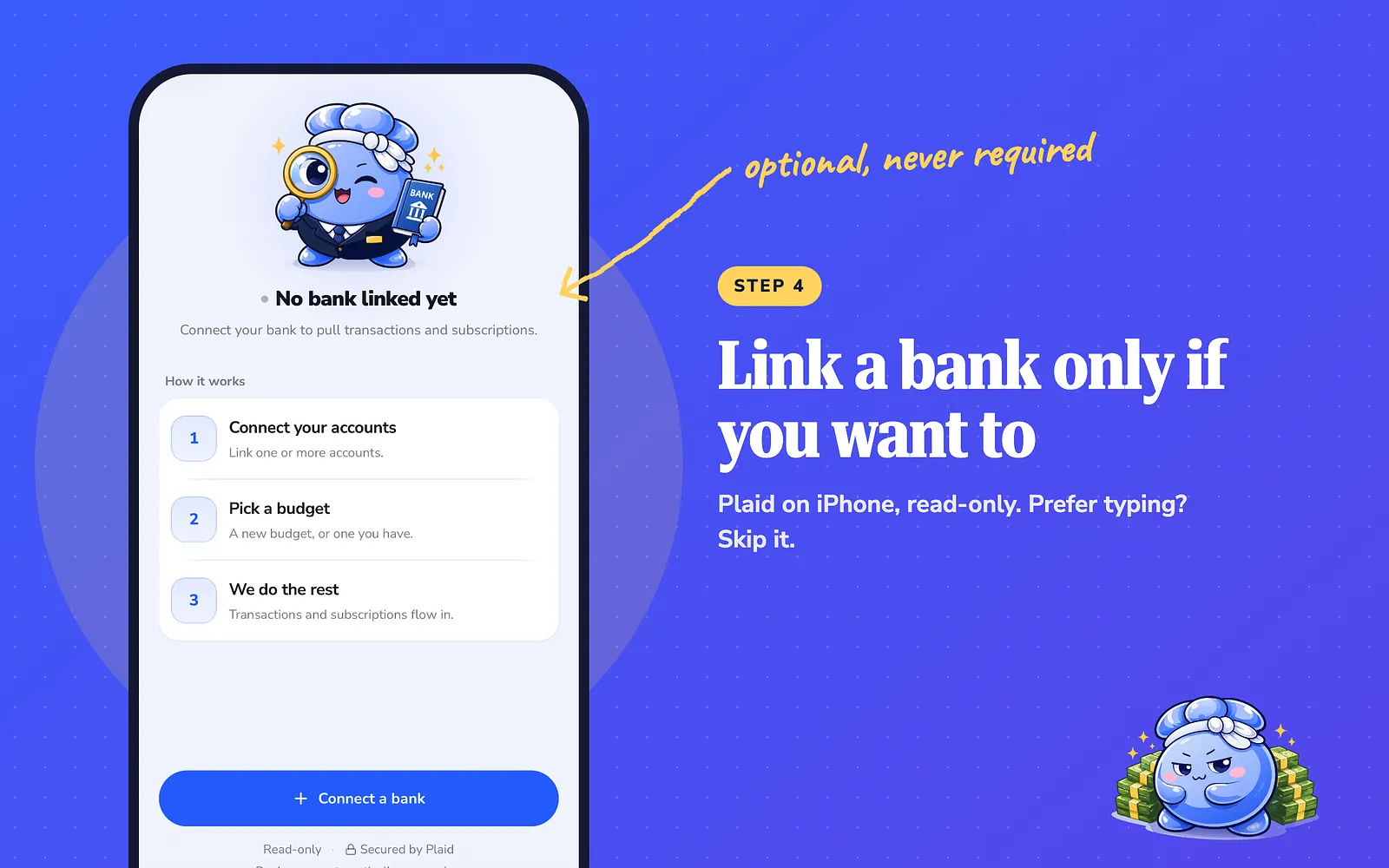
Step 4: Link a bank only if you want to
If you prefer transactions to come in on their own, link your bank through Plaid on iPhone. If you prefer typing, skip it. You can also set a savings goal and watch it grow.
What to do today
Write down how many minutes a week you will truly give your budget. That one number answers most of this comparison.
- Under 10 minutes, no wish to type purchases: skip EveryDollar free. Choose an app with bank sync or a lighter method.
- Willing to learn a method: start YNAB's 34-day trial right after payday so you see a full cycle.
- Want a free plan and happy to type: start EveryDollar free and build next month's plan tonight.
Common questions
These are the questions people ask most when they compare the two apps. Short answers below, using the same prices and trial lengths we checked on the official pages on November 23, 2026.
Is EveryDollar actually free?
Yes. The basic EveryDollar plan is free forever with manual entry, unlimited categories, sinking funds and bill due dates. Bank sync needs Premium at $17.99 a month or $79.99 a year.
Is there something better than YNAB?
It depends on what you need. EveryDollar is cheaper per year with Premium and free without it. If YNAB's method feels heavy, a simpler app with a preset budget method may suit you better.
Is EveryDollar the best budgeting app?
It is a strong choice for a free, plan-first zero based budget. It is a weaker choice if you want bank sync without paying, since sync is a Premium feature.
What are the top 3 budgeting apps?
No single list fits everyone. For zero based budgeting, YNAB and EveryDollar are the two names that lead this search. Our zero based apps list covers more options.
Does YNAB have a free trial?
Yes. YNAB offers 34 days free, and college students can get 365 days free with proof of enrollment.
Can I switch from EveryDollar to YNAB later?
Yes. They are separate apps with separate subscriptions, so you can start YNAB's 34-day trial while you still have EveryDollar and compare them on the same month.
Sources
Every price, trial length and feature for EveryDollar and YNAB in this article comes from the pages below. Reviewer experiences are from the named review sites and are single accounts, not studies.
- YNAB pricing, checked November 23, 2026
- YNAB features
- YNAB: Tackling the YNAB learning curve
- Ramsey Solutions: EveryDollar Premium subscription cost
- Ramsey Solutions: EveryDollar
- NerdWallet: EveryDollar app review
- The Penny Hoarder: EveryDollar app review
- Alex Tran: YNAB vs EveryDollar
- Capterra: You Need A Budget reviews
- Trustpilot: YNAB reviews
Keep reading
Still deciding? These three guides go deeper on YNAB itself, on apps people pick instead of YNAB, and on matching a budgeting app to how your week really runs.
Coming from another budgeting app? See how FloosYo compares to YNAB, Mint, Monarch or Rocket Money.
Which budget fits me: See which split fits the amounts you enter. Budget my income: Give every dollar a job before the month starts.