
Category management for personal finance means grouping recurring expenses so you can see their true annual cost before money leaves your account. One consumer study found that households estimated about $86 per month on subscriptions, while itemized charges averaged about $219 per month, a $133 monthly gap that adds up to roughly $1,596 per year (DataProt's subscription economy data).
That gap is easy to create. A phone plan renews, cloud storage bills you, a streaming service charges a card you rarely check, and a food delivery habit keeps repeating in the background. You may notice each transaction, but still miss the portfolio they create together.
The practical answer isn't another chart showing where your money went. It's a system that groups recurring outflows, projects their monthly and yearly cost, and gives you a decision before the next charge.
Table of Contents
- What Is Category Management for Your Money
- The Hidden Cost of Unmanaged Recurring Expenses
- Setting Up Your Personal Expense Categories
- Proactive Interventions vs Reactive Tracking
- Decision Architecture and Savings Goals
- Building a Sustainable Monthly Routine
What Is Category Management for Your Money
The phrase category management usually belongs to procurement. In business, teams group related goods and services into spend categories so they can study demand, supplier risk, and cost drivers together instead of treating every purchase as an isolated event. The U.S. General Services Administration's explanation of category management describes this approach as a way to consolidate buying, strengthen negotiating power with suppliers, and manage total cost of ownership according to each category's market and risk profile.
That same logic works for a household, but the objective changes. You aren't negotiating with suppliers across an enterprise. You're governing the recurring outflows that compete for the same limited income.
Suppose a cloud-storage renewal appears on Tuesday. You could record it as one transaction and move on. A category-management view asks a wider question: how much do all digital services cost over a month and a year, which ones are still useful, and which renewal needs a decision before it happens?
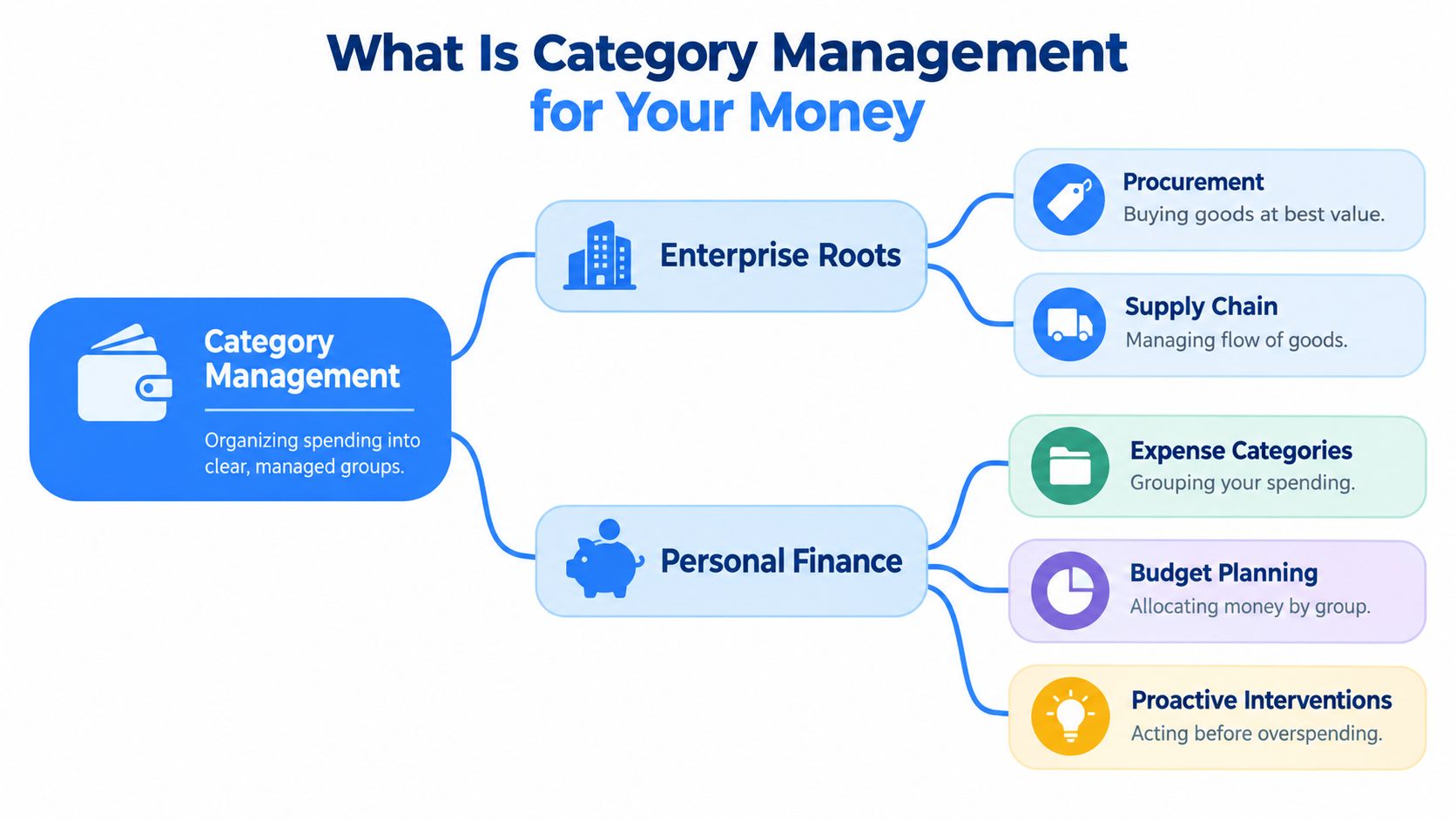
From isolated charges to managed groups
A useful personal structure might include:
- Subscriptions: Streaming, cloud storage, software, and learning services.
- Household bills: Phone, internet, utilities, and other recurring services.
- Daily habits: Coffee, takeaway meals, ride-hailing, or convenience purchases.
- Work expenses: Software and services that support freelance or creative work.
- Flexible commitments: Gym memberships, app plans, and services you can pause or cancel.
The names don't need to match anyone else's system. They need to make decisions obvious. A category is useful when it helps you see related costs, identify the next renewal, and choose whether to keep, skip, downgrade, or stop something.
The enterprise version developed in U.S. grocery retail in the early 1990s, when margins were described as about 1% and retailers needed a better operating model. The approach was later standardized into eight steps, including category definition, role, assessment, scorecard, strategies, tactics, implementation, and review, with early adopters including Safeway, Kroger, Albertson's, and Publix (Future Purchasing's category management history).
For personal finance, the most important lesson is the final one: review. Naming a category once won't control spending. You need a living view that stays connected to upcoming charges and changing priorities.
The Hidden Cost of Unmanaged Recurring Expenses
Recurring charges escape attention because they arrive separately. Your mind handles the phone bill, a streaming renewal, and a small daily purchase as different events, even though each one reduces the same available cash.
That creates a familiar mismatch between intention and reality. The Subscription Creep Index reports that 48 percent of respondents had been charged after forgetting to cancel a free trial. The same source reports that 74 percent say recurring monthly charges are easy to forget, while 42 percent admit they pay for subscriptions they no longer use.
These figures explain why manual tracking often fails. A spreadsheet can record a charge after it happens, but it won't necessarily create a timely decision before the next renewal. By the time the transaction appears, the cancellation window may have passed.
Practical rule: A recurring expense deserves attention before it posts, not only after it appears in your history.
The annual view exposes the hidden math. A small repeating cost feels harmless when seen once, but its yearly projection reveals the commitment you're accepting. That doesn't mean every recurring expense should be removed. A service you use often may be worth keeping. The point is to make the trade-off visible while you can still act.
For a broader explanation of how repeating payments work and why they're easy to overlook, see this guide to what recurring expenses are.
Why category totals beat memory
Memory is especially unreliable around free trials, annual plans, and charges tied to different cards. A renewal notice may look like routine marketing, but the Federal Trade Commission's subscription guidance defines it as a reminder that states when a subscription expires and when the customer will be charged automatically.
The FTC also advises keeping a copy of a cancellation request and checking bank or card statements afterward. That creates a simple control loop: detect the upcoming charge, decide what to do, and verify that the cancellation took effect.
A categorized system supports that loop without asking you to remember every merchant. It turns scattered transactions into a portfolio you can inspect before the money disappears.
Setting Up Your Personal Expense Categories
Start with visibility, not perfection. Connect the accounts where recurring charges occur, then let the system identify repeating merchants and amounts. A bank connection through Plaid can reduce manual searching, while voice or text entry can capture expenses that never reach the connected account.
Build categories that lead to decisions
Use a small set of practical groups first. “Digital services” is often more useful than separate categories for every streaming platform, while “daily habits” can bring several small outflows into one review.
A workable setup process looks like this:
- Review detected merchants: Confirm that the charge repeats and that the merchant label is recognizable.
- Assign a decision-friendly category: Choose the group that helps you compare related outflows.
- Customize the display: Rename categories, change their colors, and select icons that make the home view easy to scan.
- Add missing expenses: Use voice or text for cash payments, irregular bills, or purchases made outside the connected bank.
- Check projections: Look at both the monthly and yearly cost before deciding whether the category is healthy.
The purpose isn't to reconstruct every historical purchase. It's to create a reliable forward-looking picture. If a merchant is filed under the wrong group but still appears in the right renewal view, correct it when the error affects a decision.

Connect the category view to your budget
A category should answer a question. “Subscriptions” might answer, “Which services renew soon?” “Work tools” might answer, “Which recurring costs support income?” If a category only produces a colorful label, it adds organization without control.
FloosYo is one example of a personal finance app that connects to banks through Plaid, detects recurring charges, attaches merchant logos, supports custom categories, and accepts voice or text entries for expenses the bank doesn't capture. It also projects monthly and annual totals, which makes the category useful before a charge lands. For more guidance on structuring a workable system, see this resource on personal budget categories.
The category screen should leave you with a next action, not another research task.
Proactive Interventions vs Reactive Tracking
A reactive tracker tells you what already happened. It may show that your spending rose, that a category exceeded its target, or that several payments posted during the week. That information can be accurate and still arrive too late to change the charge that caused the problem.
A proactive system works on the decision timeline. It shows the renewal date, the expected amount, and the projected cost, then asks whether the service still earns its place in your spending plan.

The intervention is the useful part
A monthly total is informative. A yearly projection is more revealing. A clear action is what turns that information into control.
For each recurring expense, the decision can stay simple:
| Decision | When it fits |
|---|---|
| Keep | You use the service and accept its projected cost. |
| Skip | You want a temporary pause without treating the expense as permanently unwanted. |
| Cancel | The service no longer earns its place in the category. |
| Monitor | You need more information before the next decision point. |
Reminder timing matters because a notice must leave enough room to act. Business guidance on auto-renewal commonly recommends reminders at 90, 30, and 7 days before renewal, while annual plans may benefit from a 30-day notice that shows the exact amount and a direct cancellation path (DealHub's auto-renewal guidance). The FTC separately advises consumers not to ignore renewal notices and to follow the merchant's cancellation instructions.
The trade-off is clear. More alerts can create noise, but too few alerts leave decisions until after billing. Consolidated reminders help when several expenses fall due together, while an action hub keeps the response close to the notification.
Decision Architecture and Savings Goals
Categorization produces knowledge. Decision architecture determines whether that knowledge changes behavior.
When a recurring expense comes into view, avoid vague intentions such as “spend less next month.” Use a small set of explicit choices: keep, skip, cancel, or monitor. Each option should connect to a consequence you can understand, such as the projected amount retained over the relevant period.
Skipping an unused service can be more practical than canceling it immediately. Canceling makes sense when the value is gone. Keeping makes sense when the service supports your work or daily life. Monitoring is useful when the renewal is approaching but you still need to check usage or compare alternatives.
Turn avoided spending into a visible result
Savings goals work best when they receive a concrete amount tied to a decision. If you skip a bill or recurring service, route the estimated saved amount into one clearly named target, such as a replacement laptop, an emergency reserve, or a planned household purchase. The point is not to promise that every skipped expense becomes available cash. The point is to record the choice and make its outcome visible.
A focused system can be easier to maintain than a collection of disconnected targets. FloosYo's model links a skipped bill to a savings goal automatically, with one goal active at a time, so the decision has a visible destination instead of disappearing into a general account balance. Its voice and text capture also helps record expenses that a bank feed can't see, including cash purchases or charges made elsewhere.
That combination creates a feedback loop:
- Detect the outflow: Find the recurring charge or log it manually.
- Project the commitment: See the monthly and yearly effect.
- Choose an action: Keep, skip, cancel, or monitor.
- Record the result: Move the estimated saving toward the selected goal.
- Review the evidence: Compare saved amounts with the decisions that created them.
The approach avoids a common failure mode: tracking savings as an abstract intention. A decision becomes easier to repeat when you can see what it funded. For ideas on connecting spending choices with specific targets, use this guide to set savings goals.
Building a Sustainable Monthly Routine
Category management fails when it demands constant attention. You don't need to log every ordinary purchase the moment it happens if your bank connection captures the transaction and your system can surface the recurring items that need judgment.
A sustainable routine has three layers.
Check the near-term view
Review what is due soon. Look for a renewal you no longer want, a bill whose amount changed, or several charges landing close together. Take the decision while the cancellation or skip option is still available.
Check category health
Scan the home view for categories that have grown, collected duplicate services, or contain expenses with unclear ownership. A category may need a new label, a different icon, or a simpler grouping if you keep hesitating about where items belong.
Check the goal connection
Look at the savings goal after you skip or cancel something. The review isn't about judging yourself. It confirms that the system recorded the avoided outflow and that your future plan reflects the decision.
Widgets can make this routine easier by showing due items, goal progress, and budget standing without requiring a full app session. An actions hub can also reduce friction by putting budget creation, income planning, category editing, and goals in one place.
Good maintenance is boring by design. The system should surface the decision, reduce the number of taps, and let you return to your day.
Keep the routine lightweight enough to repeat. A weekly review can catch new recurring charges, while a more focused check before major renewal dates protects against surprise deductions. When a new habit appears, capture it immediately by voice or text instead of waiting for memory to reconstruct it later.
A better measure of category health isn't whether every historical transaction has a perfect label. It's whether you can answer four questions before money leaves: what is charging, which group does it belong to, what will it cost over a year, and what decision will I make?
That is personal category management in practice. You're treating recurring spending as a portfolio, reviewing it continuously, and intervening before small commitments become an invisible annual burden.
FloosYo connects to your bank, detects recurring charges, projects monthly and yearly costs, and gives you skip or cancel decisions before renewals land. Visit FloosYo to see how voice entry, pre-charge reminders, category views, and savings tracking can turn recurring spending into a system you can manage.