

Your phone already knows what's draining your checking account. The problem is that you only notice after the charge has landed, buried under groceries, rides, cloud storage, streaming, phone plans, and the annual renewal that shows up once a year and feels brand new again. A good personal finance app iOS should not just show where money went, it should tell you what's about to leave, what's worth keeping, and what needs to go now.
Recurring spending is no longer a side issue. Bank of America payments data reported that subscription spending rose 7.7% year over year in July 2026, while entertainment and retail subscriptions together made up about 43% of all subscription spending. The same data showed Gen Z with the fastest subscription spending growth at nearly 14% year over year Bank of America payments data. That is why the right app has to focus on outflow control, not pretty charts.
Table of Contents
- The Hidden Drain of Recurring Spending
- Core Mechanics of Modern iOS Finance Trackers
- Bank Connectivity and Privacy Architecture
- Proactive Decision Support Versus Retrospective Charts
- Eliminating Surprise Charges With Preemptive Alerts
- Executing a Complete Recurring Expense Audit
- Choosing the Right Tool for Long-Term Outflow Control
The Hidden Drain of Recurring Spending
A lot of people think they have a spending problem. They usually have a visibility problem.
A few small charges, a yearly renewal, a free trial that converts, then a phone bill, a cloud plan, a meal subscription, a fitness app nobody opens. None of these feels dangerous on its own. Together, they turn into the kind of leakage that only shows up when you compare what you thought you were paying with what hit the account.
The strongest signal is not panic, it's normalization. App subscriptions already sit deep inside consumer behavior, and the iOS market has rewarded subscription products for years. A 2020 Adjust study found subscription-based apps were only about 1% of apps in the Google Play and App Store catalogs, yet they represented 49% of the top 225 apps in the App Store Adjust study summary. That gap tells you exactly why people miss recurring charges. The category is small on paper and massive in real life.
Practical rule: if a charge repeats, treat it like a decision, not a memory test.
People don't need another dashboard that politely confirms they overspent last month. They need an app that spots repeating charges early, labels them clearly, and forces a keep, skip, or cancel decision before the next billing event. That's the whole game. If your phone can surface the charge before it lands, you stop reacting to your statements and start controlling them.
Core Mechanics of Modern iOS Finance Trackers
A real personal finance app iOS should do two things well. It should detect repeating charges automatically, and it should translate those charges into yearly cost in plain language.
How recurring detection actually works
The useful part happens under the hood. The app looks at transaction-level metadata, merchant normalization, and cadence inference to decide whether a charge is a real recurring expense or just a similar-looking one-off purchase. That matters because a clean monthly list is not enough. You need the app to recognize that the same merchant, amount, or billing rhythm is coming back before the next charge hits.
That's the difference between passive record-keeping and actual outflow management. Bank of America Institute reported subscription spending rose 7.7% year over year in July 2026 and outpaced overall card-spending growth by more than 1.5 percentage points for the prior two years Bank of America Institute. When recurring spend grows faster than the rest of spending, generic category charts become too blunt. Early recurring detection becomes the useful feature.
Why yearly totals change decisions
Monthly cost hides the weight of a habit. Annual cost exposes it.
A practical way to do that is simple, multiply daily costs by 365, weekly costs by 52, and monthly costs by 12 annual cost method. That turns a small charge into a number you can judge. A tiny subscription looks harmless when it's framed as a monthly line item. It looks different when the app shows the full year and asks whether you still want it.
A strong tracker should also surface the projected monthly and yearly total before money leaves the account. That is the point. Users make better decisions when they can see the next twelve months of outflow, not just the last thirty days of history. A yearly total is blunt, and that's exactly why it works.
What to look for in the interface
- Repeat detection: It should identify subscription patterns without forcing manual tag work.
- Annualized projections: It should show monthly and yearly totals side by side.
- Decision prompts: It should ask whether to skip, stop, or monitor.
- Fast capture: It should let you log what the bank misses, without making entry feel like homework.
A finance app that can't do those four things is mostly a record keeper. That's fine if you enjoy hindsight. It's not fine if your goal is to reduce outflow.
Bank Connectivity and Privacy Architecture
Trust comes first. If a personal finance app ios asks for bank access, you need to know exactly what that access includes.
What read-only bank access actually gives you
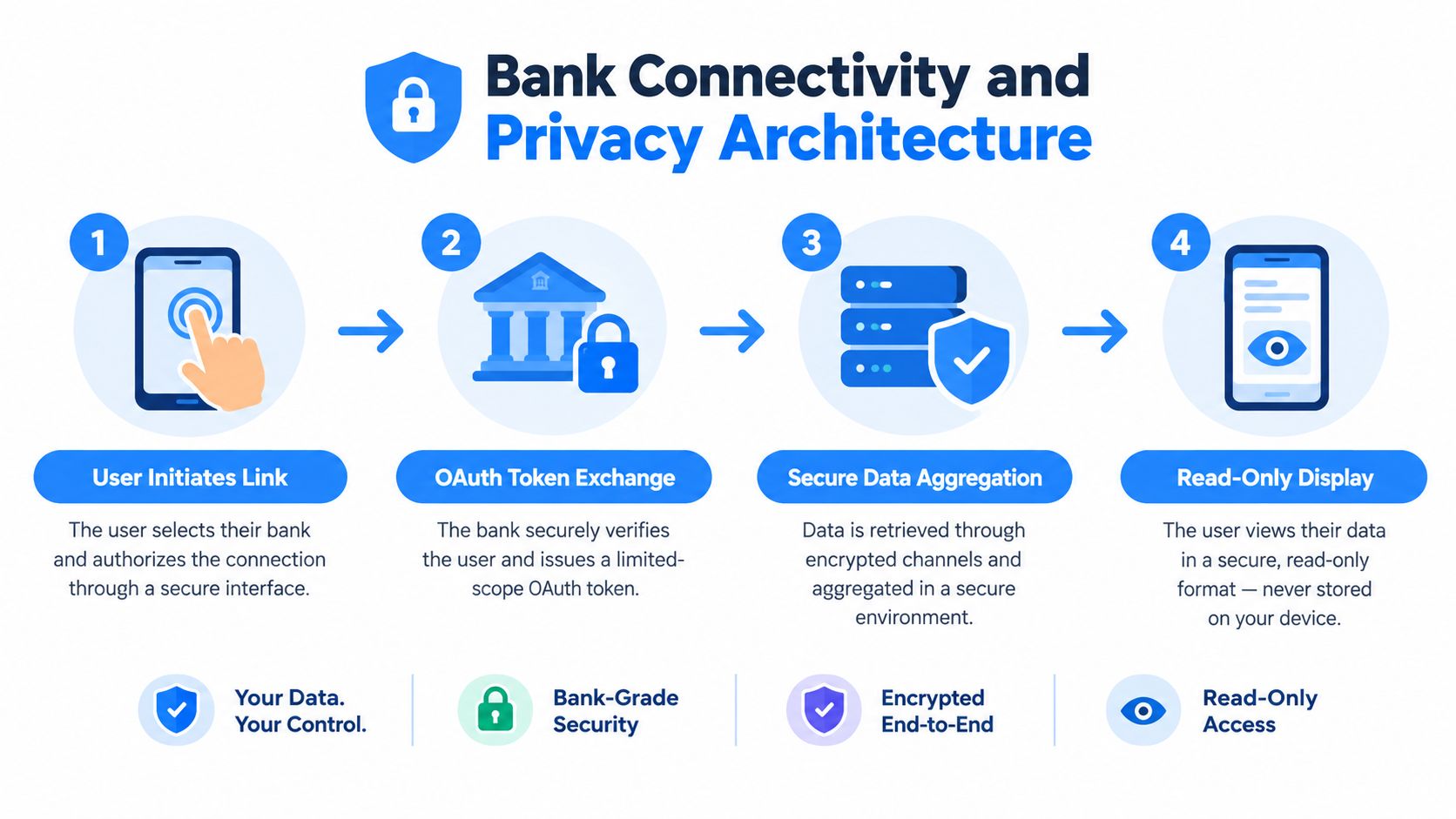
Plaid-style read-only aggregation is built for data, not payment movement. Connections are read-only by default, they can't initiate transfers, and authentication typically happens through the bank's own login flow, so credentials aren't shared with the app in OAuth-based connections Plaid model overview. For you, that means the app can pull transaction data for analysis, not move money around.
That separation matters. A recurring-expense app should act like an intake layer, not a money-movement layer. If it needs more than read and classify, that is a problem.
What a user should demand before linking
Demand a clear path to revoke access, protected tokens, and limited data exposure. A good setup should also explain how login data stays encrypted in transit and at rest, and how access can be revoked through the app, the provider portal, or the bank itself. That is the baseline, not a bonus Plaid security model overview.
If an app cannot explain how it protects your login flow and what it cannot do with your accounts, do not link it.
The right question is not whether bank sync exists. It is whether the app reads only what it needs, keeps identifiers minimal, and stays out of payment authorization entirely. That is how a finance app earns trust from people who want automation without giving up control.
For a closer look at how linked accounts work inside a finance tool, see FloosYo's expense tracker with bank sync.
Proactive Decision Support Versus Retrospective Charts
Most old-school trackers are built around reflection. They show what you already spent, then leave you to do the hard part yourself.
Old trackers tell you what happened
Traditional apps lean on category charts, pie slices, and monthly summaries. That can be useful if your only question is where the money went. It's weak if your real problem is stopping repeat charges before they recur. A chart after the fact doesn't cancel a renewal, and it doesn't help you decide whether a subscription is still worth it.
That is why a proactive tool is better. The app should surface the charge, show the annual cost, and give you a direct action. Skip it for a cycle. Cancel it. Keep it but monitor it. Those are decisions, not reports.
Better tools reduce friction at the point of entry
A practical app also has to handle the money the bank can't see. Voice entry, text entry, and receipt capture matter because not every expense comes through cleanly from a linked account. If you paid for something with cash, if a merchant description is messy, or if you need to log a habit cost quickly, the app should make that painless.
Speed with context is a key advantage. When transactions arrive pre-categorized and matched to merchant identities, users can react faster. And when a skipped subscription can route the saved amount into a goal automatically, the cancellation stops feeling like deprivation and starts feeling like a win. That behavioral shift matters more than another spend graph ever will.
| Feature | Traditional Trackers | Proactive Decision Tools |
|---|---|---|
| Main focus | Look back at spending | Act before the next charge |
| Recurring charges | Often buried in category views | Identified and flagged early |
| User effort | Manual review after the fact | Direct skip, stop, or monitor prompts |
| Logging non-bank expenses | Usually slower and clunkier | Voice or text capture built in |
| Outcome | Better reporting | Better outflow control |
The best reason to switch is simple. If the app only explains your mistakes, it's late. If it helps you avoid them, it's useful.
Eliminating Surprise Charges With Preemptive Alerts
Annual billing tricks people by slipping past attention, not by hiding the charge itself.
A yearly renewal appears once, then vanishes for months. By the time it returns, it looks like a fresh expense even though it never left. An annual subscription lookup guide points out that annual subscriptions can feel like mystery charges when they reappear, and it recommends checking three months of statements for charges that repeat on a regular interval. Pre-charge reminders matter more than retrospective summaries because they give you a chance to act before the money leaves.
Timing beats volume
A reminder before the charge lands is far more useful than a monthly digest after the debit has already cleared. Subscription creep can push surprise renewals into the $150 to $400 range across a year, and they often hit at once subscription creep cost overview. That is a timing problem, not a math problem. The app should warn you while you still have time to skip, downgrade, or cancel.
Free trials need the same treatment
Free trials are dangerous because they depend on memory. Track the conversion date the moment you start the trial, then set a reminder before the first bill lands. That beats discovering a paid plan after your card has already been charged.
Practical rule: if a charge is scheduled, the reminder should arrive before it, not after it.
Consolidated digests help too, especially when several expenses fall due around the same time. One clear alert is easier to act on than five separate notifications scattered through the week. The goal is not more noise. It is enough lead time to make a clean decision.
Executing a Complete Recurring Expense Audit
A recurring audit should be boring and strict. That is the point. Boring is cheaper.
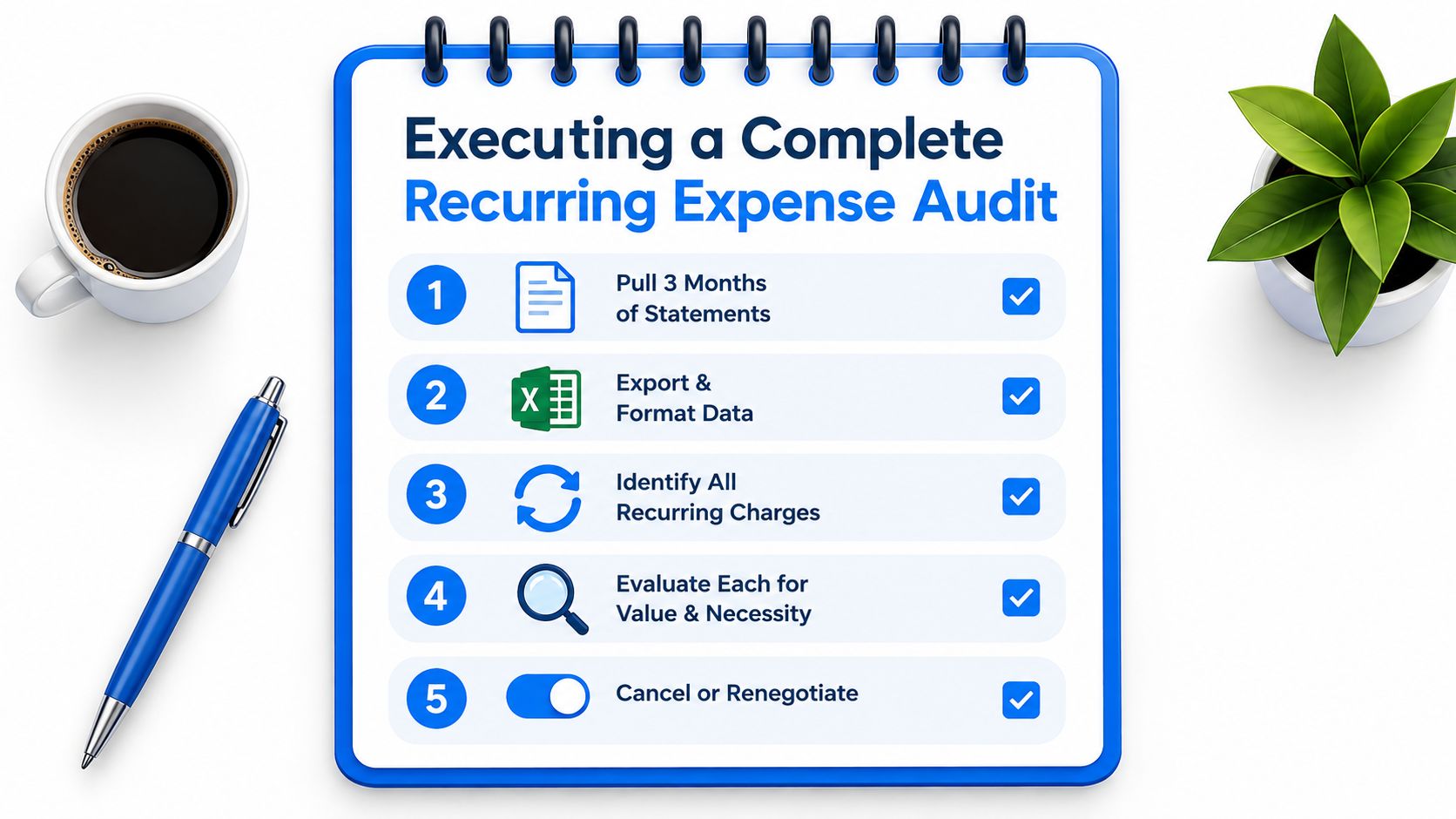
Start with the bank statement, the credit card record, and your email confirmations. Check all three, then list every recurring fee, including free trials that convert to paid plans, and review subscriptions on a regular schedule audit guide. The goal is not to admire the list. It is to force every line item to justify itself.
Use a simple filter
- Pull three months of statements. That catches monthly and near-monthly patterns without overcomplicating the review.
- Mark identical charges on regular intervals. That is how you spot subscriptions, bills, and habit costs.
- Check email for confirmations. Free trials and forgotten renewals usually leave a trail there.
- Rank each charge by value, not habit. Keep what you use. Cut what you tolerate.
- Decide immediately. Cancel, downgrade, negotiate, or keep.
Annual charges need special attention because they hide in time. A yearly fee can look like a mystery charge when it returns, even if it has been sitting there all along. Set an annual charge reminder note before renewal day so the decision happens while you still have room to act.
A clean audit also changes how you think about “small” costs. Convert each bill into its yearly cost, and the question gets sharper fast. You stop asking whether it is cheap and start asking whether it deserves a place in your outflow for another year.
For a more structured way to manage recurring items after the audit, see FloosYo's subscription management app.
Choosing the Right Tool for Long-Term Outflow Control
The right app is the one that helps you make fewer bad recurring decisions. That means it needs to do more than store transactions.
Look for read-only bank access, annualized projections, pre-charge reminders, and fast entry for what the bank misses. If the app can't show you what a recurring charge costs over a month and a year, it's not helping you think clearly. If it can't help you act before renewal day, it's still just a notebook.
The strongest buying criteria are practical
A serious app should make recurring charges obvious, not hidden inside category noise. It should let you see the merchant, the next billing event, and the projected loss if you keep the charge another year. It should also make it easy to cut a bill without turning the process into a project.
One of the more useful patterns is a tool that combines bank sync with voice entry, pre-categorized transactions, and savings tracking in one place. FloosYo does that by focusing on repeating charges, projecting monthly and yearly totals, and prompting a concrete skip or cancel decision. That is the direction this category should keep moving in.
Use this decision rule
Choose the app that makes recurring outflow harder to ignore and easier to cut.
If you want ambient awareness, home screen widgets help. If you want fewer surprise charges, reminders matter more. If you want actual control, the app has to turn every repeating expense into a deliberate choice.
For a broader look at automatic tracking on iPhone, read FloosYo's automatic expense tracker app for iOS.
FloosYo is built for the exact problem you are dealing with right now, recurring charges that keep slipping past attention. It connects to your bank, surfaces repeat spending, and shows the monthly and yearly cost before the next charge lands. If you want to cut subscription creep and make every recurring bill earn its place, visit FloosYo and see how it handles outflow control on iPhone.