
A survey of 1,000 people found that they estimated their subscription spending at $86 a month, but itemizing every recurring charge raised the average to $219, a gap of $133 and more than 2.5 times the estimate. Consumer Research's subscription spending survey captures the problem I see repeatedly with clients: people don't usually lose control through one dramatic purchase. They lose it through charges that feel too small to question.
That makes the right money tracker app for iPhone less about attractive charts and more about timing. The useful app finds recurring drains across bank accounts, cards, and other payment rails, projects what each one costs over a year, and gives you a clear keep, skip, or cancel decision before the next charge lands.
Table of Contents
- The Annual Cost Illusion of Small Charges
- Why iPhone Users Need a Recurring-First Tracker
- The Four Features That Actually Catch Recurring Spend
- How Bank Connections Keep Your Money Read-Only
- Voice Capture and Widgets for Daily Friction Removal
- Pre-Charge Workflows That Turn Insight Into Action
- Why a Tracker Should Catch Every Payment Rail
- A Seven-Day Plan to Use Your Money Tracker
The Annual Cost Illusion of Small Charges
Take four ordinary expenses: a streaming bundle at $16.99 a month, a meditation app at $12.99, a premium news site at $8, and a music tier at $10.99. Together, they cost $48.97 each month. Multiply that by twelve and the annual total is $587.64, not $1,108.68. The larger figure would require a different set of prices, so don't trust a tracker that hides its arithmetic. Your app should show the line items and the total plainly.
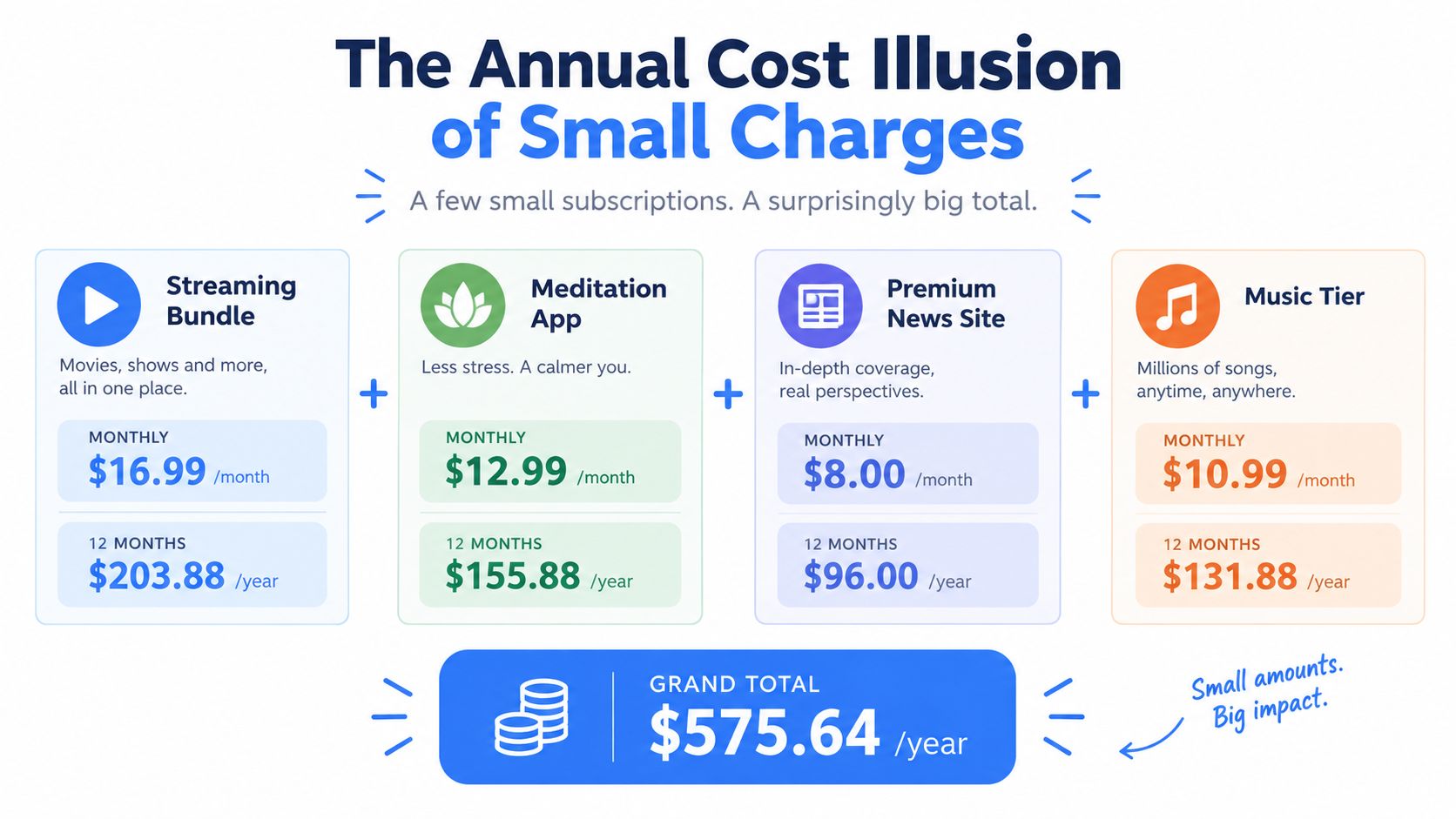
The same stack feels even less significant when you think about it weekly. A few dollars spread across each week doesn't trigger the same resistance as one large annual bill, even though the commitment is still there. Monthly statements reinforce that trick by presenting every renewal as a familiar line item, so your eyes recognize the charge without adding it to the other charges.
Why monthly thinking hides the drain
The problem isn't that each subscription is necessarily wasteful. The problem is that monthly pricing encourages you to judge each expense in isolation. A service can feel affordable today while remaining unused for weeks, and several individually reasonable services can become the most controllable part of your household outflow.
Clients often remember the obvious bills and forget the quiet renewals. They know what rent, utilities, and phone service cost. They don't always know which trials converted, which annual plan renewed, or whether a price changed after the initial sign-up.
Practical rule: If you can't state the yearly cost of a recurring charge, you haven't made a fully informed keep decision.
A useful tracker should calculate the annual figure automatically and let you inspect the underlying transactions. This guide to annual total cost is useful for understanding why yearly projections change the decision. The goal isn't to shame every convenience purchase. It's to make the commitment visible while you can still act.
That is what a money tracker app for iPhone should do. It shouldn't merely categorize what already happened. It should identify the next renewal, show its monthly and yearly effect, and let you decide whether the next charge deserves permission.
Why iPhone Users Need a Recurring-First Tracker
The budgeting-app market is already large, but usage patterns point toward a more specific job than general category reporting. One industry report estimates approximately 950 million active monthly budgeting-app users by 2026, with 58% relying on automated transaction categorization, 61% connecting at least two financial accounts, 47% using automated savings tools, and 69% tracking daily expenses through automated feeds. The budgeting app market report describes consumers who increasingly expect software to collect and sort the data instead of asking them to reconstruct it manually.
That expectation matters on iPhone because recurring charges rarely stay inside one tidy account. Your wallet may include a debit card, a credit card, Apple Pay, App Store billing, direct bank drafts, PayPal agreements, and shared household services. A recurring expense can pass through any of them, while a traditional budget view may show only a category total inside one connected account.
The iPhone blind spots
The App Store can renew a subscription without requiring a fresh decision at the moment of payment. Apple Pay can route a gym or delivery charge through a card that you don't inspect every day. A shared cloud plan can place one household bill beside many unrelated Apple charges, making the individual commitment easy to overlook.
| Payment Rail | Recurring Risk | Hardest to See In |
|---|---|---|
| App Store | Silent subscription renewal | A general bank category view |
| Apple Pay | Merchant charge routed through a stored card | A wallet you rarely reconcile |
| Direct bank debit | Bills and memberships repeat automatically | A single monthly statement |
| PayPal billing | Renewal uses a billing agreement | The primary card feed |
| Shared household account | One charge serves several people | Individual responsibility for the cost |
The market also shows why iOS deserves focused attention. One market report estimates the digital personal finance apps market at USD 1.85 billion in 2025, with iOS accounting for 57.3% of revenue, or about USD 1,059.97 million. Another estimate places iOS at 38.5% of personal finance app revenue in 2025, a difference that reflects methodology but still identifies Apple users as a highly monetizable audience. The digital personal finance apps market overview supports a clear product conclusion: iPhone finance tools should solve the platform's recurring-spend blind spots, not just reproduce generic charts.
When comparing tools, ask three questions. Does the app see multiple payment rails? Does it calculate an honest yearly projection? Does it prompt you before payment, rather than congratulate you after it? This comparison of iOS budget apps provides a useful starting point, but the decision should follow those practical tests.
The Four Features That Actually Catch Recurring Spend
A serious recurring-first tracker needs four capabilities. Leave out any one of them and the system becomes either incomplete, hard to trust, or too passive to change behavior.
Bank integration that doesn't depend on memory
Manual entry fails precisely where recurring tracking matters most. You won't reliably remember to add every gym draft, news renewal, cloud bill, or annual domain charge. A read-only bank connection gives the app the transaction stream it needs to identify what reached the account.
The mistake it prevents is simple: assuming a subscription is gone because you forgot about it. The charge record is more reliable than memory.
Recurring detection that distinguishes patterns
The app should group repeat merchants and amounts, identify the billing rhythm, and separate subscriptions from variable bills. It should also flag a price increase, because a renewal that was acceptable at one amount may deserve a new decision at another.
The mistake it prevents is treating every repeated transaction as harmless background noise. A recurring label should lead to inspection, not automatic approval.
Yearly projection that makes small costs legible
If a domain renewal costs $4.39 per month, the yearly projection is $52.68. A $14.99 fitness app becomes $179.88 over twelve monthly cycles. Those calculations don't tell you what to cancel, but they make the opportunity cost concrete.
The mistake it prevents is approving a charge because its monthly figure looks minor. The projection changes the question from “Can I afford this today?” to “Do I want this commitment over the coming year?”
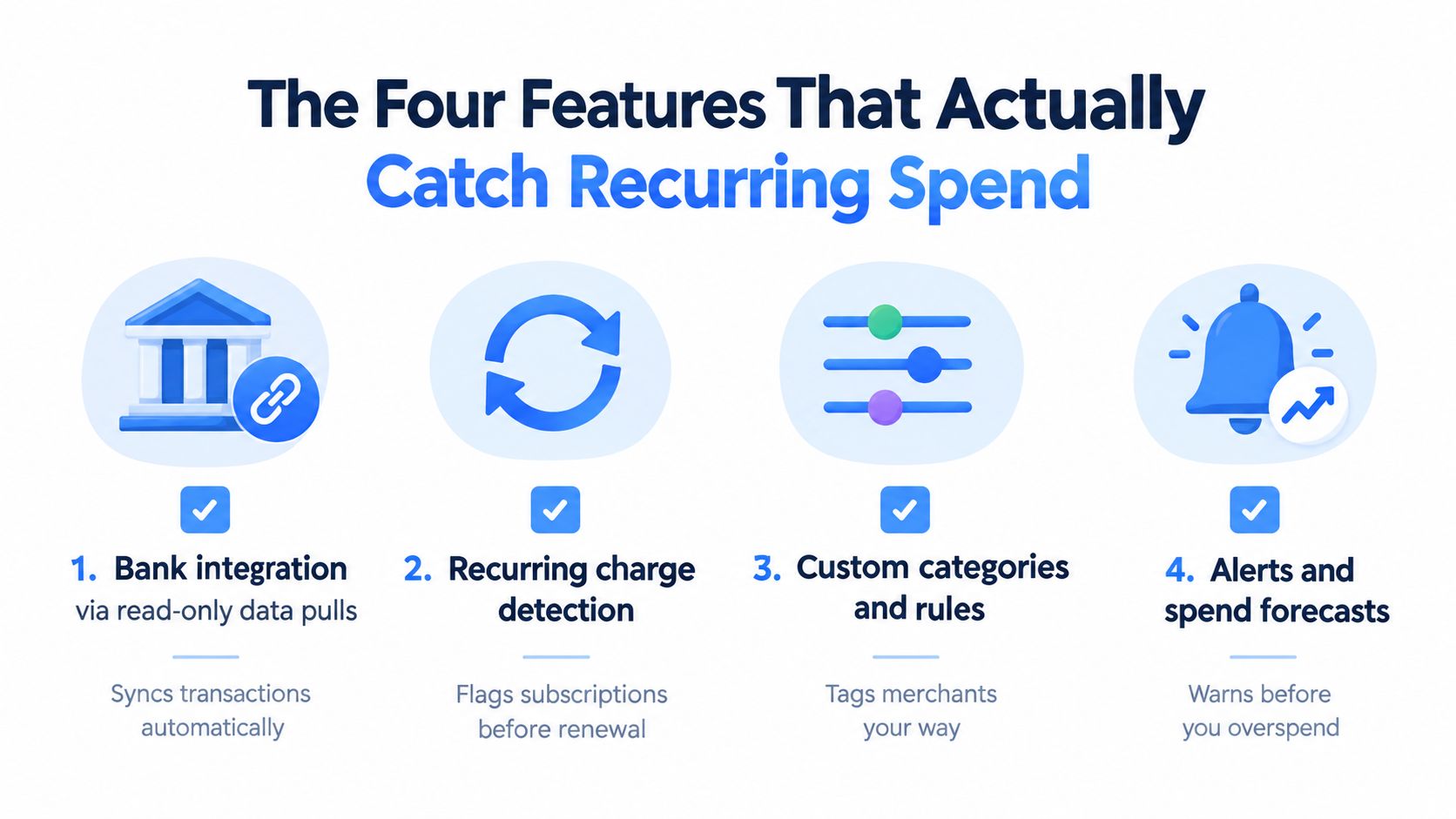
Pre-charge prompts that demand a decision
A dashboard waits for you to open it. A useful alert reaches you before the billing event and presents a clear action. The strongest workflow gives you a short review window, with options such as keep, skip, or cancel where the merchant supports them.
The mistake it prevents is discovering an unwanted renewal after settlement. For recurring spending, timing is a feature, not a notification detail.
A bank-linked system works best when it combines all four. Plaid explains that ongoing encrypted API tokens allow an app to ingest new transactions and identify repeated merchant and amount patterns without storing raw bank credentials. Plaid's open-banking API documentation describes the technical foundation for a tracker that keeps checking for new patterns instead of waiting for manual updates.
FloosYo uses bank connections, automatic recurring-charge detection, yearly projections, pre-charge reminders, and voice or text capture for expenses a bank feed misses. Treat those capabilities as evaluation criteria, not reasons to accept any app without checking its permissions and coverage.
How Bank Connections Keep Your Money Read-Only
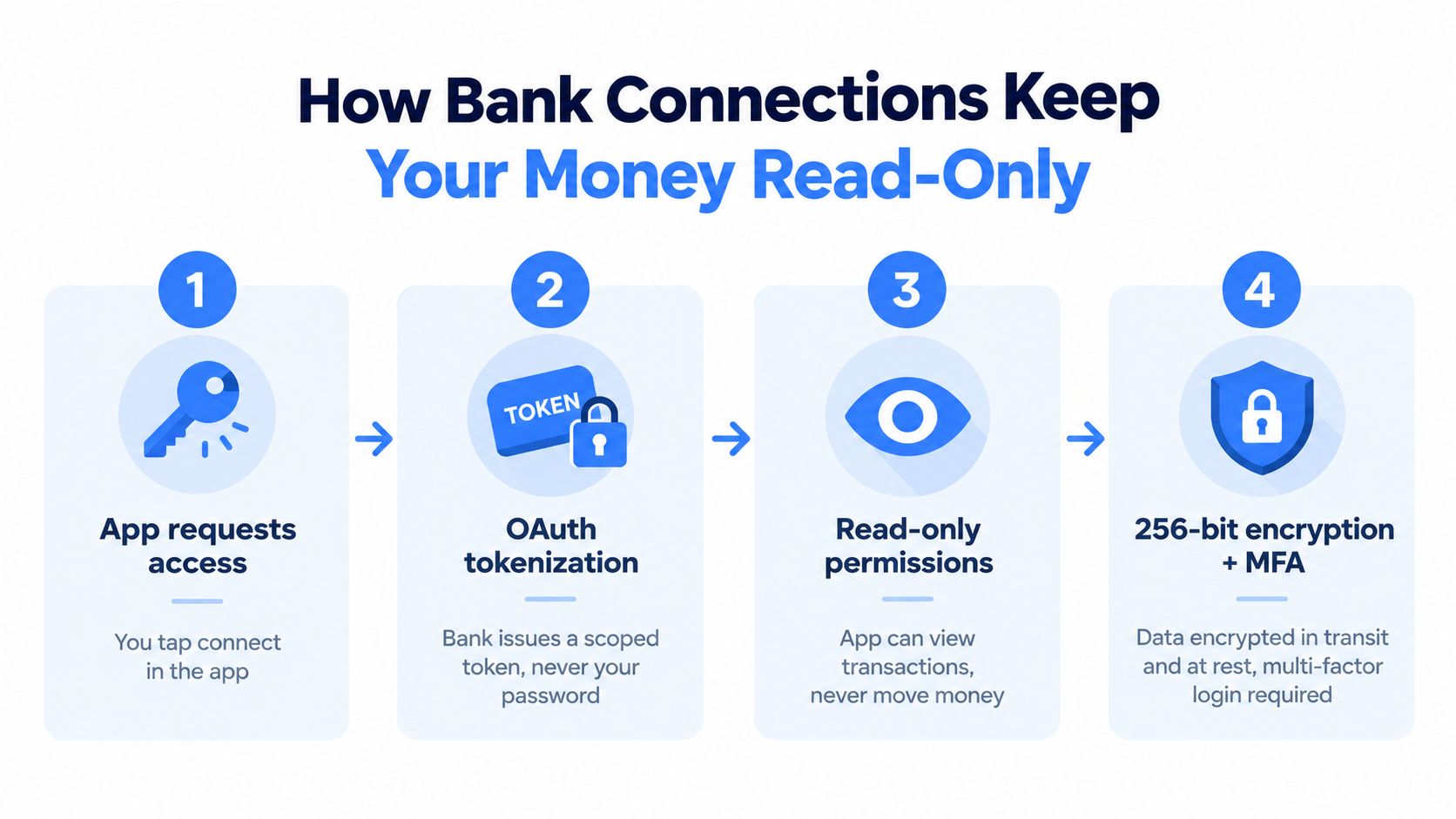
A bank connection shouldn't require you to hand your password to a budgeting app. In a typical Plaid Link flow, you authenticate on the bank's own screen. If the institution supports OAuth, it redirects you to that login, then returns a secure token that allows the approved connection without sharing your credentials with the app. Plaid's explanation of open-finance security describes this model along with AES-256 encryption, TLS, and multi-factor authentication in its systems.
What the permission actually allows
Read-only access means the app can inspect transactions and account information within the scope you approve. It can't initiate a transfer merely because it can see your balance. This open-banking guide distinguishes read-only Data APIs from transaction APIs that can initiate transfers, which is the distinction you should look for before connecting an account.
The token acts like a limited access pass. You can revoke the connection through the relevant provider or bank flow, and the app should explain how to do that. The important point is that a tracker can analyze recurring spending without becoming a place where your money is held or moved.
Use this checklist before connecting an account:
- Known aggregator: Confirm whether the app names its connection partner and explains the login flow.
- Bank-screen authentication: You should sign in through the institution's authenticated page, not type credentials into an unfamiliar form.
- Read-only wording: Look for an explicit statement that the app can view transactions but can't move money.
- Clear privacy policy: Check what data the service stores, how it protects it, and whether it sells financial data for advertising.
- Revocation instructions: Make sure you know where to disconnect the institution and remove access.
Security guidance also emphasizes layered controls such as OAuth 2.0, OpenID Connect, mutually authenticated TLS, and risk indicators in API payloads. The Open Banking Implementation Entity's security guidelines provide useful context for why strong authentication and transport protection matter.
A subscription alert is only useful if you trust the data behind it. Choose the connection model first, then judge the quality of the recurring detection and decision workflow.
Voice Capture and Widgets for Daily Friction Removal
Passive trackers usually fail because they ask for too much attention. If logging an overlooked purchase requires opening an app, finding a category, entering an amount, and saving a form, you'll postpone it until the detail disappears. Speed matters more than novelty.
Voice capture removes that delay. You can say that you spent a specific amount on a meal, ride, or one-off purchase while the information is fresh. A natural-language parser can turn the phrase into an amount, category, and frequency, which is especially useful for cash expenses and purchases a bank feed won't identify correctly.
The widget should answer one question
A home-screen or Lock Screen widget should show the information you need before opening the app:
- What is due: The next recurring charge and its expected date.
- What changed: A visible notice when a new recurring merchant appears.
- What it costs: Your current monthly recurring total and projected yearly commitment.
- What needs a decision: A reminder when a renewal is approaching.
You might glance at the widget before approving an App Store renewal, log a restaurant tip while walking away from the table, or create a quick reminder when a free trial is about to convert. Each action is small, but each one happens close to the spending event.
The widget shouldn't pretend to be a live bank statement. iPhone widgets can refresh later than the underlying transaction, so use the app for confirmation when timing matters. The widget's real job is visibility, not perfect second-by-second accounting.
A voice shortcut and a widget solve opposite sides of the same problem. Voice makes adding information fast. The widget makes reviewing information unavoidable enough to support a daily habit.
Don't add features because they look modern. Add them because they remove a step between the purchase and the decision.
Pre-Charge Workflows That Turn Insight Into Action
A recurring tracker should work backward from the billing date. The question isn't “What did I spend last month?” It's “What is about to leave my account, and do I still approve it?”
Consider a $9.99 monthly streaming service. A useful workflow warns you three days before renewal, shows the yearly projection of $119.88, and offers a choice to keep it, skip the month, or cancel. The number is only useful because the alert arrives before the charge.
| Pre-Charge Action | Passive Tracker | Category Tracker | Recurring-First Tracker |
|---|---|---|---|
| Upcoming charge notice | Reports after payment | May show it in a feed | Warns before renewal |
| Yearly projection | Rarely central | Usually secondary | Core review information |
| Skip-or-keep decision | No decision prompt | User must infer one | Presents a direct choice |
| Subscription review | Manual search | Category browsing | Recurring list review |
| Savings outcome | Shows historical spending | Shows category totals | Records prevented or skipped outflow |
A practical review rhythm
Use a three-day alert for immediate decisions, a quarterly review for every active subscription, and a yearly projection for each recurring line. If a service has a pause option, put that action beside cancellation. A temporary skip can be appropriate when you expect to use the service later but don't need the next billing cycle.
The app should also consolidate several upcoming charges so you can see the total pressure on the same week. One renewal might look harmless alone, while several due together deserve a deliberate household review.
Decision test: Measure a tracker by the charges it helps you prevent, not by the number of categories it can color.
Post-charge notifications still have a place for confirmation and reconciliation. They aren't enough for recurring spending, because the opportunity to avoid the outflow has already passed. A recurring-first tracker turns the dashboard into a short queue of decisions, and that is a much stronger savings mechanism than a historical report.
Why a Tracker Should Catch Every Payment Rail
A recurring review is only as reliable as the accounts and billing agreements it can see. One household can have several blind spots: a $14.99 news subscription hits a backup debit card, a $32 fitness autopay sits inside a joint checking account, and a $9.99 streaming renewal runs through PayPal. A tracker reading only the primary account may show a tidy budget while missing all three obligations.
The practical question is coverage, not how polished the dashboard looks. List every bank account, card, wallet, shared account, and billing agreement you hold. Then check which sources the tracker can access and which require authorization or a separate review. Anything the feed misses belongs in voice or text capture, not in a blind spot.
Audit the gaps before trusting the total
Coverage can fail in several ways. A backup card may connect to a different account, a shared account may be excluded, and an external billing agreement may not produce a clear recurring pattern in the bank feed. App Store charges can also appear under a merchant label that does not immediately identify the service.
Review each recurring item against the original account or agreement. Confirm the merchant, amount, billing frequency, and next charge date. If the tracker groups several charges under one unclear label, correct the entry before using its monthly or yearly projection.
A simple audit works well:
- List every account and payment agreement.
- Mark each source as connected, unavailable, or needing manual capture.
- Compare the tracker's recurring list with recent statements.
- Add missed charges and set a decision date before the next renewal.
The goal is not flawless automatic identification. The goal is a complete queue of recurring decisions, with a manual fallback for cash purchases, unclear bank descriptions, or services billed outside the connected sources.
A tracker can look polished while ignoring money that leaves through a disconnected account or external agreement. Judge it by whether it exposes the household's full recurring commitment and gives you enough warning to keep, pause, or cancel each charge before it lands.
A Seven-Day Plan to Use Your Money Tracker
Don't begin by building a perfect budget. Begin by making recurring outflows visible and giving each one a decision date.
- Day 1, connect the full picture: Link every relevant checking, savings, and credit account through the bank-aggregation layer. Include backup cards and shared accounts where you have permission.
- Day 2, inspect recurring charges: Review the detected list and mark obvious cancellations, unused trials, duplicate services, and charges you don't recognize.
- Day 3, project the year: Look at the monthly and yearly cost of every subscription and bill you keep. Screenshot the totals so the commitment stays concrete.
- Day 4, add visibility: Place the recurring-total or upcoming-charge widget on your Home Screen and Lock Screen, if privacy allows.
- Day 5, test voice capture: Log two cash or one-off purchases by voice. Use it for anything a bank feed won't identify accurately.
- Day 6, set the reminders: Schedule pre-charge alerts 48 hours before each upcoming bill or renewal so you have time to act.
- Day 7, make the calls: Review your skip-or-keep list and cancel, pause, or retain each item before the next billing cycle.
The process works because each day removes one source of uncertainty. You don't need to monitor every category constantly. You need complete recurring coverage, visible yearly costs, and enough warning to make a decision.
A money tracker app iPhone users can trust is one that pays for itself in the first month it catches a forgotten annual charge.
FloosYo connects your bank accounts through read-only Plaid access, detects recurring charges, projects monthly and yearly costs, and adds voice capture for spending the bank feed misses. Use FloosYo to turn upcoming renewals into clear skip, keep, or cancel decisions before the next charge lands.