

You open your statement to check the phone bill and spot a streaming service you barely recognize. Say it started as a free trial, survived two apartment moves, and only caught your attention during a year-end review. At $15 a month, that forgotten service has cost $180 over the year without giving you anything you wanted.
The useful response to "How can I lower my bill?" isn't to cut everything. It's to build a list that tells you which charges to change, how much you'll really save, and when you need to act.
Table of Contents
- Why Recurring Charges Cost More Than They Look
- Build a Complete List of Recurring Charges
- Turn Each Charge Into Monthly and Yearly Totals
- Rank Savings by Size, Effort and Timing
- How to Cancel Before the Next Charge Lands
- Fix the Problems That Keep Charges Running
- Start a Monthly Review and Track Each Saving
Why Recurring Charges Cost More Than They Look
Remembering what you signed up for isn't the same as knowing what you're paying. In a 2025 subscription survey reported by CNET, respondents estimated their monthly subscriptions at $86, while calculated totals averaged $219, and 74% considered recurring charges easy to forget.
Memory fails because each payment arrives separately. A receipt goes to an old email address, an app renews through a marketplace, or a processor name appears instead of the brand you recognize. Phone bills, utilities, and gym memberships become background noise because you've paid them for so long.
The first useful saving often starts with an unfamiliar transaction, not a spending target.
Your review should include streaming, software, cloud storage, phone and internet plans, gym memberships, and meal kits. Add food-delivery memberships, ride-hailing fees, rent, and utilities. Daily habits belong on the list too, even when you authorize each purchase separately.
The shift is simple: stop estimating and start listing from bank records. You're not deciding whether every purchase was justified. You're checking whether today's payments still match today's needs.
Open your last three statements and count the charges you can't name within ten seconds. Treat that count as a starting point, not a reason to feel guilty.
Build a Complete List of Recurring Charges
A complete list is the foundation. A spreadsheet, Apple Numbers file, or shared note works, provided every recurring expense has its own row and you can sort it without losing the details.
Gather the records before making cuts
Pull 90 days of statements. Include bank accounts and credit cards, including cards you rarely use. This gives you a practical window for spotting monthly payments and some quarterly charges, though it won't catch everything.
Look for repetition. Scan for repeated amounts and merchant names, and mark anything appearing twice. Don't ignore a familiar merchant just because the amount changed; usage charges and expired promotions can alter the total.
Check purchase histories. Open Apple App Store subscriptions, Google Play subscriptions, and marketplace account histories. These can identify services that appear on a statement under the store's name rather than their own.
Search a full year of email. Search for receipt, renewal, subscription, trial, and membership. Looking back 12 months helps uncover annual plans that won't appear in your recent statements.
Make one row per charge. Record the merchant, amount, frequency, next billing date, payment method, and person using it. Mark uncertain details for verification rather than filling them from memory.
Where recurring charges hide and what to record
| Charge type | Where it usually hides | What to record |
|---|---|---|
| Streaming and music | Card statement under a processor name, or app store | Price, next renewal date, plan tier |
| Software and cloud storage | App store or developer name on the card | Tier, price, renewal date, number of seats |
| Annual plans | One large charge once a year, often missed | Annual amount, renewal month, cancellation deadline |
| Phone and internet | Monthly bill paid by autopay | Base price, promo end date, contract term |
| Gym and fitness apps | Card statement, sometimes a bank draft | Monthly fee, notice period, contract end date |
| Meal kits and delivery memberships | Card statement or app account settings | Monthly fee, skipped cycles, usage count |
| Duplicate services | Two accounts for one service, often under different emails | Which account to keep and which to close |
When a processor name hides the service, match the transaction date and amount against receipts before treating it as unauthorized. Check alternative email addresses too. Duplicate accounts can remain active even when you only use the newer login.
For a shared household card, ask the other person who uses each uncertain item. Don't cancel cloud storage containing someone else's files or a membership they rely on.
Finish with one consolidated list and a count of unexplained items. Keep those items visible until you've identified them, rather than dropping them into a miscellaneous category.
Turn Each Charge Into Monthly and Yearly Totals
Use this conversion rule: amount × charges per year = annual cost; annual cost ÷ 12 = monthly equivalent. Keep the actual payment schedule alongside those equivalents so an annual charge doesn't look like money leaving every month.
The FTC's Negative Option Rule evidence review cited findings that consumers underestimated subscription costs by an average of $133 per month, equivalent to $1,596 per year, and that 42% had forgotten at least one subscription while continuing to pay for it. Writing down the yearly total removes the need to guess.
Converting common charges into annual cost
The following are hypothetical charges for comparison, not quoted provider prices. The workday coffee example assumes purchases on five days each week throughout the year.
| Charge | Amount | Frequency | Annual cost |
|---|---|---|---|
| Streaming service | $15 | Monthly | $180 |
| Unwanted services, combined | $50 | Monthly | $600 |
| Streaming bundle | $98.99 | Monthly | $1,187.88 |
| Software plan | $180 | Yearly | $180 |
| Delivery membership | $12 | Weekly | $624 |
| Daily coffee on workdays only | $5 | Five purchases weekly for 52 weeks | $1,300 |
| Daily coffee, every day | $5 | Daily for 365 days | $1,825 |
A monthly fee needs no adjustment before you compare it with another monthly fee. Divide an annual plan by 12, and multiply a weekly charge by 52 to get its annual equivalent. For daily habits, use the days you actually buy, not an automatic assumption that every day looks the same.
That distinction matters for coffee, lunches, and ride-hailing. Holidays, remote-working days, and changes in routine can make a calendar-based estimate misleading. A recent transaction count is more useful than an idealized schedule.
Separate the projection from the next payment
For variable utilities, average the last 12 months rather than multiplying an unusually mild month's bill. Keep the next amount due in a separate column so you can still prepare for seasonal peaks.
For promotional plans, record both the introductory price and the standard price. If the promotion ends during your projection period, calculate the periods separately instead of assuming the lower rate continues.
Use an annual total cost calculation to compare different billing rhythms consistently. Every row should finish with a monthly equivalent, annual total, and actual next payment date.
Rank Savings by Size, Effort and Timing
Rank each charge by annual saving first, ease of change second, and cancellation deadline third. An imminent deadline can move an otherwise smaller item to the front because waiting may commit you to another paid period.
Say you're comparing an unused $15 service with a $90 phone plan. The phone plan deserves priority if a downgrade produces a larger annual saving without sacrificing coverage you need. Its full bill isn't the saving, though; only the price reduction counts.
Use this simple order to keep the review focused.
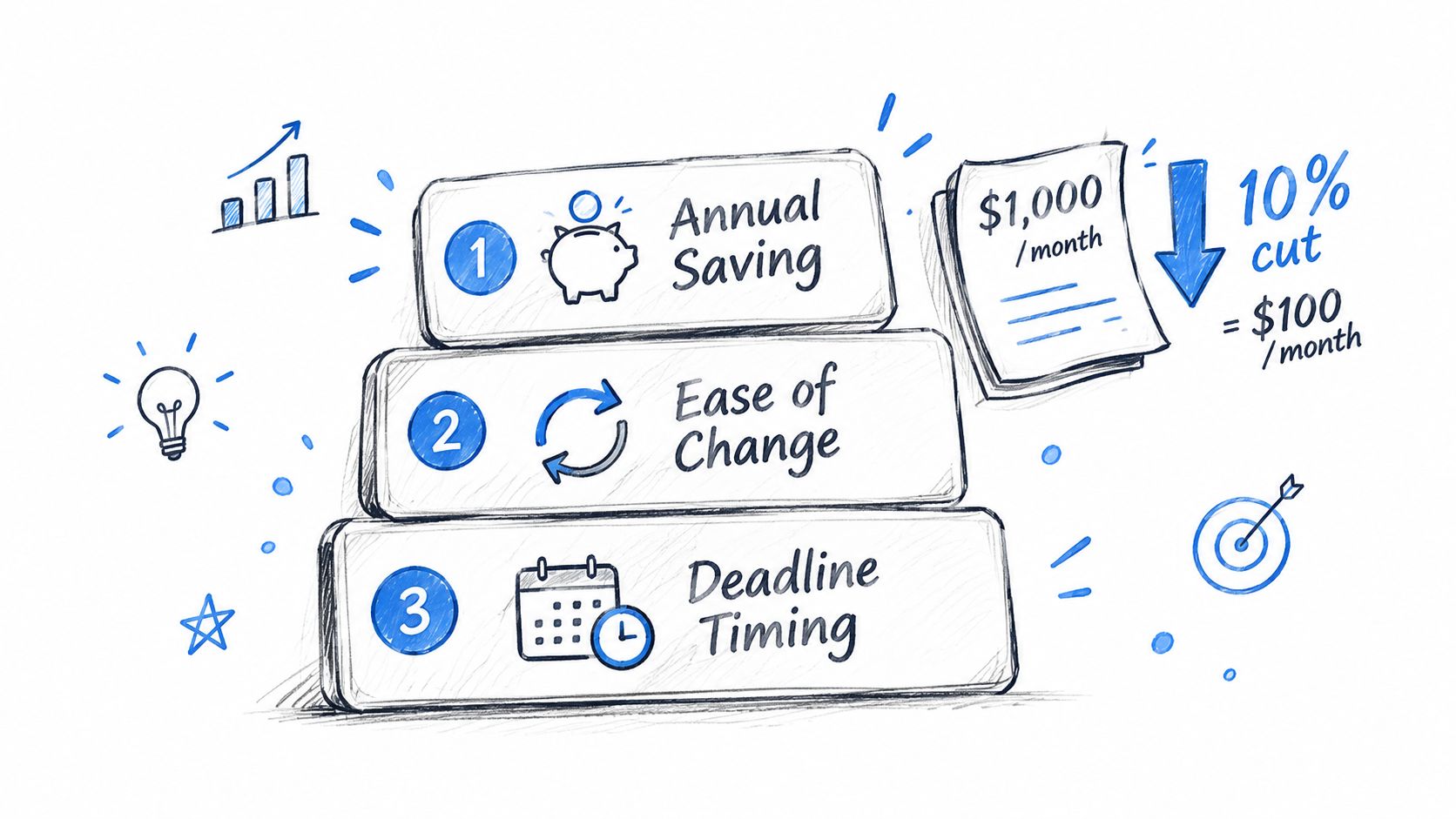
According to the U.S. Bureau of Labor Statistics' consumer expenditure release, housing and transportation together absorbed 49.9% of average consumer-unit spending in 2023; a hypothetical 10% reduction in a $1,000 monthly recurring outflow saves $1,200 annually. Large necessities deserve attention, even when changing them takes more effort than removing an app.
Savings actions compared by effort and fit
| Action | Typical saving | Effort | Best for | Watch for |
|---|---|---|---|---|
| Cancel an unused service | Its full annual cost | Low | Services you stopped using | Notice deadline and final billing cycle |
| Downgrade to a lower tier | Price gap between tiers | Low | Streaming, cloud storage, phone plans | Features you use every week |
| Skip one billing cycle | One cycle's amount | Low | Meal kits, boxes, gyms with pause options | Whether the service allows pausing |
| Switch to a cheaper provider | Gap between old and new rate | Medium | Phone, internet, utilities where switching is available | Promotional rates that expire |
| Negotiate with the retention desk | Discount or credit actually offered | Medium | Phone, internet, subscriptions | Offers are rarely volunteered, so ask directly |
| Cut usage of per-use services | Uses avoided times the fee | Medium | Food delivery, ride-hailing | Habit relapse in the first two weeks |
Compare the saving after the trade-offs
Check setup charges, equipment costs, and contract exit fees before switching. For phone service, confirm coverage where you live and work; for cloud storage, check that the lower tier holds your files.
Before negotiating, write down your current price and a competitor rate you've found. Ask in one sentence: “Can you move me to your lowest suitable plan or apply a credit?” Get the duration and any new commitment in writing.
Practical rule: Rank the saving you can keep, not the discount advertised on the offer page.
Use a needs-versus-wants review when a service is useful but oversized. Don't borrow to pay a bill just to claim a discount; borrowing fees can erase the saving. Keep the top three actionable items on your working list, with an owner and deadline for each.
How to Cancel Before the Next Charge Lands
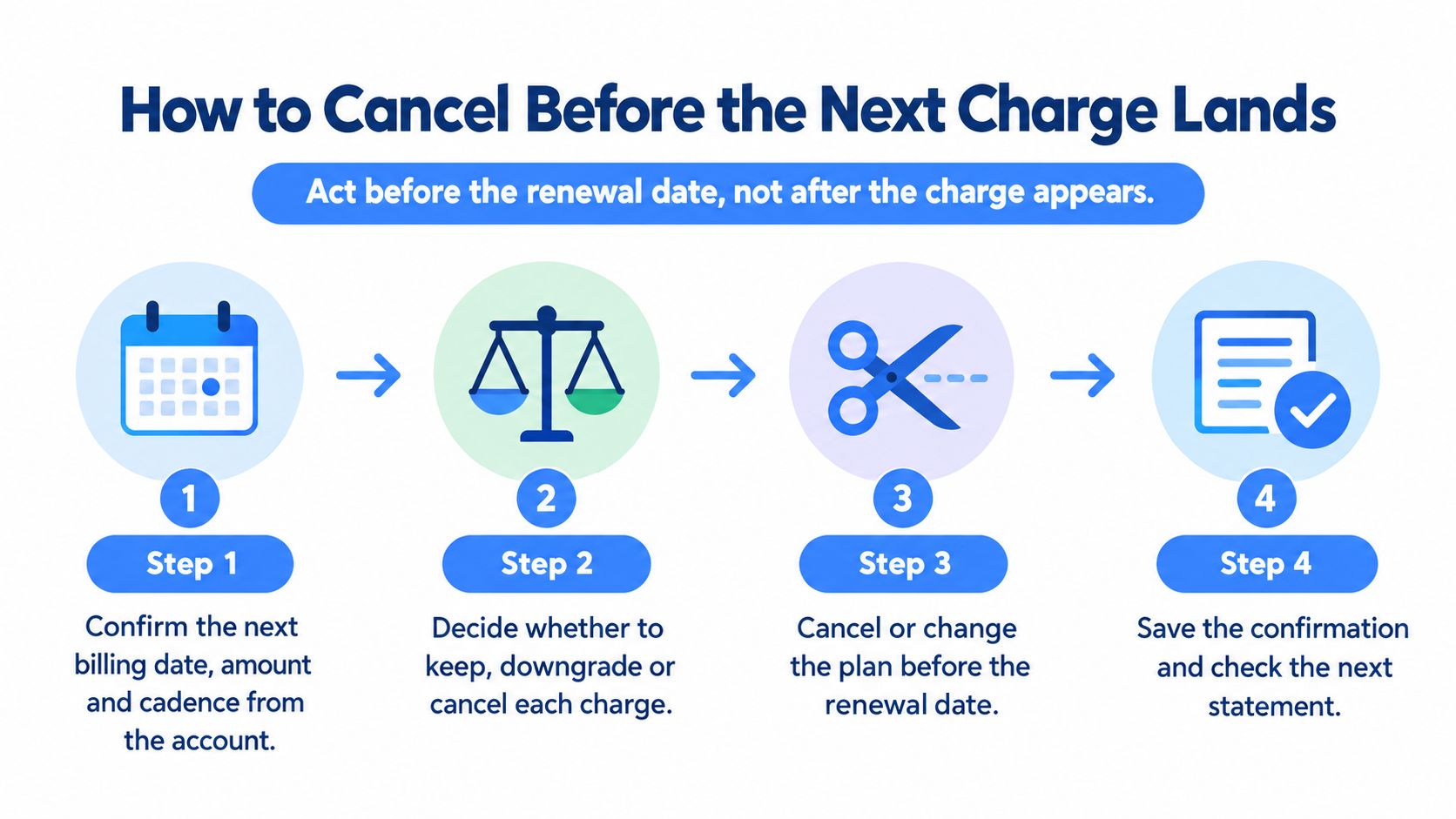
Act before the renewal date, not after the charge appears. The relevant deadline may be earlier than the billing date if the contract requires advance notice.
Findings summarized by Mastercard on subscription management reported that 23% of UK consumers were paying for a bill or subscription they no longer wanted, while 41% of U.S. online adults said subscriptions were too difficult to cancel. Deciding to cancel is only part of the job; completing the process is what stops the outflow.
This flow keeps the decision tied to the billing event.
Complete the cancellation and keep the evidence
Confirm the next billing details. Open the account page or latest receipt and verify the date, amount, and cadence. Don't assume the previous payment reflects the renewal price.
Read the notice window. Find the cancellation terms and distinguish the renewal date from the last date you can give notice. Put the earlier deadline in your calendar before starting the cancellation.
Cancel through the merchant. Use the same channel you used to sign up where possible, or the merchant's stated cancellation route. An app-store subscription may need to be managed through the store rather than the service's website.
Save proof. Keep the confirmation page, cancellation email, or reference number. If the account only shows a changed status, capture that screen with the date visible.
Record the access end date. You may retain access until the paid period finishes. Before that date, export files, download invoices, and arrange any replacement service you genuinely need.
Check the next statement. Confirm that the expected renewal didn't occur. If a payment appears after confirmed cancellation, contact the merchant promptly with the confirmation attached.
Blocking a bank payment isn't the same as canceling a contract. The merchant may still consider the service active and the amount payable, which can lead to disputes or service problems. Use payment controls for the appropriate situation, but don't substitute them for completing the contractual cancellation.
Leave time for a failed first attempt
A reminder on the renewal morning gives you little room for a broken account page, an unavailable support line, or an unexpected notice requirement. Schedule your decision early enough to resolve those problems without rushing.
If you accept a retention offer, check that it changes the next payment. Record the new price, offer end date, and whether accepting it starts another commitment.
Use the video alongside your account page, keeping the merchant's actual terms in view.
A saved confirmation is more useful than a memory of clicking a button. Keep it until you've checked the billing outcome, and leave the cancellation deadline on your calendar until the task is finished.
Fix the Problems That Keep Charges Running
A charge arrives after you thought you'd canceled. Start by comparing the transaction date, cancellation confirmation, and service end date before assuming the merchant ignored your request.
Continued access isn't necessarily a new renewal, and a final payment may relate to an earlier billing period. Ask the merchant to identify the period covered by the charge so you're disputing the right issue.
Symptoms, likely causes and fixes
| Symptom | Likely cause | Fix |
|---|---|---|
| Charge still lands after cancelling | Cancellation not processed, or paid period still running | Compare the confirmation and end date, then ask for a refund in writing |
| No cancel option online | Cancellation buried or routed to a phone line | Use the merchant's stated route and log each attempt with date and time |
| Free trial turned into a paid plan | Trial end date missed | Cancel before the trial ends and request a refund of the first charge |
| Annual plan renewed without notice | Renewal reminder missed or not received | Ask for a prorated refund under the terms, then set a reminder 30 days before the next renewal |
| Statement name not recognized | Billing descriptor differs from the brand | Match the amount and date against the app store or account history |
| Price rose after a promo ended | Promotional rate expired | Ask for a retention offer or move to a suitable base plan |
A refund request isn't a guarantee. Explain what happened, attach evidence, and ask for the specific remedy you want rather than sending a general complaint.
Handle trial conversions and disputes promptly
Robinson Bradshaw's analysis of the FTC rule describes how free trials and other negative-option offers can trigger continuing charges through silence or inaction. Set your own reminder a few days before a trial closes, even if you expect the merchant to notify you.
The legal account of the FTC's 2024 Negative Option Rule notes that the Eighth Circuit vacated it in full on July 8, 2025. Treat its disclosure and cancellation standards as useful guidance, not a current nationwide entitlement, and check relevant state rules or applicable EU consumer rights.
Card disputes have deadlines set by the issuer and applicable rules. Start within weeks, not months, and ask the issuer for the exact deadline rather than assuming the merchant's ongoing conversation pauses it.
Send a written request with transaction dates, cancellation dates, and confirmation numbers. It creates a record that a phone conversation alone doesn't provide.
Once the charge is resolved, or you've exhausted the available review routes and secured cancellation, redirect your effort and freed cash toward the next actionable saving.
Start a Monthly Review and Track Each Saving
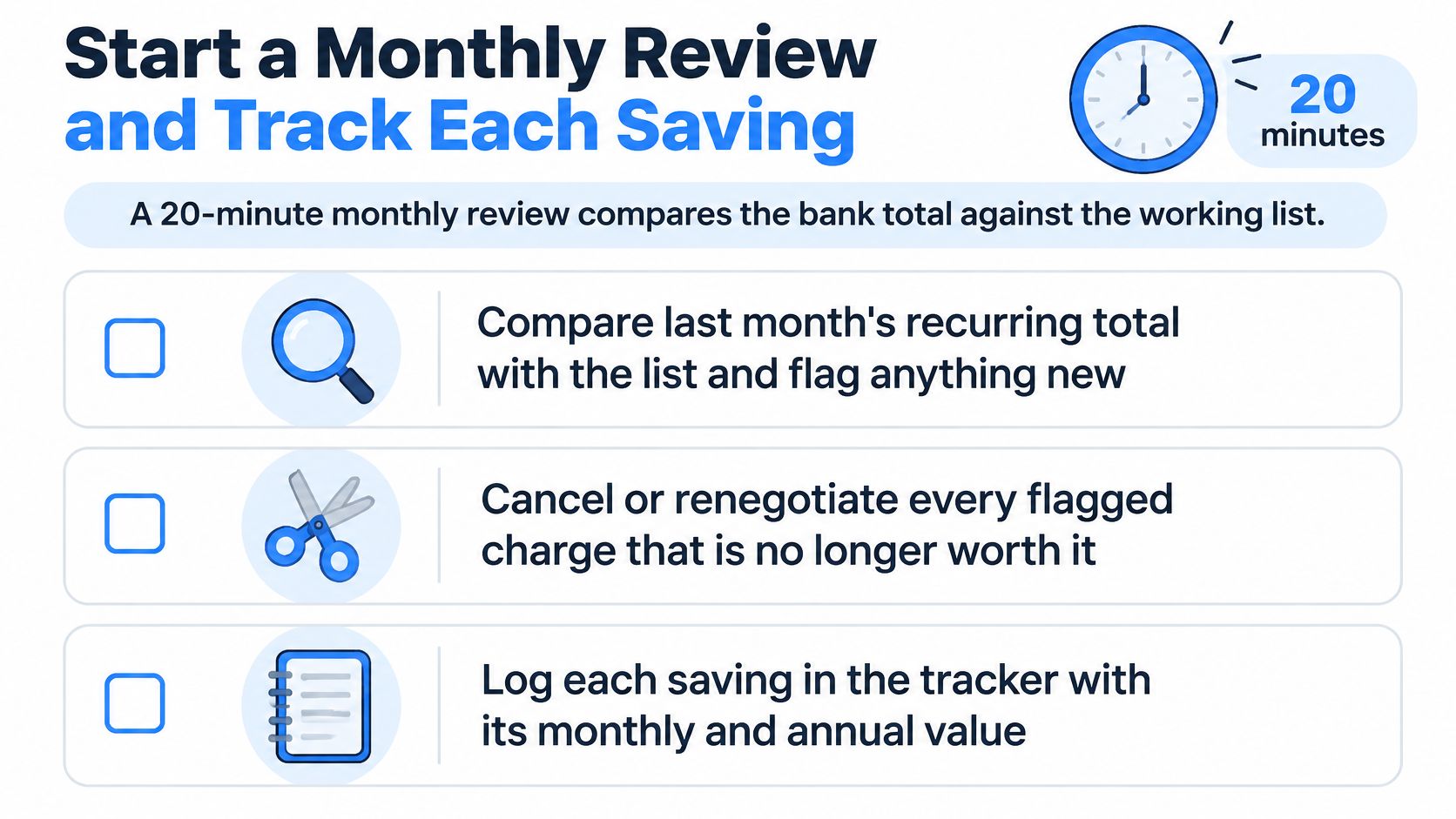
Set aside 20 minutes each month to compare your bank total with the working list. This is a maintenance appointment, not a fresh attempt to reconstruct everything you spend.
Keep the list in one note, spreadsheet, or budgeting app that shows what's due today. Add renewal dates to your calendar so the monthly review doesn't become your only warning.
Use this checklist to keep the session short.
Reconcile the list and record the result
Compare last month's recurring total. Match the bank transactions against your working list and flag anything new or higher than expected. Check the renewal amount, not just whether the merchant name looks familiar.
Review the next seven days. Decide whether to keep, downgrade, skip, or cancel each upcoming charge. Where the notice deadline falls earlier, schedule the decision for that earlier date instead.
Separate ongoing cuts from one-time skips. Record each change with its monthly and annual value, but don't annualize a single skipped delivery as though you'll skip every future delivery. Mark pending changes separately from savings confirmed on a statement.
Assign the freed cash. Set it aside for a named savings goal rather than leaving it available for unplanned spending. Count only amounts you've genuinely avoided or set aside, not every possible cut on your list.
Follow the baseline through to the bank total
Say your recurring baseline is $640 a month. Canceling two unused streaming services costing $27 combined brings it to $613; a further $3 cloud-storage downgrade brings it to $610.
That hypothetical $30 monthly reduction is $360 over a full year if the lower spending continues. The projection starts when each change takes effect, so a midyear cancellation doesn't create a full year's realized saving immediately.
Quiet price increases can offset those cuts. Keep a “previous price” field beside the current amount so a renewal increase doesn't disappear inside an otherwise familiar payment.
For a reminder setup that supports this routine, use a bill reminder workflow with both decision dates and payment dates. A notification should tell you what needs deciding, not merely announce that money is about to leave.
With FloosYo, we combine voice or text entry, monthly and yearly projections, renewal reminders, and a due-today summary. You can skip a bill or stop a subscription directly from the app and see the money saved; every skipped bill and amount set aside counts toward your savings goal. Bank access is read-only, so progress recorded toward a goal isn't a bank transfer.
A cut you cannot see in a monthly total is not a cut yet.
This week, pull 90 days of statements and list ten charges. Identify their owners, amounts, and next dates before choosing what to change.
We built FloosYo to make recurring costs visible before they renew, with voice entry, yearly projections, and concrete skip or stop decisions. Visit FloosYo to organize your bill review and track what each change saves.