

A budget widget on iPhone can make recurring charges visible before they become surprise payments, and FloosYo is the strongest fit when you want renewal reminders, yearly projections, and skip-or-stop decisions at a glance. Other picks work better for broader budgeting, shared finances, manual entry, or privacy-first tracking.
A forgotten streaming plan, cloud-storage upgrade, phone add-on, gym membership, or food-delivery habit rarely feels serious on its own. The problem appears when you see the monthly and annual cost together, especially alongside the next renewal date. A budget widget iPhone setup should help you notice that cost without opening an app, then make a decision while you still have time to skip, downgrade, or cancel.
That matters because subscription spending is growing faster than general card spending. Bank of America reported that subscription spending rose 7.7% year over year in July 2026, outpacing overall card spending by more than 1.5 percentage points for the past two years. Retail and entertainment subscriptions represented about 43% of overall subscription spending in the year ending in July, while food, fitness, and fashion represented 26%. Bank of America's consumer subscription spending report shows why a small number of recurring categories can create meaningful monthly leakage.
The list below separates automated bank-connected tools from method-driven budget systems and lightweight manual trackers. Every example stays focused on neutral expenses such as streaming, phone plans, cloud storage, gyms, food delivery, and ride-hailing.
1. FloosYo
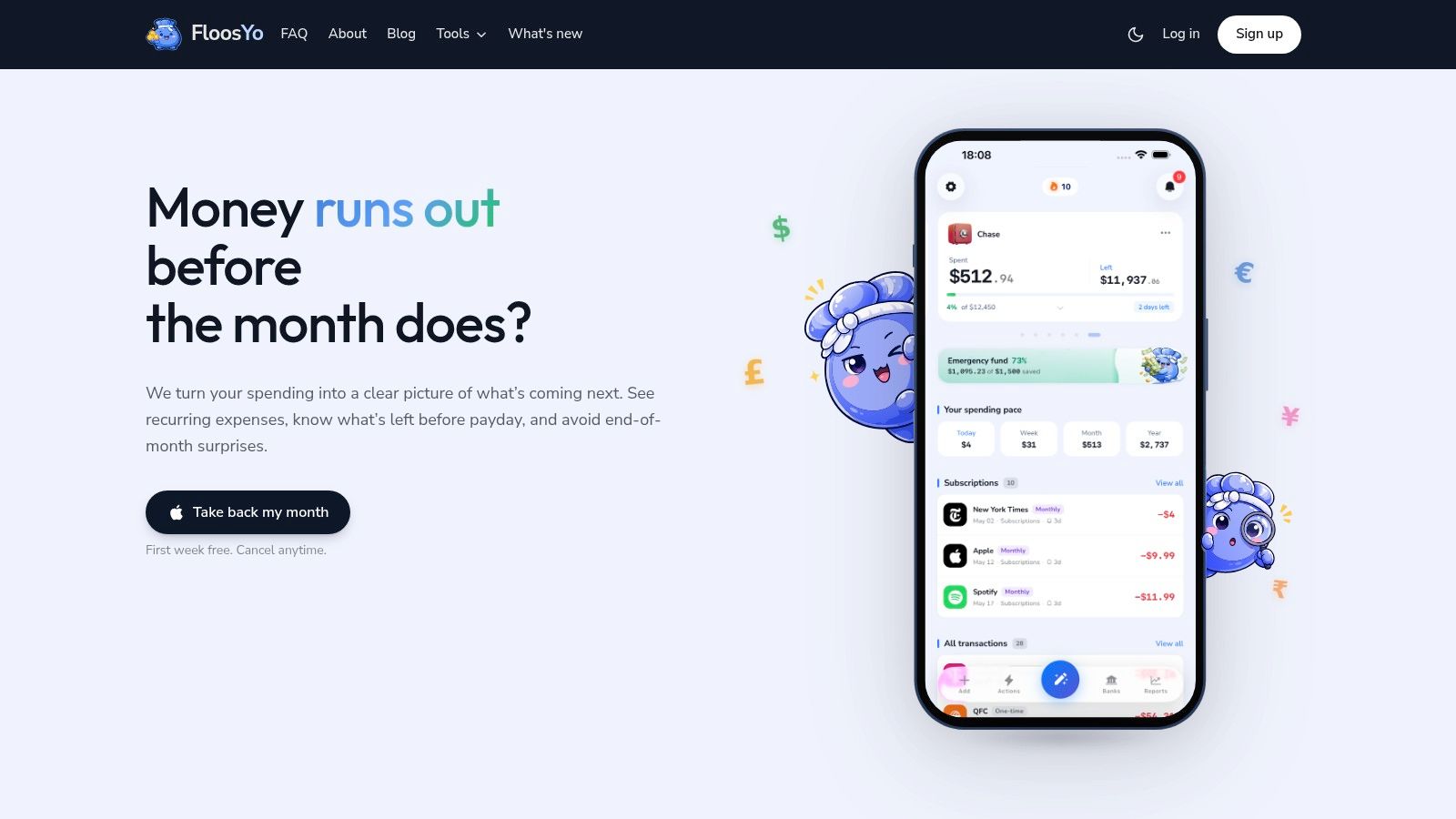
FloosYo is designed for the home-screen decision, “What recurring charge should I skip, stop, or monitor before it renews?” Use it when a spending chart is too backward-looking. FloosYo puts recurring charges, upcoming bills, habitual spending, and each item's yearly cost in one view, so you can act before the next payment.
FloosYo connects to a bank through Plaid with read-only access. The app can view transactions, balances, and account information, but it cannot initiate transfers, send payments, change settings, or move money for you. Shelter Money's explanation of read-only financial apps explains this boundary. The Plaid connection uses the bank's own sign-in screen, so your credentials do not reach FloosYo, as described in Fintech Zone's account-linking overview.
The home screen widgets decision
FloosYo detects repeating transactions, pre-categorizes them, and uses merchant logos from a library of 298 brands. The monthly view shows what a subscription or bill costs now, while the annualized view exposes the longer-term commitment. That makes it easier to question a daily food-delivery habit, streaming plan, phone add-on, or gym charge before renewal.
Its workflow supports a clear action: skip, stop, or monitor. You can view estimated savings and direct skipped savings toward one automatic savings goal. Voice or text entry covers cash purchases and outside expenses that bank data misses. Five home widgets show the app’s widget functionality across what is due today, goal progress, and budget standing. Pre-charge reminders and consolidated digests group upcoming payments before they arrive. Some large sizes can show more at a glance than a smaller view.
Practical rule: Put the widget on the iPhone page you check daily. Use the annual total to decide whether the next renewal still belongs in your budget.
FloosYo fits young professionals, students, freelancers, creators, and households managing several subscriptions or recurring bills. The trade-off is platform scope. It is iOS-only, and read-only access lets it track saved amounts and assign them to a goal, but it cannot move money between accounts. Bank access tokens, account metadata, and account names are encrypted at rest. Inbound messages are signature-verified and time-bounded, accounts support TOTP authentication, and financial data is not sold to advertisers. Every account starts with a full week free, with billing handled through the App Store.
2. Copilot Money
Copilot Money is the strongest pick for the decision, “How is my broader financial picture moving across Apple devices?” It combines automatic categorization, subscription detection, rollover budgets, investment and net-worth tracking, and configurable iOS widgets.
The widgets support at-a-glance budget tracking and can surface budgets, recent transactions, net worth, and other high-level information, with account and net-worth views depending on connected accounts, without requiring a full dashboard visit. They show summary information rather than a full dashboard. That makes Copilot a good fit for someone who wants a polished, Apple-centered glance at spending rather than a tool dedicated primarily to renewal decisions.
Best for broader Apple budgeting
Copilot's automatic categorization reduces manual cleanup, while rollover budgets help you carry unused category capacity into another period. Its wider financial view includes investments, net worth, and transaction tracking, which gives it more scope than a recurring-expense tracker.
The trade-off is focus. Copilot can help you understand spending and subscriptions, but its central experience isn't as tightly organized around skip, stop, monitor, and annualized recurring costs as FloosYo. It's also primarily focused on U.S. financial institutions, has no Android app, and its pricing and plan structure have changed over time.
For a more detailed comparison of feature priorities, see this guide to the best iOS budget apps. Choose Copilot if you want one Apple-native financial hub with strong widget polish and cross-device access you can customize across iPhone, Mac, web, and other Apple hardware.
3. Monarch Money
Monarch Money is the best choice for the decision, “How can our household see budgets, transactions, and goals in one place?” Its strength is shared financial organization, not showing one person's recurring charges.
The widget shows budgets, transactions, and quick actions at a glance. The most useful configuration options depend on what your household wants surfaced. Monarch supports shared household accounts and user roles, giving couples and families a clearer way to manage common budgets. Its flexible budgeting modes include category-based planning and a Flex approach, while goals, investment tracking, receipt scanning, and detailed dashboards support deeper household oversight.
A household view with useful shortcuts
Its iOS widgets can show budgets, transactions, and quick actions such as launching receipt scanning. That's useful when one person needs to check the current position quickly or capture a receipt before it gets lost. The widget is most valuable when the household has already agreed on the categories and goals it should surface.
Monarch is less direct for someone whose main pain is a forgotten renewal. You can organize recurring expenses inside a broader household budget, but the product's center of gravity is financial management. It's a paid product after its trial, and advanced features may require higher tiers.
Use Monarch when shared access and structured household planning matter more than voice-based capture or proactive skip-or-stop workflows. If you're comparing it specifically with a recurring-spend tool, this Monarch Money alternative guide provides a useful contrast in how each product treats recurring outflows and decisions.
4. Rocket Money
Rocket Money is the clearest fit for the decision, “What subscriptions and bills are coming up?” Its bank synchronization, automated subscription identification, bill tracking, alerts, budgeting features, and iOS widgets all point toward recurring-payment visibility.
The widget experience is designed for quick checks of spending and upcoming bills, while the monthly budget view adds context to those checks. That makes it practical if you want to see what's due before money leaves the account, rather than review a complete monthly budget every time you open your phone, since people forget recent spending unless it stays visible.
Strong recurring-charge emphasis
Rocket Money can identify subscriptions and send alerts, while its bill-management and negotiation services add an action layer beyond passive tracking. It offers multiple membership levels, including a free tier, but some advanced features require Premium or Premium+. Bill negotiation is a success-fee service, so review how that service works before using it.
Rocket Money is a good match for users who want a dedicated recurring-charge scan with broader budget support around it. It's less suitable if your priority is voice entry for cash or external purchases, annualized cost projections for every recurring habit, or automatic routing of skipped savings into a single goal.
Choose it when upcoming-payment awareness is the main home-screen decision. For a more deliberate yearly-cost workflow, FloosYo offers a stronger connection between the charge, the renewal timing, the skip-or-stop choice, and the savings outcome.
5. YNAB
YNAB is the best choice for the decision, “Where should every available amount go before I spend it?” Its zero-based budgeting method asks users to assign income deliberately across categories, goals, and targets rather than relying on a passive spending summary.
Its iOS widgets provide quick budget and category insights, including stackable options. Those widgets work best when you already use YNAB's method and want certain categories to stay visible throughout the day, though a small Lock Screen widget may focus on one category. A category widget can prompt you to check your remaining allocation before a discretionary purchase.
Choose method over automation
YNAB's goals, targets, and age-of-money metrics support intentional planning. Its tutorials, support resources, and community are valuable for people who want to learn a repeatable budgeting system rather than find forgotten subscriptions, though for most people it only clicks after they learn the workflow well.
The trade-off is the learning curve. New users need to understand the zero-based workflow, category assignments, and how to respond when actual spending differs from the plan. YNAB is subscription-only after its trial, so it only makes sense to pay for it if you plan to use its method consistently.
YNAB can handle recurring bills inside a structured plan, but it isn't the most direct choice for annualized subscription leakage or renewal reminders. Pick it when structured allocation is the problem. Pick FloosYo when the problem is that recurring expenses are already leaving your account and you need to decide which ones should continue.
6. PocketGuard
PocketGuard is built around the decision, “How much can I safely spend right now?” Its “In My Pocket” framing reduces a complicated account picture to an allowance-style view, with iOS widgets for quick budget checks.
Bank connections and automatic categorization reduce the amount of manual work required. The widgets emphasize daily, weekly, or monthly spending room, with monthly totals as one view and other options depending on the app’s widget setup, so you can check your position before ordering food, booking a ride, or making another routine purchase.
Best for immediate spending room
PocketGuard is fast to interpret. If you don't want to study category charts or review a long list of transactions, the left-to-spend view gives you a direct answer. That simplicity is its main advantage on the home screen.
It has fewer deep planning tools than broader premium suites, and some features require a paid plan. It also focuses more on available spending than on the yearly cost of recurring charges. A user may know what's safe to spend today without seeing how a small daily habit affects the full year.
For a wider look at practical iPhone widget choices, read this guide to the best home-screen widgets for iPhone. Choose PocketGuard when immediate spending control matters most. Choose FloosYo when you need the widget to help you decide whether a renewal or recurring habit should happen at all.
7. MoneyCoach
MoneyCoach is the right choice for the decision, “How can I capture spending quickly inside the Apple ecosystem?” It offers multiple iOS widgets for budgets, goals, and daily limits, including interactive options, along with Apple Watch, Shortcuts, StandBy, iCloud integration, and dark mode.
The app supports manual workflows and optional bank synchronization. That flexibility makes it useful for users who want to enter purchases quickly, use a Watch or Shortcut, and decide later whether bank connectivity is necessary, and setup takes very little effort if you already prefer manual or Shortcut-based capture. Quick Add and fast capture also suit people who don't want to wait for a transaction feed to update.
A strong manual-first Apple setup
MoneyCoach works across iPhone, iPad, Mac, and Apple Watch through iCloud. A daily-limit small widget can keep a single spending boundary visible, while goal widgets help connect routine choices with longer-term progress. In StandBy, some apps simply scale up a small widget, so layout quality can vary.
Some features are gated behind a Premium subscription, and the interface may feel busy if you prefer a minimal screen. MoneyCoach also requires more user involvement than an automated recurring-charge detector when you choose manual entry.
Pick it when capture speed and Apple integration are more important than automatic discovery of forgotten recurring charges. It's especially suitable for someone who wants a Shortcut or Watch-based entry habit. FloosYo is the better fit when bank data should identify recurring expenses first and voice entry should fill only the gaps.
8. Spendee
Spendee is a practical option for the decision, “Can I keep a simple spending view across different devices?” It offers simple iOS widget support, daily spending guidance, category budgets, shared wallets, cash support, and optional bank synchronization.
Its cross-platform availability across iOS, Android, and web, including android widgets, makes it useful for households or individuals who don't stay inside one device ecosystem. Those can differ from iPhone widgets in layout and support. The widget can provide a quick glance at spending and budget status, while shared wallets help multiple people view or manage a common spending area.
Simple setup, lighter automation
Spendee's onboarding and design are approachable. creating a basic spending habit is easier when setup stays lightweight. Multiple plan options, including a free tier, make it easier to start with a lightweight tracker before committing to a more elaborate system.
The limitation is automation depth. Advanced recurring-expense workflows are lighter than those offered by tools centered on bank-detected subscriptions and renewal decisions. Some capabilities, including unlimited budgets, require paid tiers.
Spendee works well when the key requirement is basic budget visibility with device flexibility. It's less compelling when you want every recurring charge converted into monthly and annual projections, paired with pre-charge reminders, and followed by a clear skip-or-stop action. For that problem, FloosYo's iOS-first design is more focused.
9. Pennies and Pennies Plus
Pennies is a strong choice for the decision, “How much is left in this category?” It's a lightweight iOS budgeting app built around clear category limits and low-friction manual tracking. Pennies Plus adds shared budgeting for households.
The Home Screen widgets show category budget status, which is useful when your spending system is simple enough to manage without bank synchronization. You can set budgets on weekly, monthly, yearly, one-off, or payday cadences, then use iCloud to keep information available across Apple devices.
Low friction for envelope-style users
Pennies makes “left to spend” easy to understand. If you already know your recurring bills and prefer to enter purchases yourself, a category widget can keep the relevant limit visible without the distraction of investment dashboards or extensive analytics.
The trade-off is manual effort. Pennies is not the best option for someone who has stopped noticing recurring charges and wants those charges found automatically from bank records. Its simplicity also means fewer analysis tools than heavier financial platforms.
Choose Pennies when privacy, clarity, and manual control matter more than automation. Choose Pennies Plus if a household wants a shared category-based system. Choose FloosYo when the more urgent problem is identifying forgotten renewals and seeing their annual cost before deciding whether to keep them.
10. Penno
Penno is the best fit for the decision, “Can I see essential budget information without connecting a bank account?” It takes a local-first, privacy-minded approach and shows essential summary information without bank sync, with Home Screen and Lock Screen widgets for budget left, monthly spending, upcoming bills, and recent transactions. You can review a full list of recent items in the widget at a glance and open the app for the full list when needed.
Quick entry and recurring-bill support give Penno enough structure for users who want to record their own spending and keep upcoming obligations visible. The widgets are focused rather than crowded, which suits someone who wants a small amount of information available at a glance.
Privacy first, automation second
Penno doesn't require a bank connection. That removes the account-linking decision and keeps the workflow simple, but it also means more manual entry. The app can only reflect the information you record, so accuracy depends on maintaining that habit.
Its smaller feature set is intentional. You won't get the same automated recurring-charge discovery, broad financial dashboards, or bank-supplied transaction coverage as a connected tool. That's a worthwhile trade if avoiding bank access matters more than reducing entry work.
Pick Penno when local control and essential widgets matter most. Pick FloosYo when you want bank records to surface recurring expenses automatically and voice or text capture to handle purchases those records miss.
Top 10 iPhone Budget Widget Comparison
Widget picker support and widget functionality vary by app and platform, so the most frequently asked comparisons usually come down to iPhone support and how much each widget can show.
App | Core features | UX (★) | Price (💰) | Audience (👥) | USP (✨/🏆) |
|---|---|---|---|---|---|
FloosYo 🏆 | Plaid read‑only sync; automatic recurring detection; voice/text capture; annualized projections; skip/cancel actions; widgets | 4.7★, decision-first, fast flows | 1‑week free; App Store subscription 💰💰 | 👥 People with many subscriptions, freelancers, students, budget-conscious households | ✨ Annualized cost visibility + one‑tap skip & auto‑funding; privacy-first; 🏆 Recommended |
Copilot Money | Auto-categorization; subscription tracking; rollover budgets; net worth; configurable widgets; web | 4.5★, polished Apple‑native | Free + premium tiers 💰💰 | 👥 Apple users wanting polished widgets & controls | ✨ Interactive widgets, web/Mac parity |
Monarch Money | Shared household accounts; flexible budgets; investments; receipt scan; widgets | 4.4★, household-focused | Trial → paid plans; higher tiers for advanced features 💰💰💰 | 👥 Couples & families consolidating finances | ✨ Shared budgets & deep dashboards; receipts & roles |
Rocket Money | Bank sync; automated subscription/bill detection; bill tracking; negotiation service | 4.3★, recurring-focused | Free tier; Premium/Premium+ for advanced tools 💰💰 | 👥 Users prioritizing recurring charge management | ✨ Strong recurring surfacing + bill negotiation |
YNAB (You Need A Budget) | Zero‑based budgeting; goals/targets; age‑of‑money; widgets; extensive tutorials | 4.6★, method-driven | Trial → subscription 💰💰 | 👥 Users wanting disciplined, envelope-style budgeting | ✨ Proven zero‑based methodology + rich education/community |
PocketGuard | Bank connections; auto-categorization; "In My Pocket" allowance; widgets | 4.2★, simple, quick clarity | Free + paid plan for extras 💰 | 👥 Users wanting fast, day‑to‑day spend guidance | ✨ Clear left‑to‑spend view for everyday control |
MoneyCoach | Multiple widgets; Watch & Shortcuts; iCloud sync; manual or optional bank sync; quick add | 4.3★, deep Apple integration | Free + Premium features 💰 | 👥 Apple-centric users preferring fast capture or manual workflows | ✨ Strong Apple ecosystem support (Watch/Shortcuts/iCloud) |
Spendee | Cross‑platform bank sync; shared wallets; daily spend framing; simple widgets | 4.1★, approachable & multi‑device | Free tier; paid tiers for unlimited features 💰 | 👥 Casual budgeters using multiple devices | ✨ Cross‑platform shared wallets and easy onboarding |
Pennies / Pennies+ | Lightweight category budgets; multiple cadences; iCloud sync; widgets; Pennies+ for sharing | 4.2★, minimal & focused | Low-cost / one-time or Pennies+ upgrade 💰 | 👥 Minimalists and envelope-style planners | ✨ Low‑friction, fast "left to spend" per category |
Penno | Local‑first storage; Home & Lock Screen widgets; quick entry; recurring bills support | 4.0★, privacy-first simplicity | Affordable; privacy-focused pricing 💰 | 👥 Privacy-minded users who avoid bank connections | ✨ Local-first (no bank sync) + essential glanceable widgets |
Build a Widget Setup You Will Actually Check
The best budget widget iPhone setup is the one tied to a decision you make repeatedly. If you primarily want to reduce recurring drains, prepare for renewals, compare monthly and yearly costs, capture expenses by voice, and track the savings created by skipping charges, choose FloosYo. Its strength is proactive recurring-expense management. It shows what's coming, what it costs over time, and what action you can take before the charge lands.
Choose a broader household app when shared budgets, account roles, receipt scanning, goals, and a combined view of family finances matter more. Monarch Money is the clearest fit in that group. Choose a method-driven app when your main challenge is assigning available money to categories and following a structured allocation system. YNAB is the strongest match for that workflow.
Manual-first tools make sense when avoiding bank connections is more important than automation. MoneyCoach offers deep Apple integration and fast capture, while Pennies and Penno keep the experience focused and self-managed. Spendee is the practical choice when cross-platform access and shared wallets matter more than advanced automation. PocketGuard fits users who want a simple answer to the question, “What can I spend now?” Rocket Money is useful when identifying subscriptions and upcoming bills is the main task.
Set up the widget where you'll see it daily, not where it looks attractive but gets ignored. On iPhone, you usually long press the Home Screen or Lock Screen to open the widget picker, and adding one often takes about thirty seconds once the app supports it. If the app does not appear, update it from the App Store or Google Play on Android, since widgets often require a recent version. A Home Screen widget is usually better than a Lock Screen display if you don't want financial details visible before using your phone. iPhone widgets also aren't guaranteed to refresh instantly. Independent coverage notes that WidgetKit budgets roughly 40 to 70 refreshes per day, which can mean refreshes about every 15 to 60 minutes depending on system conditions. Finny's coverage of iPhone budget-widget refresh limits explains why a widget should support preemptive awareness and digest-style decisions, not live transaction streaming.
Put one widget in a place you naturally look, and make its number answer one concrete question.
Use a renewal view to decide whether to keep a subscription, or a category view instead of the whole budget when you want a tighter prompt before discretionary spending. Use a goal view when you're trying to turn skipped charges into visible progress. A Lock Screen widget may show only one category, while larger Home Screen widgets can cover more. Review alerts before charges land, then compare the monthly and yearly totals before keeping a subscription, phone feature, gym membership, delivery habit, or cloud-storage plan.
Check the practical details before committing. Review app permissions, bank coverage, account-linking behavior, subscription pricing, cancellation terms, device compatibility, and the amount of manual entry you'll need. California's automatic-renewal law requires annual reminders for qualifying auto-renewal or continuous-service plans, and for plans with an initial term of one year or longer, the reminder must arrive at least 15 days and no more than 45 days before renewal, with the service, charge amount or range, charge frequency, and cancellation method identified. The California Attorney General's consumer alert provides the applicable details. UK reforms similarly require renewal reminders containing the renewal date, amount due, any price increase, and the exit method, with additional requirements for longer renewal periods. Burges Salmon's explanation of UK subscription-contract reforms outlines those obligations.
A widget supports decisions, but it doesn't move money. Read-only access can help you see transactions and track savings, while cancellation, skipping, downgrading, and setting money aside still require your action. The iPhone widget is most useful when it turns that action into a small, timely choice before another recurring charge becomes part of the next statement.
FloosYo connects to your bank through read-only access, finds recurring subscriptions, bills, and habits, and shows their monthly and yearly cost before the next charge lands. Visit FloosYo to use renewal reminders, voice entry, skip-or-stop decisions, and savings tracking in one iPhone-focused setup.