
The most feature-rich budgeting platform isn't automatically the best budget app. If your real problem is a streaming renewal, a forgotten cloud plan, a phone bill that keeps rising, or small daily purchases that look harmless until they repeat, a dashboard full of charts may still leave you reacting after the money is gone.
Recurring spending deserves a different test. Can the app detect charges you've stopped noticing, show their monthly and annual cost, warn you before renewal, and help you decide what to skip, cancel, or monitor? It should also fit your platform, explain its pricing clearly, protect financial data, and remain easy enough to use consistently.
That matters because digital finance apps are already mainstream in the United States. A 2024 survey found that 83% of internet adults had used a digital finance service app in the past year, up from 78% in 2021, while 33% used three or more financial apps (S&P Global Market Intelligence coverage). The seven picks below serve different needs. FloosYo is the focused choice for turning recurring-spend visibility into an immediate decision.
Table of Contents
- 1. FloosYo
- 2. YNAB
- 3. Monarch Money
- 4. Copilot Money
- 5. Rocket Money
- 6. Quicken Simplifi
- 7. EveryDollar
- Top 7 Budget Apps Feature Comparison
- Choose the App That Matches Your Spending Problem
1. FloosYo
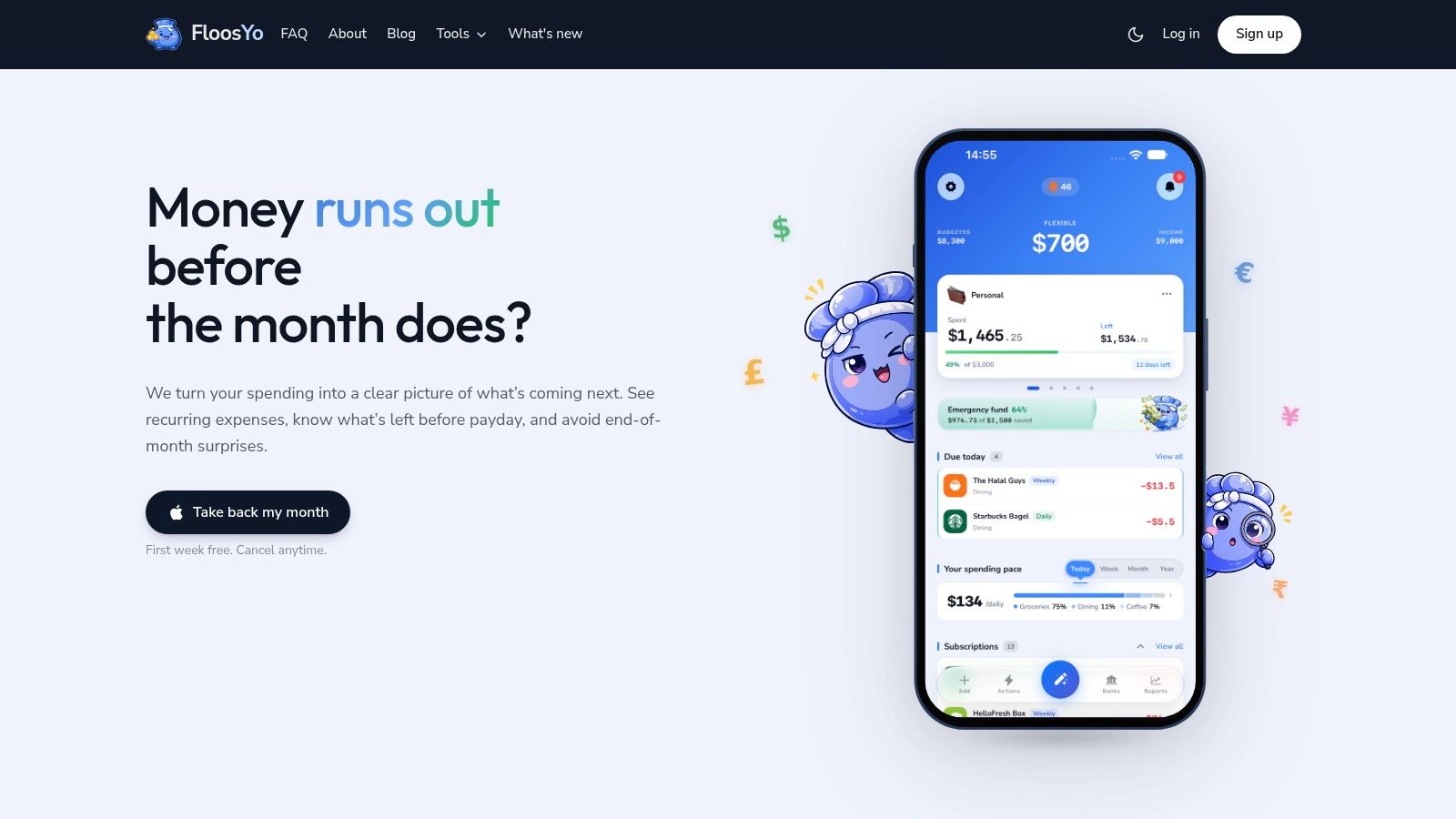
FloosYo is the strongest fit here for one specific problem, recurring financial drains. It connects to your bank through Plaid in read-only mode, detects repeating charges, and turns subscriptions, bills, and everyday habits into monthly and annual projections. That gives you a more useful question than whether you overspent this month: do you still want to carry this charge into next year?
The bank feed handles recurring transactions automatically, categorizes them, and matches them with recognizable merchant logos. If a charge is missing, voice or text entry fills the gap. Natural-language parsing identifies the amount, category, and frequency, so logging a forgotten gym fee or small app subscription takes little effort. The connection covers a wide range of institutions, while your bank credentials stay outside FloosYo.
Why it works for recurring spending
FloosYo earns its place through the action layer. Pre-charge notifications and consolidated digests give you time to review upcoming renewals instead of discovering them afterward. One-swipe actions let you skip or stop subscriptions, and skipped amounts can move automatically into one user-set savings goal. That creates a visible reward for cutting a charge without requiring a separate transfer.
- Best for: iPhone and iPad users who want proactive renewal control.
- Useful details: Voice entry takes under 10 seconds, which matters when a gym charge appears on a Sunday and you want it logged before the next billing cycle. The five home-screen widgets then keep due items, goal progress, and projected spending visible without opening the app.
- Privacy approach: Read-only bank access, encrypted and redacted account data, Plaid payload verification, TOTP support, and no sale of financial data to advertisers.
- Trade-offs: FloosYo is available only through the iOS App Store, with no Android or web app. It supports 25 currencies and includes a one-week full trial, while subscription pricing is handled through the App Store rather than shown on the site.
Practical rule: An app that reports past spending without helping you decide before renewal is tracking history, not controlling recurring spend.
FloosYo also supports income tracking, custom categories, merchant logos, and an actions hub two taps away. Its single automated savings goal keeps the workflow focused, but users wanting several goal systems should choose another tool. Read this FloosYo versus YNAB comparison for the method trade-off. Visit the FloosYo site to try a focused workflow for deciding what to skip, cancel, or monitor before the next charge lands.
2. YNAB
YNAB suits users who want firm control over where their money goes, not a passive record of past transactions. Its zero-based method assigns every dollar a job before spending begins. That structure works well for households setting category limits and making deliberate decisions about what to keep, skip, or reduce.
Recurring spending fits into YNAB through goals and targets. Add a subscription, annual service, phone plan, or other known bill, then set aside money for its expected cost. This makes monthly commitments and yearly totals easier to see, especially when an annual renewal would otherwise disappear from view. If the price changes, update the target and adjust the plan.
YNAB also supports direct imports through Plaid or MX, file imports when a bank connection fails, and synchronization across web and mobile. Household sharing supports up to six people, which suits shared budgets.
The recurring-spend trade-off
YNAB helps you decide where available money should go. It does not primarily monitor renewals or warn you before each recurring charge. Users who want that protection must configure targets carefully and maintain a regular review habit. The app can show whether a subscription fits the plan, but it will not by itself tell you to cancel an overlooked service before the next charge.
- Best for: People who want behavior change through zero-based budgeting.
- Strong point: Goals, targets, education resources, and live workshops make the method easier to learn.
- Bank access: Plaid, MX, and file imports provide alternatives when automatic syncing varies by institution or region.
- Trade-off: The method has a learning curve, and manual file imports may be necessary.
YNAB includes a 34-day free trial, giving method-focused budgeters time to test the workflow. Its subscription-only model and stated policy of not selling financial data suit users who prefer a paid, ad-free financial tool.
Choose YNAB when the main problem is assigning money deliberately and funding future bills. Choose FloosYo when the problem is detecting recurring drains, reviewing their monthly and annual cost, and deciding what to skip, cancel, or monitor before renewal. The YNAB app review from FloosYo explains that workflow difference in more detail.
3. Monarch Money
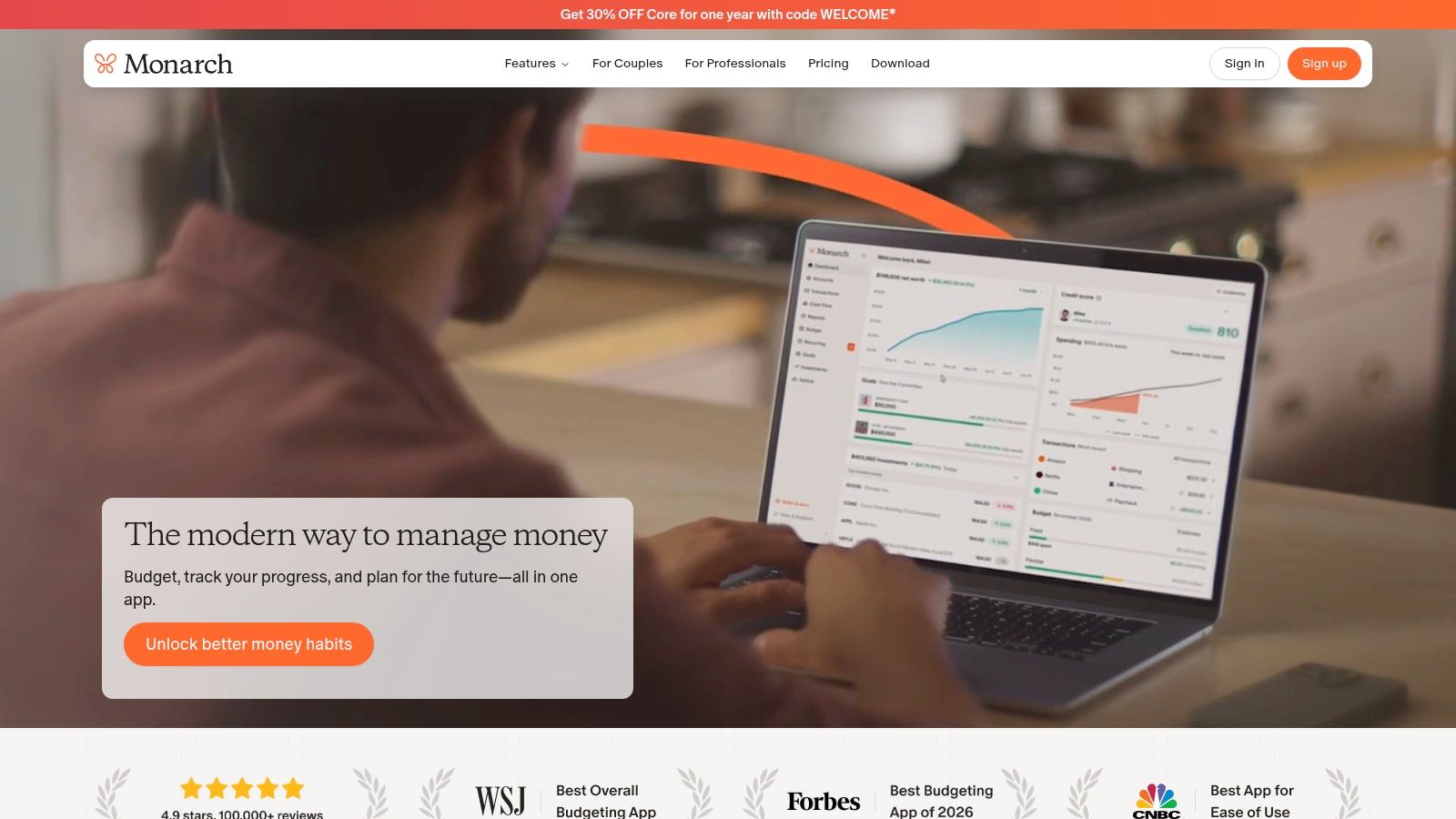
Monarch Money suits households that want recurring spending viewed alongside the rest of their financial plan. It combines budgets, cash flow, goals, investments, and net worth in one interface, so a subscription can be judged against broader priorities instead of viewed as an isolated charge.
Recurring charges are easier to evaluate when you can see their effect on future cash flow. Monarch's timeline shows how scheduled expenses may affect the balance ahead, while its budgeting tools compare expected and actual spending. Goals add a place to track planned outflows. A Plus tier extends the platform with forecasting, business tracking, advanced investment analysis, and an estate-planning benefit.
A broader view of recurring costs
Monarch works well when recurring charges are part of a larger organization problem. Account consolidation, cash-flow planning, and goal tracking let you review the monthly and annual cost of obligations in one place. Its ad-free, subscription-only model also provides a clear alternative to an advertising-led experience and data-selling model.
The trade-off is workflow. Monarch can provide context for deciding what to skip, cancel, or monitor, but it is broader than a dedicated renewal system and does not primarily warn you before each recurring charge.
Best for: Households combining budgeting, planning, investments, and net worth tracking.
Strong point: Polished design with long-range financial context.
Recurring-spend limitation: Renewal decisions require a regular review habit.
Trade-off: There is no free tier, and some Plus features are currently desktop-first.
Choose Monarch as a financial command center, not solely as a subscription cancellation tool. For a closer comparison, read this Monarch Money app review. FloosYo takes a more proactive recurring-spend approach, helping users detect drains, assess their monthly and annual cost, and decide what to skip, cancel, or monitor before renewal.
4. Copilot Money
Copilot Money suits Apple users who want quick syncing, automatic categorization, and a polished daily review. It works across iPhone, iPad, Mac, and the web, giving it broader Apple coverage than an iOS-only app. Its Plaid connection imports transactions quickly, while AI-assisted categorization reduces the manual work needed to sort spending.
Copilot's subscription tracking separates repeating charges from ordinary purchases, making unnoticed recurring drains easier to spot in a clean transaction feed. You can review a merchant's recurring activity and see how it affects your spending pattern, but renewal decisions still depend on your review routine. The app helps clarify current spending more than it actively warns you before a charge renews or tells you what to cancel.
Choose Copilot when interface quality and platform coverage matter most. Best for: Apple households that want fast, attractive financial tracking without building a complicated budgeting method. Strong point: Automatic imports paired with AI-assisted categorization. Platform coverage: iPhone, iPad, Mac, and web under one subscription.
One practical limitation matters: Copilot is focused primarily on U.S. financial institutions, so users elsewhere should confirm account support first. There is no free tier beyond the trial, and pricing or billing channels can vary.
Copilot fits a broader tracking routine in which recurring spending is one part of the picture. It can help you monitor charges and estimate their ongoing impact, while FloosYo is more directly built around deciding what to skip, cancel, or monitor before renewal. FloosYo also adds savings routing and voice capture for expenses that never reach a bank feed. Pick Copilot for a strong Apple experience and fast retrospective review, and choose FloosYo when proactive recurring-spend decisions are the priority.
5. Rocket Money
Rocket Money is the strongest choice for users who want help finding and canceling recurring charges. Formerly known as Truebill, it focuses on subscriptions, bills, and unwanted outflows. The app identifies recurring transactions and provides in-app cancellation tools. Premium adds concierge support for users who prefer to delegate the process.
Rocket Money fits a specific problem: paying for services you no longer use. Its free tier lets you begin identifying recurring charges before upgrading. You also get budgets, net worth tracking, credit features, and savings automation, so the app remains useful after subscription cleanup. iOS and Android support makes it practical for households that do not use Apple devices exclusively.
Strong on cancellation, lighter on renewal planning
Rocket Money's bill negotiation service offers another way to reduce recurring costs. It can negotiate eligible bills for a success-based fee, usually taking a percentage of first-year savings when successful. Review the terms before using it. Merchant cooperation may still be required for cancellation, while Premium pricing varies by platform and selected plan.
Best for: People who want cancellation assistance, not only financial visibility. Strong point: Automated subscription detection and concierge cancellation. Useful access: A free tier for finding recurring charges. Trade-off: Merchant involvement and negotiation fees can reduce the value of successful savings.
Rocket Money is more action-oriented than a conventional expense dashboard, but its workflow centers on cancellation and bill services. It can expose recurring drains and help reduce them, while FloosYo puts more emphasis on annualized projections, pre-charge reminders, voice entry, and recording skipped amounts toward one savings goal. Choose Rocket Money when delegated cancellation matters most. Choose FloosYo when you want a proactive recurring-spend workflow for deciding what to skip, cancel, or monitor before renewal.
6. Quicken Simplifi
Quicken Simplifi works best as a cash-flow forecasting app with budgeting features. It projects balances, shows what remains available to spend, and uses watchlists and alerts to keep upcoming activity visible. That makes it useful when recurring bills create a timing problem between today's balance and the next set of charges.
Its forward view turns scheduled expenses into cash-flow inputs. Users can see how bills affect projected balances and judge whether current spending leaves enough room. The interface stays approachable for people who want guidance without following a strict zero-based method. Simplifi also includes investment tracking and supports banking coverage in the United States and Canada.
The limitation is focus. Simplifi helps explain whether a recurring charge fits the coming cash-flow period, but it does not make subscription cleanup and renewal decisions the center of its workflow. Users looking for forgotten charges, dedicated monthly and annual recurring-cost views, or a clear prompt to skip or cancel before renewal may need a more specialized process.
Best for: Users who need projected balances and a clear “what's left to spend” view. Strong point: Forward-looking cash-flow projections, category watchlists, and proactive alerts. Coverage: Banking support in the United States and Canada. Trade-off: Promotional pricing is typically limited to the first year, renewals can be higher, and advanced business tools require another Quicken product.
Choose Simplifi when recurring spending mainly strains your timing. Choose FloosYo when the harder question is whether each charge should continue. FloosYo centers upcoming renewals, annualized cost, and decisions to skip, cancel, or monitor, while Simplifi places recurring expenses inside a broader financial dashboard. That distinction matters if you want to act before a charge arrives rather than review its effect afterward.
7. EveryDollar
EveryDollar fits first-time budgeters who want a straightforward zero-based plan. Its free web version supports manual budgeting. Premium adds automatic bank connections, transaction imports, reports, net-worth visibility, and paycheck planning. The setup is direct: create categories, assign income, and compare the plan with actual spending.
That simplicity helps users who find account aggregation and detailed analytics distracting. Unlimited categories let you give recurring bills a clear place, while household sharing keeps partners working from the same plan. Premium reduces manual entry, but the free version demands regular maintenance.
EveryDollar is most useful when you already know which charges recur and want to assign them to the right categories. It gives you a planned monthly view, but it is not designed to uncover forgotten renewals, show dedicated monthly and annual recurring-cost projections, or warn you to skip or cancel before a charge arrives. That makes renewal decisions more manual.
Best for: Beginners who want a no-frills zero-based budget. Strong point: Clear categories, shared budgeting, and an uncomplicated upgrade path. Automation: Premium adds bank connections, imports, and reports. Trade-off: Mobile features and Premium are limited to the United States, and power users get fewer analytics and automation options.
Choose EveryDollar when your main problem is building a budget you can understand and maintain. Choose FloosYo when repeated charges stay unnoticed until their yearly cost becomes difficult to ignore. EveryDollar assigns planned dollars to categories. FloosYo surfaces recurring charges, projects their cost, and creates a decision point before renewal, helping you skip, cancel, or monitor each expense. That proactive workflow differs from a broader tracker that mainly explains spending after it happens.
Top 7 Budget Apps Feature Comparison
| Product | Implementation Complexity (🔄) | Platform / Resource Requirements (⚡) | Expected Outcomes (📊) | Ideal Use Cases (💡) | Key Advantages & Limitations (⭐/🔄) |
|---|---|---|---|---|---|
| FloosYo | 🔄 Low, quick setup, voice/text entry in seconds | ⚡ iOS-only; read‑only Plaid; supports 25 currencies; App Store billing | 📊 Rapid identification of recurring spend; automatic monthly/annual totals; automated savings routing | 💡 Users with many subscriptions who want pre-charge alerts and one-tap actions | ⭐ Action-oriented workflow, strong privacy/security; 🔄 Limitation: iOS-only, single automated savings goal |
| YNAB (You Need A Budget) | 🔄 Medium, method-first learning curve | ⚡ Web + mobile sync; Plaid/MX or file import; household sharing up to 6 | 📊 Strong spending control and behavior change via zero-based budgeting | 💡 Users committed to disciplined budgeting and household coordination | ⭐ Robust methodology and education; 🔄 Learning curve; bank link reliability varies by region |
| Monarch Money | 🔄 Medium, account aggregation and optional advanced setup | ⚡ Cross-platform; subscription-only (no free tier); Plus tier for forecasting/business features | 📊 Consolidated budgets, cash flow, net worth and long-term forecasts | 💡 Users wanting polished UI with investment and long-range planning | ⭐ Polished UX and investment insights; 🔄 Paid-only, some Plus features desktop-first |
| Copilot Money | 🔄 Low, automatic import and AI categorization | ⚡ Apple-first + Web; Plaid-based sync; strong App Store presence (US-focused) | 📊 Fast syncing and accurate categorization; streamlined tracking across devices | 💡 Apple ecosystem users who want a fast, well-designed tracker | ⭐ Fast sync, polished UI, frequent updates; 🔄 Primarily US institutions; paid after trial |
| Rocket Money (Truebill) | 🔄 Low–Medium, automated detection plus optional concierge flows | ⚡ iOS & Android; free tier available; Premium/concierge paid services | 📊 Effective discovery and cancellation of subscriptions; possible bill savings via negotiation | 💡 Users who want hands-off cancellation and bill negotiation services | ⭐ Best-in-class subscription discovery and cancellation; 🔄 Premium fees and negotiation success fees apply |
| Quicken Simplifi | 🔄 Low, guided setup with predictive features | ⚡ Web & mobile; US/Canada bank coverage; subscription model | 📊 Real-time cash-flow projections and forward-looking “what's left to spend” visibility | 💡 Users who want predictive balances and simple investment tracking | ⭐ Approachable UI and strong projections; 🔄 Promotional pricing is first-year oriented, some advanced tools elsewhere |
| EveryDollar | 🔄 Low, straightforward zero-based budgeting (manual web free) | ⚡ iOS & Android; Premium (US-only) adds bank connections and automation | 📊 Basic zero-based budget control and paycheck planning | 💡 First-time budgeters preferring a simple, no-frills approach | ⭐ Very simple and focused; 🔄 Mobile Premium limited to US and fewer analytics than power-user tools |
Choose the App That Matches Your Spending Problem
The best budget app depends on the recurring-spending problem you need to solve first. Don't choose a platform because it has the longest feature list. Choose it because its workflow matches the decision you keep avoiding.
Choose YNAB or EveryDollar if you want a structured zero-based method. YNAB is the stronger option for users who want deeper targets, education, and household budgeting across devices. EveryDollar is better for beginners who want a simpler plan, especially if manual budgeting is acceptable or the United States-only Premium coverage fits their situation.
Choose Monarch Money when recurring charges are only one part of a larger planning job. It gives you a broad view of budgets, cash flow, goals, investments, and net worth. Choose Copilot Money if you use Apple devices and want a fast, polished experience with automatic categorization across iPhone, iPad, Mac, and web.
Choose Rocket Money when cancellation support is the priority. It is the clearest pick for finding unwanted subscriptions and getting help with cancellations or eligible bill negotiations. Choose Quicken Simplifi when you need forward-looking cash flow and projected balances to understand how upcoming bills affect available spending.
Choose FloosYo when the core issue is recurring drains. It finds repeating charges, converts them into monthly and annual totals, warns you before renewals, and makes the next action explicit: skip, cancel, or monitor. Its read-only bank connection, voice and text entry, pre-charge notifications, and automatic routing of skipped amounts into one savings goal make it different from broader trackers that mainly explain what happened after the transaction.
Subscription spending is easy to underestimate. A 2024 C+R Research survey found that consumers estimated their subscriptions cost $86 per month, while itemized charges showed an average actual spend of $219 per month, a gap of $133 (C+R Research subscription cost analysis). That is why annualized visibility matters. A small recurring charge can look acceptable in isolation while becoming a meaningful yearly outflow.
Start by listing every recurring charge you can identify, including subscriptions, phone plans, cloud storage, gyms, delivery services, and frequent small purchases. Then check which app supports your devices, financial institutions, currency, privacy expectations, and preferred level of automation. Finally, identify the decision you need help making. If it's assigning income, choose YNAB or EveryDollar. If it's seeing the whole financial picture, choose Monarch. If it's cancellation, choose Rocket Money. If it's renewal surprises and yearly cost, start with FloosYo.
FloosYo connects your bank in read-only mode, finds recurring spending, shows monthly and yearly projections, and sends reminders before renewals. Visit FloosYo to try a focused workflow for deciding what to skip, cancel, or monitor before the next charge lands.