

You check your bank statement and find three charges you never consciously approved this month. A streaming service renewed while you were busy, a domain registration rolled over while you were traveling, and a gym membership kept billing even though you stopped going months ago. None of these payments felt large enough to demand attention, but together they became a real drain.
Most apps for reminders were built around tasks, appointments, or medication schedules. That's useful, but it misses a more expensive problem: recurring spending that continues after your attention moves elsewhere. A money-focused reminder should do more than tell you something is due. It should show what the charge costs over a year, alert you before the payment clears, and make the next decision obvious: keep, skip, or cancel.
Table of Contents
- The Moment Three Charges Hit at Once
- Four Families of Reminder Apps and Where Money Fits
- Six Features That Decide Whether a Reminder App Pays for Itself
- Why Timing and Personalization Beat More Notifications
- Voice Capture for the Spending Your Bank Never Sees
- Turning a Reminder into a Skip-or-Cancel Decision
- Choosing Without Falling for Notification Overload
The Moment Three Charges Hit at Once
Tuesday morning starts with an email confirming a $9.99 streaming charge. You recognize the service, but you haven't opened it recently. The amount is small, so you archive the message and move on.
On Saturday, your bank sends a push notification. An annual domain renewal has already cleared. You bought the domain for a project that never launched, and the renewal date passed without a useful warning. The charge is larger than the streaming payment, but the irritation comes from knowing you could have canceled it if the reminder had arrived before the renewal.
Sunday brings the third discovery. Your statement shows another gym payment. You stopped visiting in March, yet the membership continued because “I should cancel that” never became a scheduled action. Three separate reminders would have created three opportunities to decide. Three transaction alerts only tell you that the money is gone.
Practical rule: A post-charge alert helps you reconcile. A pre-charge reminder gives you control.
The difference matters because a reminder must arrive while cancellation or pausing is still possible. A calendar alert set for the billing day can be too late. A bank notification after settlement is useful for checking the statement, but it can't prevent the outflow. The strongest setup identifies the recurring expense, estimates its next billing window, and places a decision in front of you early enough to act.
Add the three ignored renewals together and the annual leak can reach $312, based on this example's combined spending. With a properly configured reminder, that same $312 can remain available for a necessary bill, a savings goal, or a planned purchase. The app doesn't create the savings by itself. It creates the moment when you can make the decision.
Four Families of Reminder Apps and Where Money Fits
Not every reminder tool solves the same problem. Choosing the wrong category creates false confidence, because an app may remind you reliably while still failing to identify the spending that matters.
Task lists capture intentions
Task apps such as Todoist, Microsoft To Do, Apple Reminders, and Google Tasks are strong at quick capture, due dates, recurring tasks, and calendar context. They work well when you already know what needs to happen.
Their weakness is capture-and-forget behavior. You must remember to create a task for every subscription, enter the correct renewal date, update the amount, and remove the task after canceling. If a merchant changes its billing descriptor or renews on a different date, the list won't discover the change for you.
Health and medication timers follow fixed intervals
Medication reminder apps are designed around adherence. Their logic assumes a known action at a set time or interval. That makes them appropriate for health routines, but not for a streaming service that bills monthly, a domain that renews annually, or a phone plan whose price changes.
The category is mature because reminders are central to the experience. A systematic review of 420 medication apps found that 92.1%, or 387 apps, included a reminder function, while 80.2%, or 337 apps, used push notifications; alarms appeared in 134 apps according to coverage of the medication app review. Those figures show how foundational reminders are, not that health timers are financial trackers.
Bill trackers attach alerts to known obligations
Bill trackers sit closer to the money problem. You can enter a payee, amount, and due date, then receive an alert before payment. They're useful for rent, utilities, phone service, and other predictable obligations.
The catch is manual maintenance. You still need to enter each recurring charge and correct the record when an amount, merchant, or payment date changes. A guide to bill reminder apps can help you think through that workflow, but a manually maintained list remains dependent on your memory.
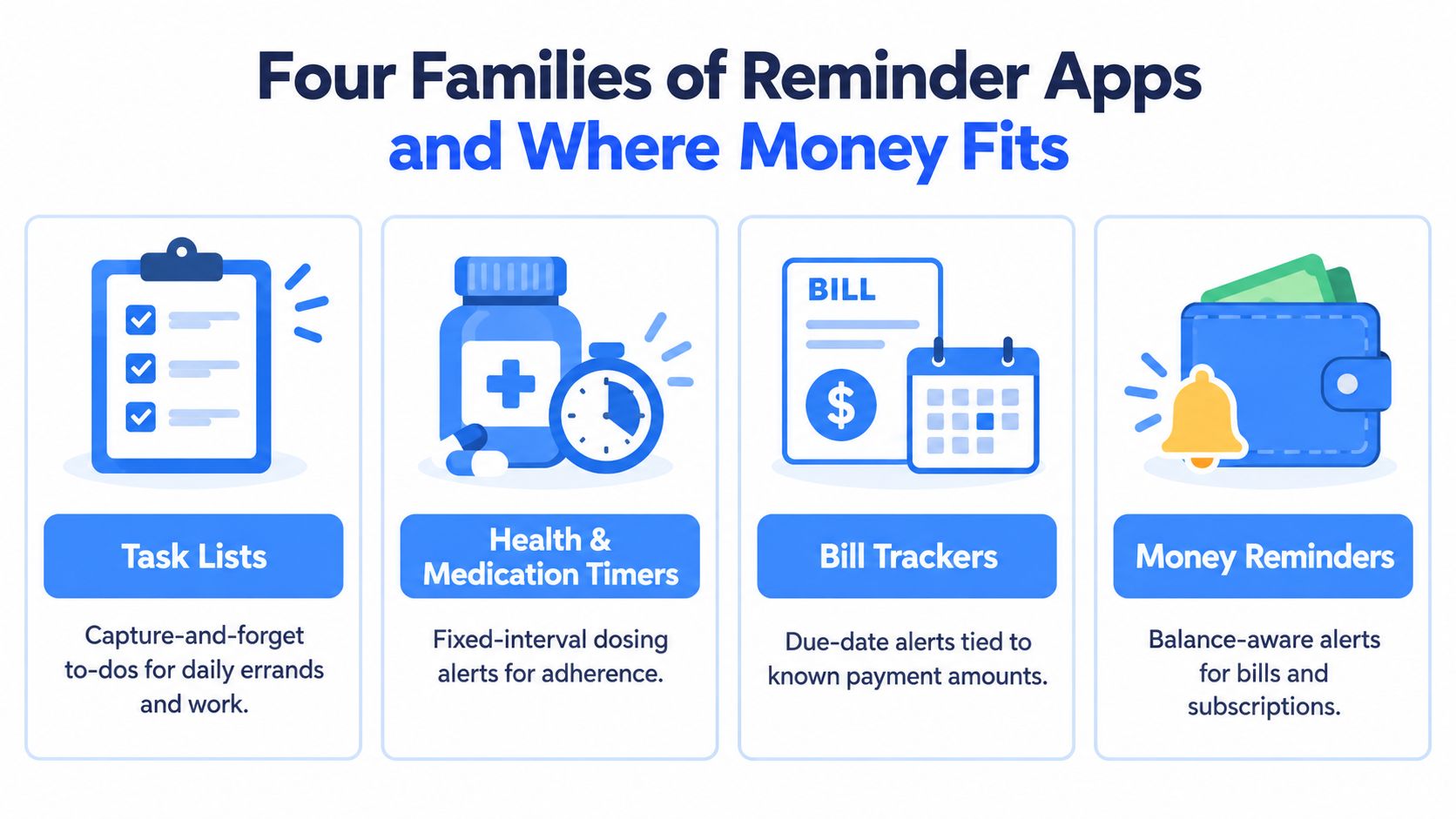
Recurring-spend monitors own the financial use case
Recurring-spend monitors begin with transaction patterns rather than a blank task list. They identify repeating charges, connect them to merchant context, project monthly and yearly costs, and place a decision prompt beside the expense.
That combination matters. Detection finds what you forgot. Projection makes the cost meaningful. A decision layer turns awareness into action. For subscription management, this is the category that fits the job instead of forcing a general reminder app to imitate a finance tool.
Six Features That Decide Whether a Reminder App Pays for Itself
A reminder app should earn its place by helping you prevent or remove outflows. Judge it against these six features, in this order.
Automatic recurring-charge detection
The app should find repeating charges from connected financial data instead of asking you to recall every subscription. Manual entry misses forgotten services, renamed merchants, and expenses you never classified as subscriptions. Read-only bank access can surface patterns without giving the app permission to move money.
Pre-charge timing
A reminder that arrives after settlement is an accounting alert, not a cancellation tool. Look for configurable notifications before renewals, with enough lead time to check the service, contact the merchant, or skip the next cycle.
Monthly and yearly projections
A monthly figure can feel harmless because it fits inside a weekly spending decision. A yearly projection exposes the full commitment. The app should show both views for each recurring expense, not bury annual cost inside a report you never open.
Decision prompts
A notification should lead to an action. “Review subscription” is weaker than clear options such as skip this cycle, cancel permanently, or keep active. If the app forces you to search for the merchant's cancellation page every time, the reminder loses much of its value.
Voice capture
Bank feeds won't see cash payments, peer-to-peer transfers, or some side-income expenses. Voice entry lets you record those outflows immediately, before the context disappears.
Bank and calendar integration
Financial data supplies the transaction history. Calendar integration preserves time and planning context. Together, they reduce the chance that a renewal gets buried among work appointments and routine alerts.
| Feature | Failure Mode | Annual Savings Range |
|---|---|---|
| Automatic recurring-charge detection | Forgotten or renamed charges never enter the tracker | Not stated |
| Pre-charge timing | The alert arrives after the payment has cleared | Not stated |
| Monthly and yearly projections | Small monthly charges hide their long-term cost | Not stated |
| Decision prompts | You acknowledge the alert but take no action | Not stated |
| Voice capture | Cash and peer-to-peer spending remains invisible | Not stated |
| Bank and calendar integration | Financial and scheduling context stays fragmented | Not stated |
This ranking is based on direct control over dollars, not interface polish. Detection and timing create the opportunity, projection creates urgency, and the decision prompt removes friction. Voice capture and integrations close the gaps that would otherwise undermine the system.
Why Timing and Personalization Beat More Notifications
More alerts don't automatically create more action. In one randomized mobile-app study, the probability of opening an app between 8 PM and 9 PM was 0.122 after a new notification, 0.131 after a standard notification, and 0.036 without a notification; across 24 hours, the probabilities were 0.351, 0.342, and 0.280, respectively, as reported in the mobile notification engagement study. The same study reported a 3.5-fold increase in immediate-hour engagement and a 1.3-fold increase over the full day when notifications were used.
That doesn't mean every reminder should arrive at the same hour. A microrandomized mobile-health trial found the strongest push-notification effect at 12:30 pm on weekdays after testing six daily send times, demonstrating that context and timing affect response in the adaptive notification trial.
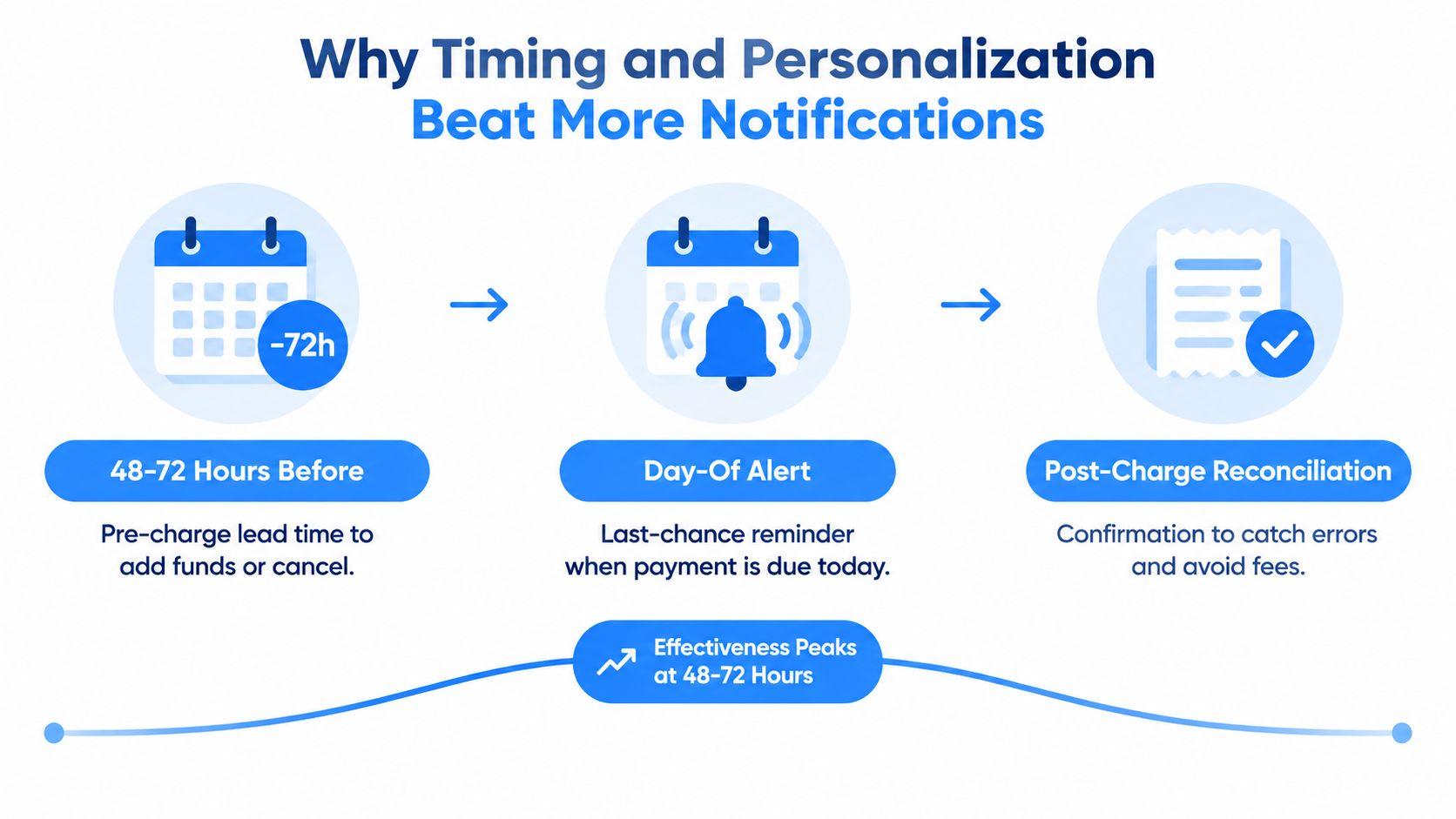
Use three timing layers
Pre-charge lead time is the main decision window. It gives you time to check usage, locate cancellation instructions, or move a necessary expense into your plan.
Day-of alerts are a final prompt, not the primary strategy. They work for charges that need confirmation but shouldn't replace an earlier warning.
Post-charge reconciliation confirms what happened and helps you catch an unexpected amount, duplicate charge, or failed cancellation. It can't recover every payment, so treat it as quality control.
Personalize the cadence
Timing and frequency shape response. An exploratory smartphone intervention found that both factors affected app use, while a separate reminder-systems study found stronger responses to context-aware reminders and a noticeable engagement decline after two to three weeks as fatigue developed, summarized in the research on personalized reminder systems.
Set different rules for a yearly domain renewal, a monthly streaming charge, and a daily food purchase. Use merchant-specific lead times, snooze options, and escalation to email or calendar when a prompt remains unresolved. A good financial reminder should reach the cancel or pause action in fewer than three taps. If the user has to open several screens, search for the merchant, and reconstruct the amount, the flow breaks before the decision happens.
Voice Capture for the Spending Your Bank Never Sees
Bank-connected apps are powerful, but bank data has blind spots. Cash paid to a contractor, a peer-to-peer transfer to a friend, or an expense related to side income may never arrive with the merchant detail needed for a useful recurring-spend record.
Voice capture closes that gap at the moment money leaves your hands. Speaking a short phrase takes less effort than opening a form, choosing a category, entering a date, and typing a note. The faster the capture, the more likely you are to preserve the reason for the payment instead of trying to reconstruct it later.
Use a consistent spoken pattern
Say the details in the same order every time:
- Amount first: “Twelve dollars.”
- Merchant or recipient second: “To Alex.”
- Category third: “For household repairs.”
- Timing tag fourth: “For Tuesday.”
A complete example would be: “Twelve dollars to Alex for household repairs, for Tuesday.” Another could be: “Forty dollars, cloud storage, business expense, monthly.” The exact wording can vary, but the order gives the app enough context to parse amount, category, and frequency.
Voice works in situations where a keyboard is inconvenient. You can log a cash payment between meetings, record a purchase while parked after driving, or capture a contractor payment while you're handling the handoff. A receipt photo can preserve proof, but it often adds a later sorting task. Manual entry offers precision, but it creates enough friction to encourage delay.
For a practical system that combines quick capture with broader daily visibility, compare the workflow described in this daily spending tracker app guide. The principle is simple: use bank feeds for what the bank sees and voice for everything else.
Turning a Reminder into a Skip-or-Cancel Decision
A reminder becomes financially useful only when it connects three things: an early warning, a clear cost projection, and an immediate choice. Without all three, you may notice the charge and still do nothing.
The workflow should look like this:
- The pre-charge alert arrives. It names the merchant, expected amount, and renewal date.
- The projection appears beside it. You see the monthly cost and the annualized total, with recent usage context where available.
- The app presents a decision. Choose skip this cycle, cancel permanently, or keep active.
- A short snooze protects against impulsive decisions. If you need time, snooze the item and require a fresh decision when the snooze expires.
- The result enters a savings record. A skipped or canceled expense contributes to a running total.
The annual projection is the persuasion lever. A recurring charge can seem acceptable when viewed alone, but the yearly view makes the commitment visible before another payment leaves the account. Don't use a projection to pressure yourself into canceling something valuable. Use it to compare the service's cost with your actual use and priorities.
Make the choice operational
A weak reminder says, “Your subscription renews soon.” A useful one says, “This service is scheduled to renew. Keep it, skip the next cycle, or cancel it.” The second version turns passive awareness into a small decision tree.
The action should also preserve the user's control. FloosYo, for example, connects bank transactions, identifies recurring expenses, shows monthly and annual projections, supports voice or text capture, and provides skip or cancel actions with estimated savings scenarios. It can also record saved amounts against a goal, while its bank connection is read-only and cannot move money.
The measurement loop matters because memory is unreliable. Each completed action should add to a cumulative savings total and show how the total changes over time. That record turns isolated decisions into evidence that the system is working.
For a deeper view of this decision model, see this subscription management app resource. The important test is not how many reminders you receive. It's how many unnecessary charges you stop before they post.
Choosing Without Falling for Notification Overload
A crowded notification panel is not a financial system. It trains you to swipe first and investigate later, which is exactly how a renewal reminder becomes background noise.
The available evidence supports restraint. Reminder engagement can decline sharply after two to three weeks, including a marked drop between days 14 and 21, according to the review of reminder fatigue and sustained engagement. That makes frequency control a core feature, not a cosmetic preference.
Consumer-protection rules also reinforce the need for clear renewal information and cancellation access. California requires businesses to send an annual automatic-renewal reminder using the enrollment communication method or the method the consumer generally uses to interact with the business, and the reminder must identify the service, charge frequency and amount, and cancellation method under the California automatic renewal guidance. Illinois requires written notice 30 to 60 days before the cancellation deadline for qualifying long-term contracts that renew, with the renewal condition, cancellation mechanism, and deadline included in the Illinois automatic contract renewal requirements. The CFPB describes negative-option programs as arrangements that renew automatically unless the consumer cancels, including trials that later begin charging a higher fee, in its consumer guidance on unwanted subscription charges.
Score the reminder environment
Give each app or setup a practical review:
- Alert value: Does every notification identify the merchant, amount, date, and decision?
- Snooze-to-action ratio: Can you postpone a decision without losing the item?
- Urgency clarity: Can you distinguish a renewal from a routine habit?
- Cancellation access: Does the alert lead directly to skip, pause, or cancellation instructions?
- Category control: Can you silence an entire category without disabling financial alerts?
- Context support: Does the system account for time zones and connect to relevant bank or calendar sources?
| Criterion | Alert-Heavy Setup | Decision-Oriented Setup |
|---|---|---|
| Notification volume | Repeated reminders for the same unresolved item | A small number of timed prompts |
| Message quality | Generic “payment due” language | Merchant, amount, timing, and action |
| Timing | Often day-of or after payment | Primarily before the charge |
| User response | Swipe, dismiss, or ignore | Skip, cancel, keep, or snooze |
| Long-term effect | Fatigue makes alerts easier to ignore | Fewer prompts preserve attention |
| Review method | Separate statement checking and task lists | Recurring expense, projection, and action in one place |
A lean setup with three or four well-timed alerts in a month can be more useful than thirty noisy notifications because each prompt has a defined purpose. Keep the yearly domain renewal, gym membership, and recurring services visible. Suppress routine alerts that don't require a decision.
Before committing, verify that the app supports time-zone-aware scheduling, surfaces bank or calendar sources, lets you disable categories independently, shows yearly projections, and offers a direct path to skip or cancel. Also check accessibility. An accessibility review found common task and reminder tools with unlabeled buttons, missing headers, and poor focus handling, while most reviewed iOS apps remained inaccessible, as documented by the American Foundation for the Blind accessibility review. A reminder that a blind or low-vision user can't use isn't a reminder system. It's another barrier.
FloosYo connects your bank to identify recurring charges, adds voice or text capture for spending outside bank feeds, and shows monthly and yearly projections before renewal. Visit FloosYo to review upcoming bills and subscriptions, then turn each one into a clear keep, skip, or cancel decision.